Last fall, an M1 forwarded me an email she’d sent to a cardiology attending. Subject line: “Quick Question :)” Body: four fat paragraphs, three attachments, and a vague ask. She couldn’t understand why he never replied. I could tell you why in about three seconds. So could every attending on that email chain.
Let me walk you through what actually goes through attendings’ heads when they see your name pop up in their inbox—and how to get what you need without becoming “that student” people quietly avoid.
How Attendings Actually See Your Emails
You see “Dr. So-and-So, expert in the coolest field ever.”
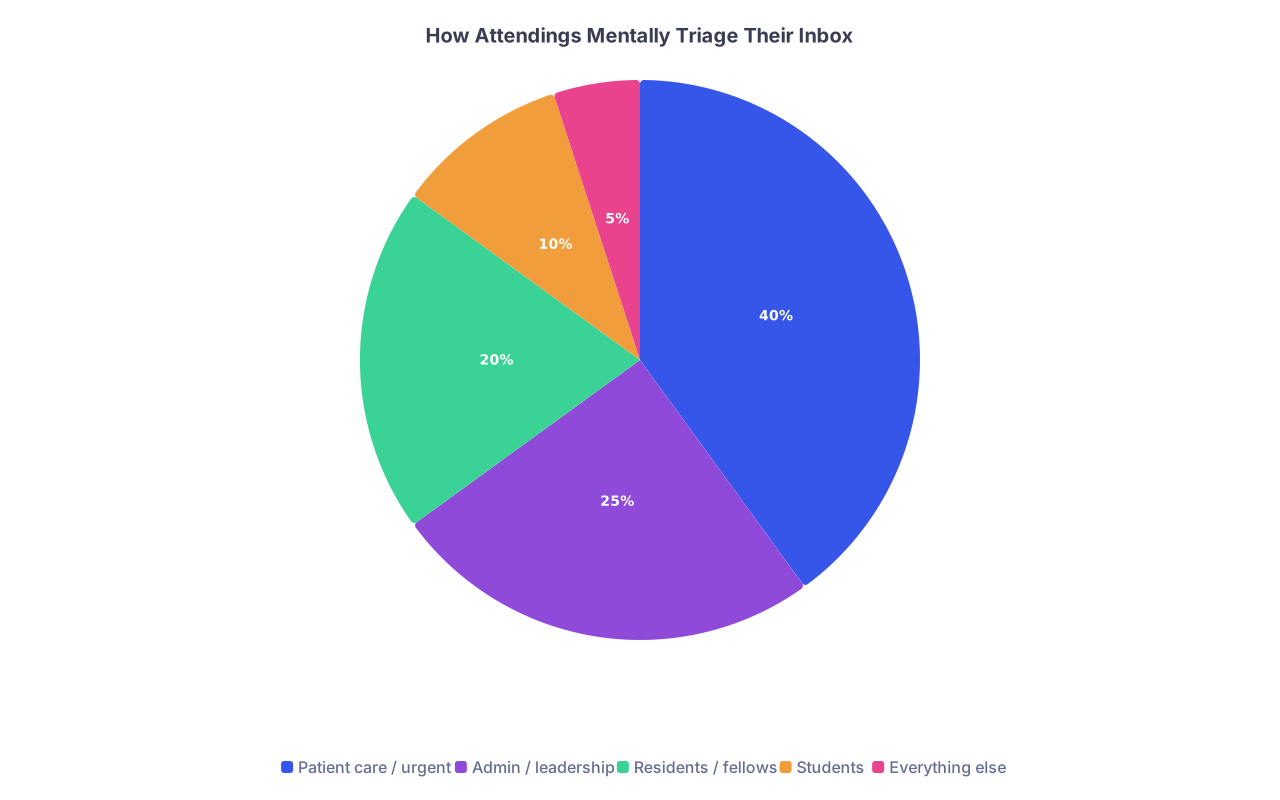
They see: 97 unread messages, 5 patient results, 3 administration demands, 2 angry families, and… your email.
They’re triaging. Constantly.
| Category | Value |
|---|---|
| Patient care / urgent | 40 |
| Admin / leadership | 25 |
| Residents / fellows | 20 |
| Students | 10 |
| Everything else | 5 |
Nobody will tell you this out loud, but I’ve heard it in workrooms more times than I can count:
- “I’ll get to student emails tonight… maybe.”
- “If it’s longer than my phone screen, I’m not reading it.”
- “If they don’t know my field well enough to spell it correctly, I’m done.”
Here’s the first unwritten rule: your email is not starting from a neutral position. It’s starting buried. You have to make it extremely easy to:
- See what you want.
- Decide if it’s worth replying.
- Reply in under 60 seconds.
If your email fails any of those, it gets mentally bookmarked as “later.”
“Later” often means never.
The Subject Line: Where Most M1s Blow It
I’ve watched attendings scroll their phone during a five-minute elevator ride. They’re scanning only subject lines and senders. That’s it.
What doesn’t get opened:
- “Quick Question”
- “Request”
- “Opportunity?”
- “Hello Dr.”
- “Shadowing???”
What gets opened more often than you’d think:
- “M1 at [School] – interested in [their field] – brief question”
- “[Course name] student – follow-up from session today”
- “Referred by Dr. [Name] – 10-minute meeting request”
Specific. Short. Predictable.
Here’s the internal rule many attendings follow without admitting it: if the subject line is sloppy, the student is probably sloppy. And they don’t want to commit to a sloppy interaction.
Second rule: do not use urgency unless it’s actually urgent.
Subject lines with “Urgent” or “Time-sensitive” from an M1 about anything that is not a patient makes you look self-centered or clueless. You do not want that reputation.
How to Address Them (And How to Subtly Irritate Them)
There are attendings who truly don’t care how you address them. There are others who will never tell you they hated how you addressed them—but they will remember.
Default: “Dear Dr. [Last Name],”
Not “Hi [First Name],”
Not “Dear [First Name],”
Not “To whom it may concern,”
Not “Hey Dr. [Last Name],” unless they already put “Hey, call me Sam” in your face several times.
If you’re at a place like UCSF, UW, or OHSU with a more “informal” culture, students sometimes get confused. Even there, the quiet rule is: start more formal; they’ll downgrade it if they want. No one has ever complained about being called “Dr. [Last Name]” by an M1.
One more thing: spell their name right.
I have seen attendings ignore perfectly good emails for one reason: their name was misspelled in the salutation. Harsh? Maybe. Real? Yes.
The Body: One Screen, One Purpose
The fastest way to annoy an attending is to send them homework. A dense block of text, multiple questions, unclear ask—that’s work. They will not prioritize your work over their own.
The unwritten standard: your email should fit comfortably on a phone screen. One screen. Maybe a hair more, but not much.
Think structure, not word count. Something like:
- One line of context
- One line of who you are
- One or two lines of your ask
- One line of appreciation / logistics
No life story. No transcript of your personal statement.
A bad M1 email looks like this (I’ve seen hundreds):
- Opens with three sentences thanking them for “their time and dedication to teaching”
- Two paragraphs retelling their entire path to medicine
- Vague sentence: “I would love to connect if you have time”
- No clear ask. No constraint on time. No reason to answer now.
A good M1 email:
- Tells them who you are in one clean sentence
- States one specific thing you want
- Makes it easy to say yes without a 20-minute reply
What You Can Reasonably Ask For as an M1
This is where many first-years misstep. You’re trying to skip steps. Attendings feel that, and it turns them off quickly.
Here’s what’s generally reasonable:
- A 10–15 minute Zoom or in-person chat about their field or career path
- Shadowing for a half-day or specific clinic if they’re known for teaching
- Quick advice on how to get involved in a specific type of work (research, QI, global health)
- Feedback on a very narrow item (e.g., “Is this project idea feasible in your clinic?”)
What feels unreasonable coming from an M1:
- “Can you mentor me?” as a first interaction
- “Can I join your research project?” when you have no prior contact and no skills outlined
- “Can you look over my CV and personal statement?” in M1 (yes, people do this)
- “Can I shadow you regularly?” with no end point
From the attending side, this is how it lands:
- Reasonable: “I need to invest 10–15 minutes, once.”
- Annoying: “If I say yes, I’m signing up for an ongoing obligation with a stranger.”
Your job is to frame the initial request as finite and low-cost. Once you’ve proven you’re not a time sink, they’ll often open more doors on their own.
The One Email Template That Almost Always Works
Let me give you the skeleton of an email that faculty barely complain about—because it respects their time and actually gets to the point.
Imagine you’re an M1 at “State Med” interested in Emergency Medicine:
“Subject: M1 at State Med – interested in EM – brief meeting request
Dear Dr. Patel,
My name is Alex Chen, and I’m a first-year medical student at State Med interested in emergency medicine. Dr. Rivera suggested I reach out to you because of your work with ultrasound education.
If you’re available, I’d be very grateful for 10–15 minutes to ask a few questions about early ways to get involved in EM and ultrasound as a first-year. I’m flexible and happy to work around your schedule, including a brief Zoom or phone call.
Thank you very much for your time and consideration.
Best regards,
Alex Chen
MS1, State Med
[phone] | [school email]”
Short. Respectful. Specific. Single purpose.
Now compare that to what I actually see:
“Hi Dr P,
My name is Alex and I’m a first year med student and I’ve always been passionate about emergency medicine ever since I was a kid. Growing up I saw a lot of emergencies in my family and community and knew I wanted to help. I’m reaching out because I would love to pick your brain and hear your story and hopefully get some guidance and maybe find out about research or shadowing or anything else you think would be helpful for me to pursue my dreams of EM…”
You get the idea. That second one makes the attending tired before they reach the ask.
Timing, Follow-Up, and How Not to Be a Pest
You’d be surprised how much your send time matters.
General patterns I’ve seen in multiple departments:
- Emails sent late at night or very early (5–7 am) get answered more by “inbox-zero” types who clean up their mail at odd hours
- Emails sent Friday late afternoon sink into the weekend void
- Mid-morning on a weekday is standard, but you’re competing with clinic noise
If you send something time-sensitive (for you, not labeled as urgent to them), send it Tuesday–Thursday, 8–11 am local time. That’s when many attendings triage between clinics or meetings.
Follow-up etiquette is where M1s often cross into “annoying” without realizing it.
Here’s the unspoken cadence most faculty tolerate:
- No reply after 7–10 days? One polite follow-up. Very short.
- No reply after that? Stop. Do not send a third email. Go find someone else.
Your follow-up should not guilt-trip or restate your entire ask. Something like:
“Dear Dr. Patel,
Just wanted to briefly follow up on my email below in case it was buried in your inbox. No rush at all, and I completely understand if your schedule doesn’t allow for a meeting right now.
Best,
Alex”
That last line—giving them a graceful out—is important. It signals you’re not entitled. That reduces annoyance significantly.
What annoys them:
- Following up in 48 hours
- “Just bumping this to the top of your inbox :)” (seen as flippant)
- Acting like they owe you a response because you’re a student
Some will ignore you forever even if they like you. That’s not about you. That’s about bandwidth. Do not take it personally. Just move down your list.
CC, Reply-All, and the Politics You Don’t See
You think email is just you and the attending. It rarely is.
There are a few political landmines here:
- CC’ing the wrong people
- Not CC’ing the right people
- Hitting reply-all without thinking
If your course director or a dean introduced you to an attending over email, keep them CC’d for the first reply or two. Dropping them instantly can seem odd. After the connection is made and a meeting is set, the attending or the faculty can drop the higher-up; follow their lead.
If you’re cold-emailing an attending, don’t CC other students, your friends, or random faculty to “show initiative.” I’ve seen group emails from students asking, “Can a few of us shadow you?” that got one-word replies or radio silence. It feels like ambush.
Also: never, ever write something in an email that you wouldn’t want forwarded. Because it might be. Attendings forward “promising student – please help place” emails. They also forward “this is why we need to teach email etiquette” emails, with your words anonymized (if you’re lucky).
Shadowing vs. Research vs. “Mentorship” Emails
You might think these are all the same. They aren’t. Attendings mentally categorize them very differently.
Shadowing
Shadowing requests are low-stakes but logistically annoying. Schedules. Badges. HIPAA. OR lists. They’re not going to re-organize their life for an M1 they don’t know.
Better strategy: ask about whether and how to shadow, not “Can I shadow you every Thursday?”
“Would it be possible to shadow you for a half day in clinic at some point this semester, if your schedule allows and if students are permitted?” That’s about the maximum.
Research
Cold-emailing “Do you have any research opportunities?” is amateur hour. I’ve watched attendings roll their eyes at that exact line.
Instead, show you read something they did:
“I read your recent paper on [specific topic] in [journal]. As an M1 I’m just starting to build research skills, but I’m particularly interested in [narrow focus]. If you anticipate any upcoming projects where a first-year could be helpful with data collection, chart review, or basic tasks, I’d be very interested in contributing and learning.”
You’re not pretending to be more skilled than you are. You’re offering low-level help. That’s realistic M1 energy.
Mentorship
Do not lead with “Will you be my mentor?” You haven’t given them any reason to invest that deeply.
Instead, ask for a single short meeting. Then, if it goes well, you can say: “I really appreciated your advice. Would it be alright if I reached out occasionally with brief questions as I navigate first year?” If they say yes and they actually respond over time, then you know you’re moving into mentorship territory.
Emailing Right After a Lecture or Small Group
This is fertile ground that most M1s waste.
Scenario: An attending gives a great talk on renal physiology or career paths. You enjoyed it and want to connect. Most students think “I should say thanks” and leave it there. Or they walk up with 20 other students and get lost.
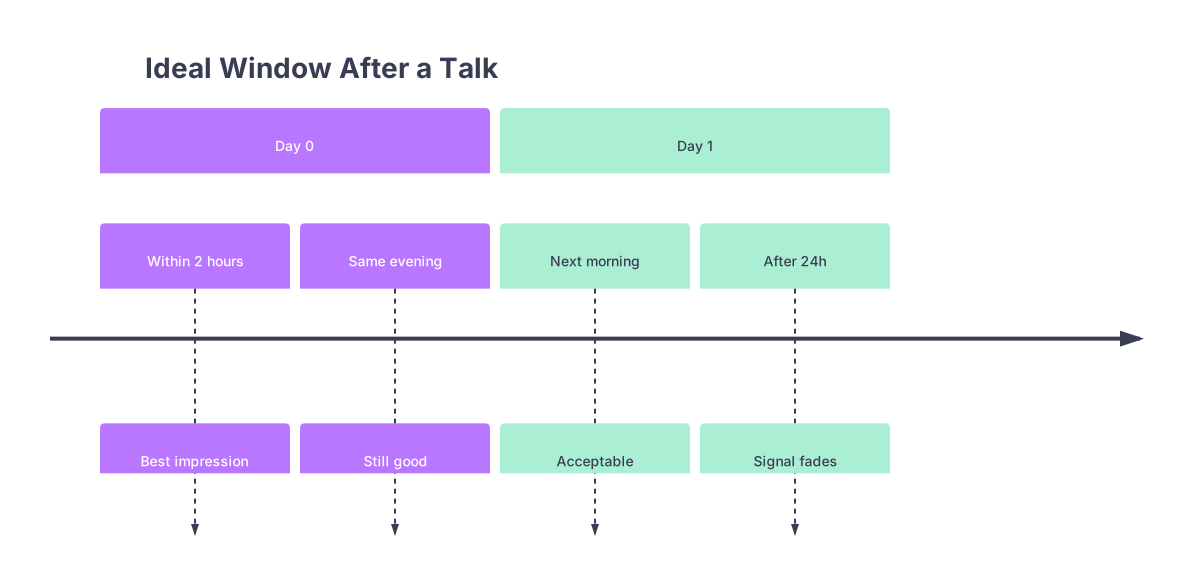
Here’s the move: a same-day, targeted email. Not the next week. Not months later.
| Period | Event |
|---|---|
| Day 0 - Within 2 hours | Best impression |
| Day 0 - Same evening | Still good |
| Day 1 - Next morning | Acceptable |
| Day 1 - After 24h | Signal fades |
Your advantage is freshness. They remember your face vaguely, your question maybe, the session for sure.
Something like:
“Dear Dr. Lee,
I’m an M1 who attended your session on kidney disease this morning. I especially appreciated your explanation of how you talk to patients about starting dialysis; that’s not something we get from the textbook.
I’m starting to think seriously about nephrology and would be grateful for 10–15 minutes at some point to ask your perspective on what students who are interested in your field should focus on in M1/M2.
Thank you again for your time today.
Best,
…”
Notice the specificity. One thing you liked. One specific reason you’re reaching out. That differentiates you from the generic “thanks for teaching us” spam.
What Instantly Flags You as “High Maintenance”
I’ve sat in residency selection meetings where someone pulls up email histories with applicants. Yes, people remember patterns.
Behaviors that quietly get you labeled as high-maintenance:
- Sending multiple long emails instead of one concise one
- Expecting near-immediate responses and emailing again if they don’t come
- Asking for exceptions and special accommodations via faculty you barely know
- Forwarding faculty internal emails to classmates without permission
- Writing emotionally charged or overly personal content to someone you just met
You want to be thought of as: low-drama, precise, and easy to help.
That doesn’t mean being fake or robotic. It means separating your internal anxiety from your external communication. You can absolutely be stressed and lost in M1. But your emails should read calm, clear, and contained.
Common Myths About Emailing Attendings in M1
Let me kill a few myths that float around class GroupMes and Reddit threads.
Myth 1: “If they don’t respond, they hate me or I offended them.”
Reality: You are one of 30 things they meant to get to. Don’t catastrophize.
Myth 2: “I shouldn’t email anyone as an M1 until I know exactly what I want.”
Reality: M1 is exactly when you should be sampling conversations. Just keep your asks small.
Myth 3: “If I don’t send a long backstory, they won’t understand my situation.”
Reality: They don’t need your situation. They need a clear question. Context only if it changes the answer.
Myth 4: “More enthusiasm = better.”
Reality: Over-the-top flattery and exclamation-point storms read as immature.
Myth 5: “I have to sound impressive.”
Reality: Trying to sound impressive as an M1 usually makes you sound insecure. Respectful, direct, and concise is much more impressive.
Quick Comparison: Bad vs. Better
To make this concrete, here’s how little tweaks change how your email lands.
| Element | Weak Version | Stronger Version |
|---|---|---|
| Subject Line | "Quick question" | "M1 interested in IM – brief meeting?" |
| Greeting | "Hi there" | "Dear Dr. Nguyen," |
| Self-intro | "I’m a med student at your school" | "I’m a first-year at [School] interested in [field]" |
| Ask | "I’d love to connect sometime" | "Would you have 10–15 minutes for a brief call?" |
| Length | 4–5 chunky paragraphs | 1–2 short paragraphs |
These are small changes. But on the receiving end, they add up fast.
FAQ (Read This Before You Hit Send)
1. How many attendings can I cold-email without looking desperate?
More than you think—as long as your emails are individualized and respectful. If you’re blasting the same generic message to 15 people, that’s obvious and tacky. But emailing 3–5 targeted faculty in a department over a few weeks is normal. Just don’t CC them all on the same “Dear Sir/Madam” monstrosity.
2. Is it okay to email from my phone?
Completely fine if you can still format a clean message. What’s not fine is obvious “sent from my iPhone” sloppiness: no greeting, no sign-off, typos everywhere. Many attendings are reading on their phones; they don’t care what you use, they care what it looks like.
3. What if I accidentally mess up—wrong name, wrong title?
Own it once, briefly. Send a short follow-up: “Apologies for misspelling your name in my previous email.” Then move on. Do not write a paragraph of self-flagellation. That’s more awkward than the original mistake.
4. Can I follow up a non-response by asking in person after a lecture or on the wards?
Yes, if you’re tactful. “I emailed you last week, but I know you’re busy; no need to respond now” signals that you understand their time pressure. Don’t corner them with, “Did you get my email?” in a public space. That puts them on the spot and feels confrontational.
5. How formal should my tone be as an M1?
Aim for “professional but not stiff.” Full sentences, no texting abbreviations, no memes or emojis—unless you already have a very informal rapport with that specific person. You can relax tone once they’ve explicitly done so with you. Let them set the floor; don’t try to drag it down yourself.
In the end, remember three things.
First, attendings aren’t grading your soul when they see your name pop up in their inbox. They’re triaging. Make it easy for them to say yes by being short, specific, and respectful.
Second, M1 is when you build a reputation—good or bad—for how you handle yourself. Every well-crafted email is a tiny data point that you’re the kind of student people like working with.
Third, you don’t need to be brilliant on email. Just not annoying. If you can hit that bar consistently, you’re already ahead of half your class.