
The biggest mistake new telemedicine physicians make is assuming that “signed offer” means “start seeing patients in a few weeks.” It does not. Six months is a realistic, often aggressive, timeline from offer to first telehealth visit.
Here is how to use those six months intelligently, step by step, so you are not the one emailing credentialing with “just checking on the status.”
Month 0: Offer Signed – Lock Down the Foundations
At this point you should stop thinking like an applicant and start thinking like an operations project manager. Day 1 after signing is where your 6‑month clock really starts.
Week 1: Confirm the Master Timeline and Requirements
You need a written map from the employer, not vague promises.
Ask for, and document:
- Target start date for:
- First active state license
- Completion of payer enrollment (if applicable)
- First scheduled telehealth session
- Exact list of:
- Required state licenses
- Hospital affiliations (if any)
- Payers to be enrolled with
- Telehealth platforms and EHRs you will use
Clarify early:
- Are you W‑2 or 1099?
- Who pays for:
- Licensing fees
- DEA / state controlled substances registrations
- Fingerprinting / background checks
- Malpractice tail, if you are moonlighting
Then build your own working timeline. Not in your head. On paper or spreadsheet.
| Month | Primary Focus |
|---|---|
| 0 | Offer, paperwork, plan |
| 1 | State license apps start |
| 2 | Licenses in process, DEA |
| 3 | Credentialing, enrollment |
| 4 | Platform + EHR training |
| 5 | Mock visits, go-live |
Week 2: Complete Employer and HR Paperwork
You cannot be credentialed if HR does not have your basic data. This is where many people lose 2–3 weeks for no good reason.
At this point you should:
- Return:
- Employment contract (if not fully executed)
- W‑4 / direct deposit
- Background check consent
- I‑9 eligibility documents
- Gather a “credentialing packet” in one place:
- Medical school and residency certificates
- Board certification or eligibility letter
- USMLE / COMLEX score reports
- CV updated to the month (no gaps—ever)
- 3–5 reference letters or contact info (as required)
- Malpractice certificates + claims history
- Copies of existing licenses and DEA
Create a single folder (cloud + local) with:
- “ID” subfolder: passport, driver’s license
- “Training”: diplomas, residency certificate
- “Licenses”: PDFs of every license/DEA
- “Malpractice”: policies and claim letters
- “CV and Forms”: master CV, standard applications
You will reuse these 20 times. Do it once, do it right.
Month 1: Licenses, Licenses, Licenses
Licensing is usually your longest pole in the tent. At this point you should be front‑loading every application you will need for the next 12–18 months, not just the first day.
Week 1–2: Prioritize State Licensure Strategy
If your employer wants multiple states, you cannot do them randomly.
Ask:
- Are you using the Interstate Medical Licensure Compact (IMLC)?
- Which 1–3 states are critical for initial scheduling volume?
- Which states require in‑state address, fingerprints, jurisprudence exams?
Then build a priority order:
- States required before first shift (often 1–3 states)
- High‑yield states for volume
- “Nice‑to‑have” or future territories
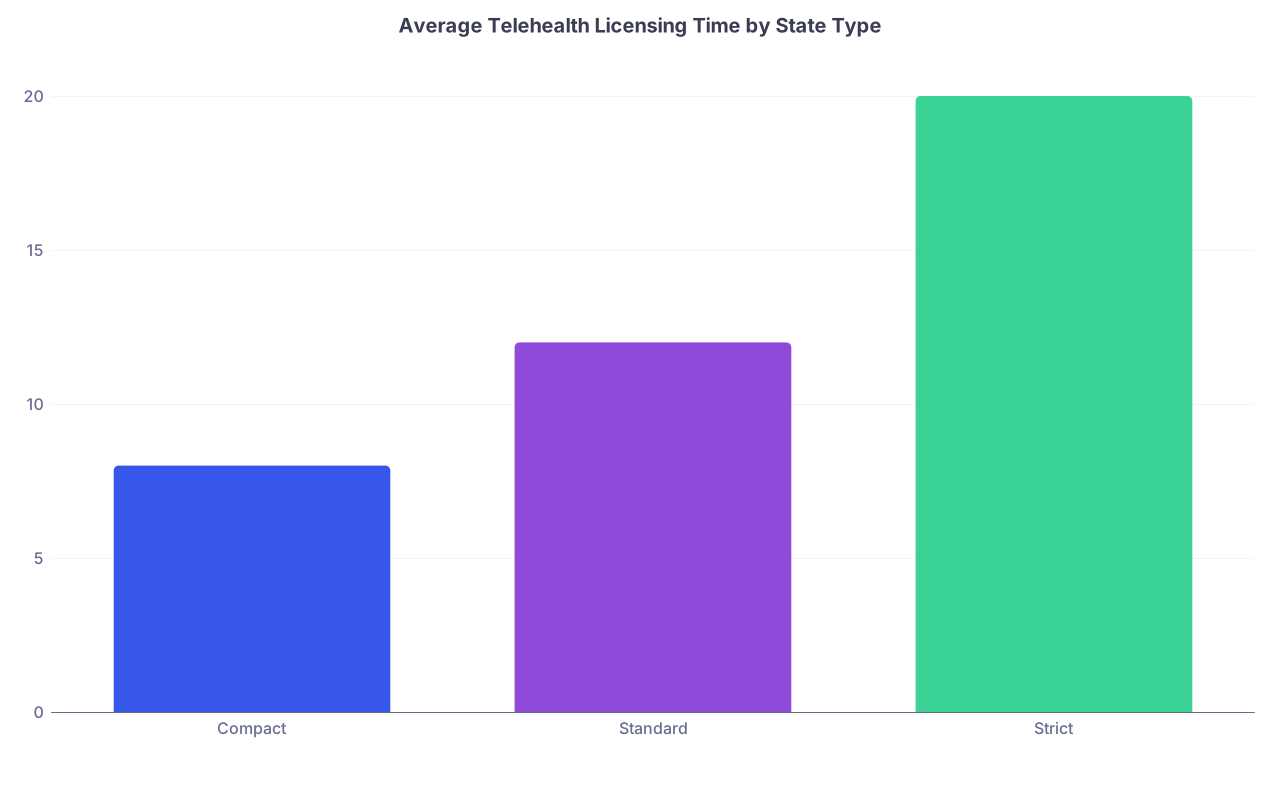
| Category | Value |
|---|---|
| Compact | 8 |
| Standard | 12 |
| Strict | 20 |
As a rule:
- Compact states: 4–8 weeks once your IMLC eligibility is set
- Standard states: 8–12 weeks
- Strict or slow states (CA, TX, etc.): 3–6 months
Week 2–4: Submit Licensing Applications Aggressively
At this point you should have:
- All core documents scanned and ready
- Notarization options lined up (local bank, UPS store, or online notary)
Then:
- Submit:
- IMLC application (if eligible)
- 1–3 top‑priority state applications
- Request:
- FSMB credential verification
- USMLE transcript release
- Medical school and residency verifications (some still mail/fax)
Do not “wait and see” how the first state goes. Parallel processing beats serial.
Stay organized:
- Build a simple tracking sheet:
Columns: State, Date Submitted, Fee Paid, Items Outstanding, Contact Person, Last Follow‑Up, Notes.
Set a recurring weekly calendar reminder: “Licensing Follow‑Ups – 30 minutes.”
Month 2: DEAs, Controlled Substances, and Background Checks
By now, your first license applications are filed, but nothing feels “done.” That is normal. Month 2 is about stacking everything else on top.
Week 1: DEA and State Controlled Substances
At this point you should:
- Confirm with employer:
- Do you need a separate DEA for each state or can you use one main practice address?
- Do you prescribe controlled substances in this telehealth role at all?
- If yes:
- Apply for or transfer DEA registration
- Apply for state‑level controlled substance registrations where required
Do not delay DEA “because the license is not in hand yet.” You can stage the paperwork so it is ready to submit the moment a license posts.
Week 2–3: Fingerprinting and Background Checks
More states and hospitals are using:
- LiveScan or ink fingerprints
- State and FBI background checks
At this point you should:
- Book fingerprinting appointments for:
- State boards
- Employer background checks
- Any telehealth network partners (if you are a contractor)
- Keep every receipt and tracking number
I see people lose a month because they “did not get around” to fingerprints. Do not be that person.
Week 4: Start Medical Staff / Payer Credentialing
If your telehealth role bills insurance, Malpractice + payer credentialing is the next long step.
At this point you should:
- Confirm:
- Will you be enrolled individually with payers?
- Or will the group bill under its own contracts and you just need to be “linked”?
- Provide to the credentialing team:
- Completed CAQH (and unlocked profile)
- Updated work history with month‑by‑month continuity
- Any prior sanctions, board actions, malpractice claims—upfront and clearly explained
Missing or “forgotten” malpractice suits are the fastest way to get stuck in endless back‑and‑forth.
Month 3: Credentialing and Enrollment Grind
This is the least glamorous month. Nothing feels urgent until someone realizes your start date is 6 weeks away and you are not enrolled with major payers.
Week 1–2: Medical Staff Credentialing (If Applicable)
Some telehealth positions require hospital privileges (e.g., tele‑ICU, tele‑stroke). Those medical staff offices move on their own time.
At this point you should:
- Return every hospital application within 48 hours
- Provide:
- Updated references with email and phone
- Explanation statements for:
- Any gaps > 30 days
- Any transfers or early contract terminations
- Track:
- Committee meeting dates (credentials committee, MEC, board)
If the hospital board only meets monthly and you miss the cut‑off, your start date can slip by 30 days. I have watched this happen over a single missing signature.
Week 3–4: Insurance Payer Enrollment
In parallel, payer enrollment should be actively moving:
- For each major payer (BCBS, Aetna, UHC, Medicare, Medicaid), confirm:
- Date application submitted
- Typical turnaround time
- Any provisional status options
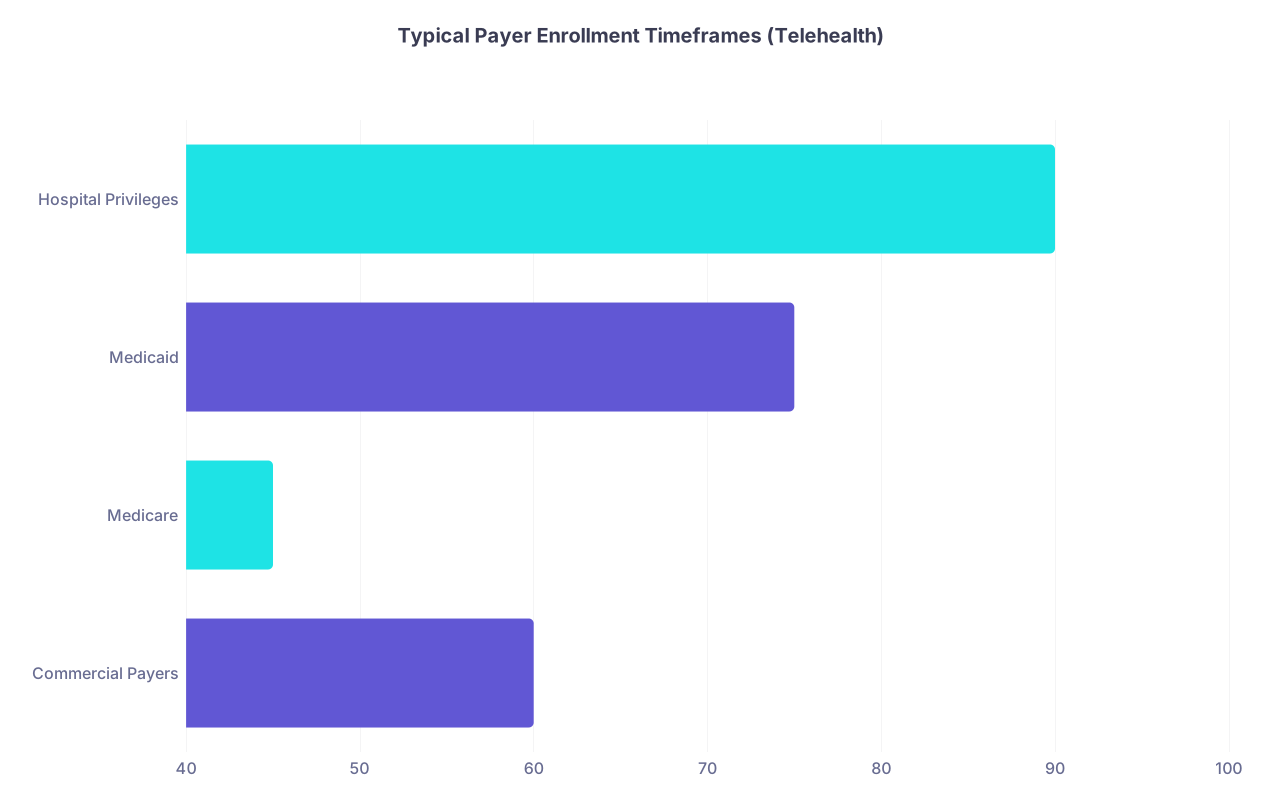
| Category | Value |
|---|---|
| Commercial Payers | 60 |
| Medicare | 45 |
| Medicaid | 75 |
| Hospital Privileges | 90 |
At this point you should:
- Respond to any payer requests within 24 hours
- Keep your CAQH profile:
- Current mailing address
- Active licenses and DEA numbers
- Malpractice coverage dates aligned with anticipated start
If your role is cash‑pay only, you can skip this misery. But that is not most employed telehealth jobs right now.
Month 4: Technology, Training, and Workflow Design
By month 4, paperwork should be “mostly in motion.” This is where you shift from paperwork to actual practice setup.
Week 1: Hardware and Environment
Telehealth from your kitchen table with kids in the background is a good way to get complaints. You need a deliberately built workspace.
At this point you should:
- Set up:
- Dedicated workstation (desktop or reliable laptop)
- Dual monitors if possible (EHR on one, video on the other)
- Wired high‑speed internet or business‑grade Wi‑Fi
- High‑quality webcam and microphone or headset
- Optimize your environment:
- Neutral, uncluttered background
- Consistent lighting (ring light or desk lamp if needed)
- Door you can close; noise control

Test your internet speed at different times of day. Evening bandwidth drops will matter if your shifts are after work hours.
Week 2: Platform Access and Security
Now you start touching the actual tools.
At this point you should:
- Receive:
- EHR login credentials
- Telehealth video platform access
- Secure messaging / email accounts
- Complete:
- Required cybersecurity modules
- HIPAA refreshers with telehealth‑specific focus:
- No PHI in personal email
- Use of VPN if required
- Local device encryption and auto‑lock
Change default passwords immediately, use a password manager, and enable multi‑factor authentication. You are a walking HIPAA violation if you do not.
Week 3–4: EHR and Workflow Training
This is where you decide whether your first week feels chaotic or controlled.
At this point you should:
- Complete all formal training modules for:
- EHR navigation, orders, documentation, prescriptions
- Telehealth visit flow (from check‑in to close)
- Build your own:
- Smart phrases for HPI, ROS, physical exam adapted for telehealth
- Standard workups for your bread‑and‑butter complaints
Example for primary care telehealth:
- Smart phrases for:
- URIs with home exam instructions
- UTI workup with appropriateness criteria
- Back pain with red‑flag screening
- Anxiety/depression follow‑up visits
Run “sandbox” charts on fake or test patients. Practice:
- Starting a visit
- Adding a diagnosis
- E‑prescribing
- Sending patient instructions or work notes
Month 5: Dry Runs, Scheduling, and Policy Clarity
This is the month where you turn from “theoretically ready” to “actually ready.” No one should meet their first real patient cold.
Week 1: Protocols, Escalation Paths, and Scope
Telehealth goes wrong when physicians are unclear on what should not be managed virtually.
At this point you should:
- Review written policies for:
- Conditions you are expected to manage via video
- Conditions that require urgent in‑person evaluation
- When to call EMS directly vs advise urgent care / ED
- Know:
- How to find local ED or urgent care for the patient’s location
- How to document “advised in‑person evaluation” clearly
Clarify:
- How are after‑hours messages handled?
- Who covers your panel when you are offline?
- What is the expectation around message turnaround times?
You do not want to be guessing when your first aggressive chest pain case logs in.
Week 2: Mock Visits and Shadowing
This step separates professionals from those who look like they are “trying out Zoom.”
At this point you should:
- Do:
- 3–5 full mock visits with:
- A colleague
- A friend acting as a patient
- A staff trainer
- 3–5 full mock visits with:
- Practice:
- Logging in on time
- Greeting, consent, and verification scripting
- Conducting a focused virtual physical exam
- Documenting in real time
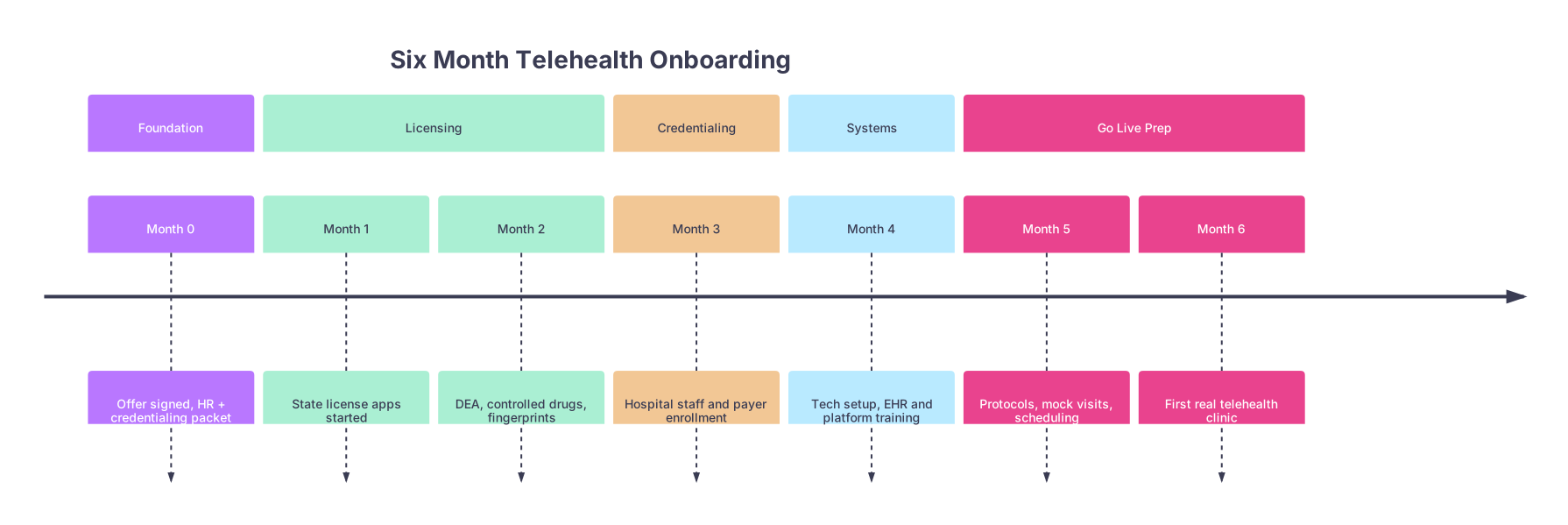
| Period | Event |
|---|---|
| Foundation - Month 0 | Offer signed, HR + credentialing packet |
| Licensing - Month 1 | State license apps started |
| Licensing - Month 2 | DEA, controlled drugs, fingerprints |
| Credentialing - Month 3 | Hospital staff and payer enrollment |
| Systems - Month 4 | Tech setup, EHR and platform training |
| Go Live Prep - Month 5 | Protocols, mock visits, scheduling |
| Go Live Prep - Month 6 | First real telehealth clinic |
If possible:
- Shadow:
- An experienced telehealth clinician in your group
- At least one full session:
- Watch pacing
- See how they redirect chatty patients
- Note how they deliver bad news virtually
Week 3–4: Schedule Build and Final Checks
By late Month 5 you should not be asking “when am I starting.” That should already be on the books.
At this point you should:
- Confirm:
- All critical licenses are active in the NPI registry and state portals
- DEA and state CSRs (if needed) are active
- Malpractice coverage start date matches your planned go‑live
- Payer enrollment is complete or at least acceptable for a soft launch
- Work with scheduling:
- Set conservative visit lengths for week 1–2 (e.g., 30 minutes instead of 15)
- Block time for:
- Mid‑session catch‑up
- Same‑day documentation wrap‑up
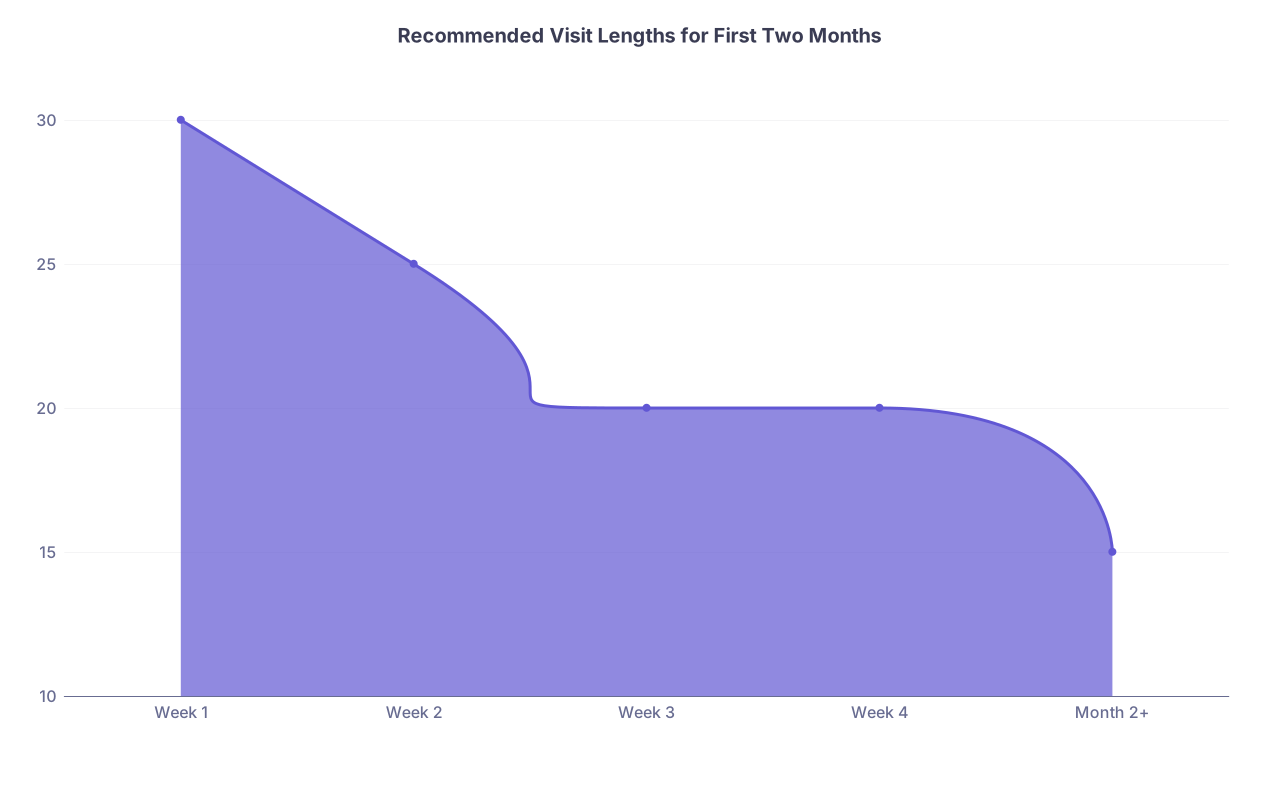
| Category | Value |
|---|---|
| Week 1 | 30 |
| Week 2 | 25 |
| Week 3 | 20 |
| Week 4 | 20 |
| Month 2+ | 15 |
This is where you avoid the new‑grad disaster pattern: double‑booked from day one, drowning in unfinished notes.
Month 6: First Telehealth Visits and Stabilization
Now you are on the runway. The question is not if you will have bumps. It is how controlled those bumps will be.
Week 1: Soft Launch
At this point you should treat your first week like a supervised dress rehearsal.
Plan:
- 50–70% of your eventual volume
- Mix of:
- Follow‑ups
- Lower‑acuity visits
- Limited new‑patient slots
Before the first patient:
- Test:
- Video connection
- Audio
- EHR and e‑prescribing in real time
- Have:
- IT support contact info visible
- A written “visit checklist” taped near your monitor
Example quick checklist:
- Confirm patient identity and location
- Confirm consent for telehealth
- Ask about emergency access at their location
- Set agenda: “We have about 20 minutes and I see three concerns listed…”
- Close with:
- Summary
- Plan
- Warning signs and follow‑up instructions

Week 2–4: Scale Up and Refine
By mid‑Month 6, technical issues should be rare. The focus shifts to efficiency and quality.
At this point you should:
- Gradually move toward your target visit length
- Track:
- Average visits per session
- Average time spent charting after sessions
- No‑show and cancellation rates
- Debrief weekly:
- What kinds of visits are taking too long?
- Where are you over‑ordering or under‑documenting?
- Which states / payers are giving billing or coverage headaches?
Have a feedback loop with:
- A lead physician or medical director
- A senior colleague in the same telehealth service line
- The operations or scheduling lead
Adjust:
- Scheduling templates
- Patient instructions
- Your own shortcuts and templates

Quick Recap: What Actually Matters
You do not need another recap of every detail. You need the spine of the plan:
Months 0–2: Front‑load licensing and paperwork.
Get every state app, DEA, background check, and credentialing form submitted as early as humanly possible. Parallel, not serial.Months 3–4: Clear credentialing while building your tech stack.
While hospitals and payers grind, you get your hardware, EHR skills, and telehealth workflows in place.Months 5–6: Train, rehearse, then launch intelligently.
Mock visits, clear protocols, soft‑launch scheduling, and structured feedback. That is how you walk into your first real telehealth visit looking like you have been doing this for years, not days.