
It’s August 1st. You’ve been out of residency for a month. Your hospital job feels… fine. But your inbox is full of recruiter emails:
“$120/hr urgent care telemed, pick your shifts!” “Psych telehealth – 4 hr blocks, work from anywhere!” “Primary care telemed panel, minimum 15 hrs/week!”
You’re tempted to say yes to everything. Extra cash, flexibility, work from your couch. Then you remember the horror story you heard from a co-resident: double-booked platforms, overlapping shifts, three different logins, and a 14‑hour “easy” day that left them wrecked.
This guide is for that exact moment. You’re past residency, you want to stack telemedicine contracts, and you do not want your life to turn into a spreadsheet-hell of competing schedules.
We’ll walk it in order: first 90 days, then month-by-month, then week-by-week once you’re live, and finally day-by-day on how to actually work multiple platforms without chaos.
Big Picture: What Stacking Telemedicine Contracts Really Looks Like
Before we go chronological, you need the model in your head.
Stacking telemedicine contracts usually means some mix of:
- A “core” contract (panel-based or minimum-hours, somewhat predictable)
- One or two per-diem / on-demand platforms (you turn yourself “available” when you want volume)
- Maybe a niche side contract (psych-only, derm store-and-forward, ED teleconsults)
They each behave differently on your calendar.
| Type | Schedule Style | Typical Commitment |
|---|---|---|
| Panel-based primary | Pre-booked slots | 10–40 hrs/week |
| On-demand urgent | Log in/log out | 0–30 hrs/week, flexible |
| Behavioral health | 50–60 min blocks | 5–25 hrs/week |
| Specialist consult | As-needed consults | Variable, low volume |
| Store-and-forward | Async, any time | Project-based |
You’re not just managing hours. You’re managing:
- Competing “minimum hours” clauses
- Overlapping exclusivity clauses
- Credentialing timelines (which are glacial)
- Different documentation burdens that change how many visits you can safely stack
So the timeline starts before you sign anything.
Phase 1: Weeks 0–2 – Decide Your Capacity and Boundaries
You are here: you haven’t signed multiple contracts yet. Maybe you have a main job and you’re “exploring telemed.” This is where most people skip straight to applications and regret it later.
Week 0–1: Set Hard Limits (Before Recruiters Touch You)
Sit down with a calendar and get real.
Answer these, on paper:
- How many total clinical hours/week do you want?
- How many telemedicine hours/week fit into that?
- What time blocks are non‑negotiable personal time?
- How many nights/week and weekends/month are you actually willing to do?
Example for a fresh grad with a 0.7 FTE clinic job:
- Total clinical: 40 hrs/week max
- Existing job: 28 hrs
- Telemed cap: 8–10 hrs on weekdays + 4–6 hrs weekends
- Hard line: no more than 2 late nights/week, no work past 11 pm
Write it. Because in 3 weeks, a recruiter will try to talk you into “just 15 hours, super flexible,” and you’ll need something to push back with.
Week 1–2: Map Your “Scheduling Risk Zones”
Not every hour is equal.
Mark on a weekly template:
- “Safe” windows (you’re reliably home, no kids’ pick‑ups, no commute issues)
- “High‑risk” windows (post-call, after clinic, around daycare pickup)
- “Never” windows (partner’s only night off, church, sleep core)
These become your:
- Green blocks: where you can safely stack a stricter scheduled platform
- Yellow blocks: maybe per-diem log‑in when life is calm
- Red blocks: forbidden
Do this now. You’ll plug contracts into these windows later.
Phase 2: Weeks 2–6 – Evaluate and Sequence Contracts
Now the recruiters and platforms start to matter. At this point you should be collecting options, not overcommitting your future schedule.
Week 2–3: Intake and Triage Offers
Create a simple tracking sheet for every telemed opportunity:
- Type: panel / on-demand / consult / async
- Minimum hours (per week or per month)
- Shift structure (fixed blocks vs free log‑in)
- Exclusivity clause? (by specialty? state? employer type?)
- Average volume per hour
- Pay per visit or per hour (both if hybrid)
- Credentialing time estimate
| Platform | Type | Min Hours | Exclusivity | Pay Model |
|---|---|---|---|---|
| A | Panel PC | 10/wk | Yes (PC) | $90/hr |
| B | On-demand UC | 0 | No | $45/visit |
| C | Telepsych | 5/wk | Yes (psych) | $130/hr |
| D | Async Derm | 0 | No | $20/case |
Your goal this month is not to maximize offers. It’s to decide:
- Which one will be your anchor contract (if any)
- Which can realistically be stacked without double-booking your brain
Week 3–4: Pick Your Anchor (or Decide You Don’t Want One)
At this point you should decide: are you building around a core telemed contract, or are you going pure per-diem chaos?
My strong opinion: if you’re trying to make meaningful income, pick an anchor.
Good anchor characteristics:
- Predictable scheduled shifts (panel-based primary care, telepsych, or structured urgent care)
- Clear minimum hours that fit comfortably in your “green” blocks
- No insane exclusivity clauses that block everything else
Bad anchor characteristics:
- 20+ hours/week minimum when you already have a main job
- Exclusivity that bans you from any other telemed in your specialty nationwide
- Micromanaged schedules with penalty for minor cancellations
If you want to stack multiple:
- Choose one anchor max
- Everything else should be true per-diem or zero-minimum
Week 4–6: Stagger Your Applications and Credentialing
At this point you should apply with purpose, not spam.
Week 4:
- Submit full application to Anchor Platform A
- Submit to 1–2 per-diem platforms that:
- Have no minimum hours
- Don’t require long term shift sign-ups
- Don’t require exclusivity in your primary practice area
Week 5:
- If you want a niche contract (telepsych, derm, ED consults), submit 1–2 targeted applications
- Do not add more panel-based roles until you see the first contract terms in writing
Week 6:
- You should now have:
- 1 anchor in credentialing or contract review
- 1–3 per-diem in process
- Start a credentialing timeline doc: estimated go-live dates, states, and platforms
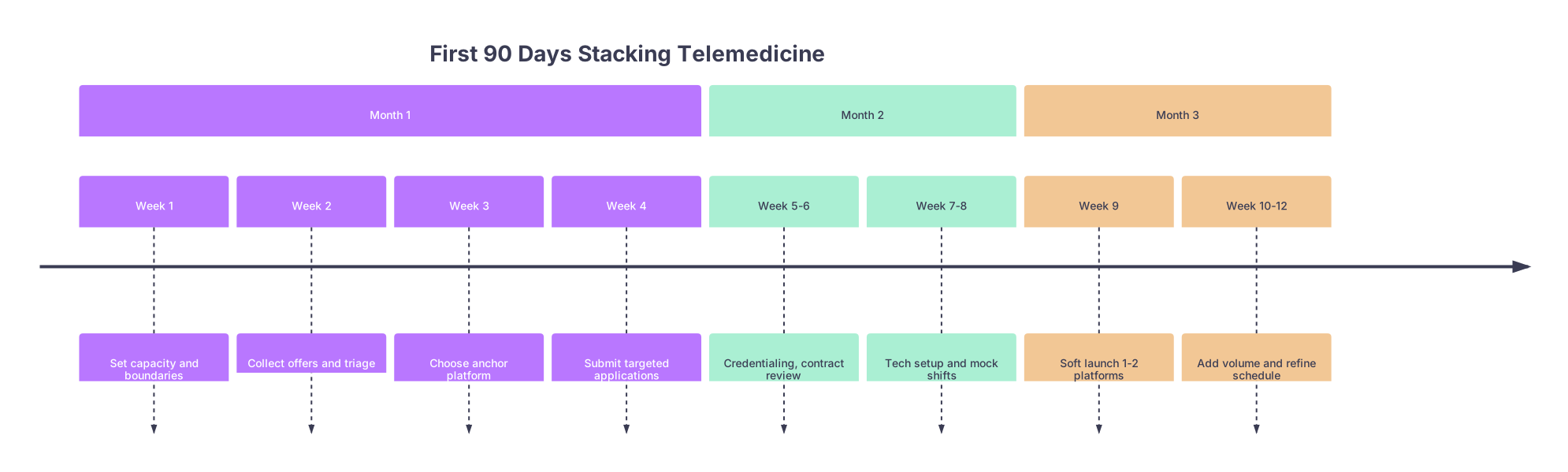
| Period | Event |
|---|---|
| Month 1 - Week 1 | Set capacity and boundaries |
| Month 1 - Week 2 | Collect offers and triage |
| Month 1 - Week 3 | Choose anchor platform |
| Month 1 - Week 4 | Submit targeted applications |
| Month 2 - Week 5-6 | Credentialing, contract review |
| Month 2 - Week 7-8 | Tech setup and mock shifts |
| Month 3 - Week 9 | Soft launch 1-2 platforms |
| Month 3 - Week 10-12 | Add volume and refine schedule |
Phase 3: Month 2 – Contracts Signed, Systems Built (Before You Go Live)
This is where people get reckless. They sign everything, go live on 3 platforms in the same week, then drown.
Don’t do that.
Week 7: Finalize Contracts and Lock Your “Template Week”
Once you have actual contracts and go-live estimates, build a template week for your stacked schedule.
Start conservative:
- Anchor platform: plug in 50–70% of the hours you think you can handle into your green zones
- Per-diem platform A: designate 1–2 “primary” blocks where you’re most likely to log in
- Per-diem platform B or async work: no fixed blocks yet, just “backup” options
Example template (for someone with a day job):
- Mon–Thu:
- 8–5: main job
- 7–10 pm Tue/Thu: anchor telemed (scheduled)
- Sat:
- 8 am–12 pm: anchor telemed (scheduled)
- 1–3 pm: open per-diem urgent care (log in if not exhausted)
- Sun:
- Off, or async cases only
Lock this template before you even touch a live schedule.
Week 8: Build Your Scheduling Infrastructure
At this point you should be building the skeleton that will prevent chaos later.
You need:
Master calendar (Google Calendar, Outlook, whatever)
- Separate color for each platform
- Recurring events for anchor shifts
- “Soft holds” for planned per-diem blocks
Buffer rules (non-negotiable)
- At least 15 minutes between platforms for:
- Finish notes
- Log out, log in
- Bathroom / water / brain reset
- No back-to-back late-night + early-morning telemed blocks
- At least 15 minutes between platforms for:
-
- If one platform has heavy notes, build that into the time
- Example: 50-min telepsych visit? Don’t schedule them on 60-minute marks all night. You’ll fall behind and bleed into other platforms.
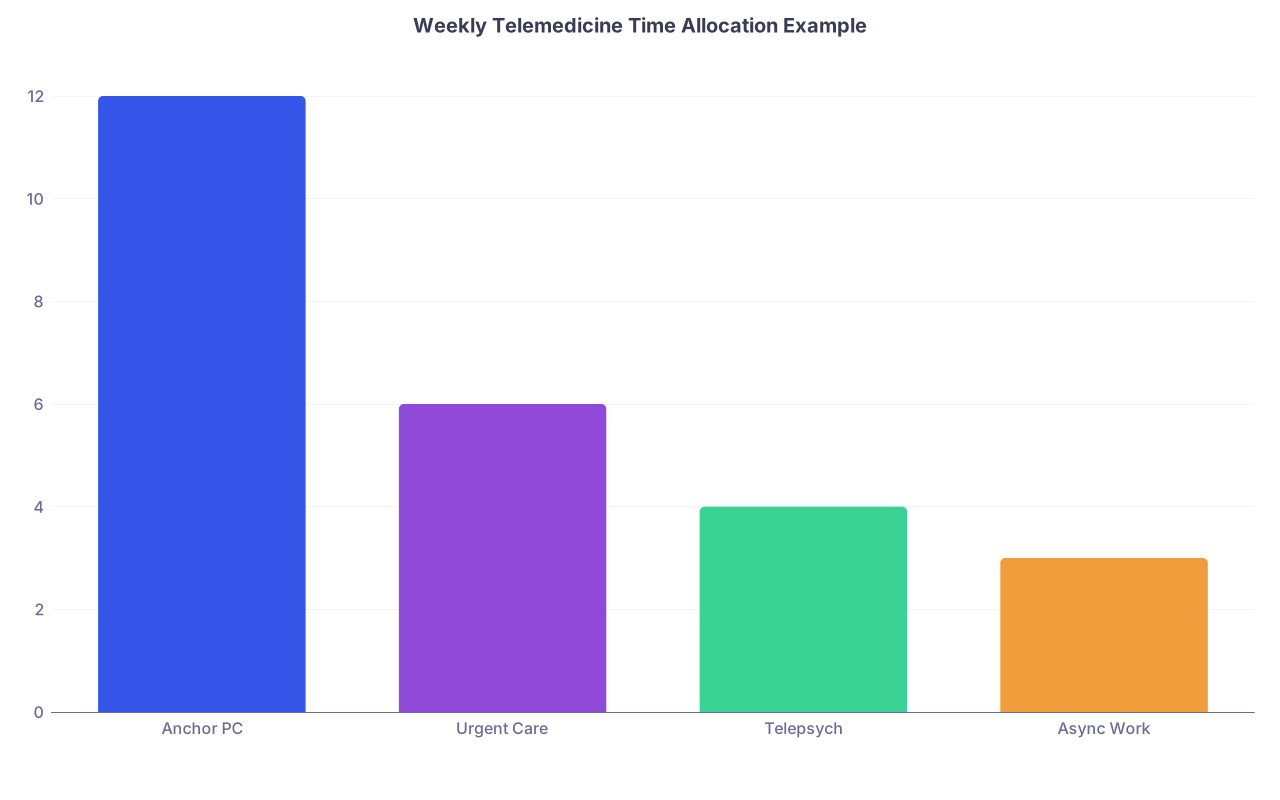
| Category | Value |
|---|---|
| Anchor PC | 12 |
| Urgent Care | 6 |
| Telepsych | 4 |
| Async Work | 3 |
Also: set up a simple “What am I doing when” note, taped near your desk. Hour blocks, platform names. You’ll be surprised how foggy your brain gets at hour 9.
Tech Setup and Rehearsal (End of Month 2)
- Install all EHRs, video platforms, and authenticator apps on:
- Primary device
- Backup device (laptop or desktop)
- Test:
- Camera, mic, internet speed
- E-prescribing on each platform
- EHR shortcuts, templates, macros
Then do mock shifts:
- One 2–3 hour block where you:
- Log into platform A
- Do fake notes, click around as if visits are coming
- Immediately after, pretend to log into platform B
- Switch windows, find what slows you down
You want all the confusion and password resets to happen now, not mid-stack during a real shift.
Phase 4: Month 3 – Soft Launch and Volume Ramp
Now you’re credentialed on at least one platform, maybe two. At this point you should start small on purpose.
Week 9: Launch Only One Platform Heavy
Pick one:
- Either your anchor panel
- Or your highest-paying, most predictable per-diem
Schedule:
- 1–2 shifts during your planned weekday blocks
- 1 weekend block
Do NOT add the second platform in the same week unless your first go-live is a total dud with near-zero volume.
Focus this week on:
- How many patients/hour can you safely manage with appropriate notes?
- How drained are you after a 3–4 hour block?
- How often does life intrude (kids, calls, tech issues)?
Take notes after each shift. You’re setting your future limits.
Week 10: Add Light Volume From a Second Platform
If week 9 went smoothly, now add the second platform, but:
- Only in non-overlapping blocks from your first platform
- Start with shorter blocks (2 hours)
- Use your “soft hold” slots, do not add new ones yet
For example:
- Keep Tue/Thu evenings for platform A
- Add Sat afternoon 2–4 pm for platform B
At this point you should:
- Watch for charting creep: are notes from A bleeding into your start time for B?
- Check your mental load: switching EHRs is its own tax
If both feel tolerable, maintain this for 2 weeks before increasing.
Week 11–12: Dial In Your Personal Ceiling
By the end of month 3, you should be able to answer:
- What’s my max telemed hours/day without feeling wrecked?
- What’s my max telemed hours/week on top of my other job?
- Which platforms truly earn their calendar space?
Now adjust:
- If one platform is low pay + high stress → drop or downgrade it
- If one platform is steady pay + tolerable load → give it better time slots
- Lock in a new “stable schedule” for the next 3 months
Ongoing: Week-by-Week Scheduling Rhythm (Once You’re Stable)
Once you’re through the messy launch, your life shifts into a weekly cadence.
Here’s what that looks like if you want to avoid chaos.
2–3 Weeks Ahead: Commit Your Anchor, Hold Per-Diem Windows
At this point you should:
- Schedule your anchor shifts 2–4 weeks out, inside your green blocks
- Mark per-diem blocks as:
- “Primary” (very likely to use)
- “Optional” (only if you want extra money that week)
Do not fill all your per-diem windows every week. Leave slack. You’re not a robot.
Weekly Review (10–15 Minutes, Same Day Every Week)
Do this on Sunday evening or Friday afternoon:
Look at the coming week:
- Total clinical hours (main job + telemed)
- Nights and weekends count
Adjust:
- If you’re at or near your weekly cap → cancel optional per-diem blocks now
- If a home event popped up → clear the conflicting telemed block
Check earnings target:
- If you have a shortfall for the month, you can intentionally turn on more urgent care/log-in time
- Aim for one extra block, not five
This small review is what stops slow creep into 60–70 hour weeks.
Daily: How to Work Multiple Telemedicine Platforms Without Melting Down
Now we’re at the ground level. You’re mid-week, stacking shifts.
Here’s what your day should actually look like.
Morning: Pre-flight Check (5 Minutes)
- Look at today’s calendar:
- Platform names
- Start/stop times
- Buffers
- Purposefully decide:
- “I’m keeping all of these,” or
- “I’m dropping that optional 2–4 pm block”
Open:
- Email or message center from each platform once
- Check for:
- Shift changes
- Platform downtime alerts
- Policy updates (suddenly no controlleds? changed state rules?)
- Check for:
Before Each Shift: 5-Minute Setup
10–15 minutes before a shift:
- Open only the EHR and tools for that platform
- Close everything else that can distract you
- Pull up:
- Your quick note templates
- Your state PDMP or required checks
- Have a small notepad or digital note titled: “Follow-ups to finish after shift”
You want to reduce friction and decision fatigue.
During Back-to-Back Platforms: The Buffer Ritual
Between platforms (you gave yourself 15 minutes, remember?):
- Finish notes on platform A. No exceptions.
- Log out, close EHR A completely.
- Stand up. Bathroom, water, 5 deep breaths. Yes, really.
- Sit down, log into platform B.
- Glance at your mini schedule to reorient: what kind of cases am I about to see?
This ritual is what prevents “I thought I was still on urgent care and forgot this panel patient needs follow-up lab orders.”
Hard Rules You Enforce Every Single Day
Have these written somewhere visible:
- No double-booking blocks across platforms. Ever.
- If one platform overruns by >20 minutes more than twice in a month, you drop a block from that platform.
- No more than X telemed hours in a calendar day (you discovered X in month 3).
- After your last shift, you do a 5-minute “wrap”:
- Outstanding messages?
- Any patient that needs priority follow-up tomorrow?
- Any charts unfinished? They get finished now or explicitly blocked time tomorrow.
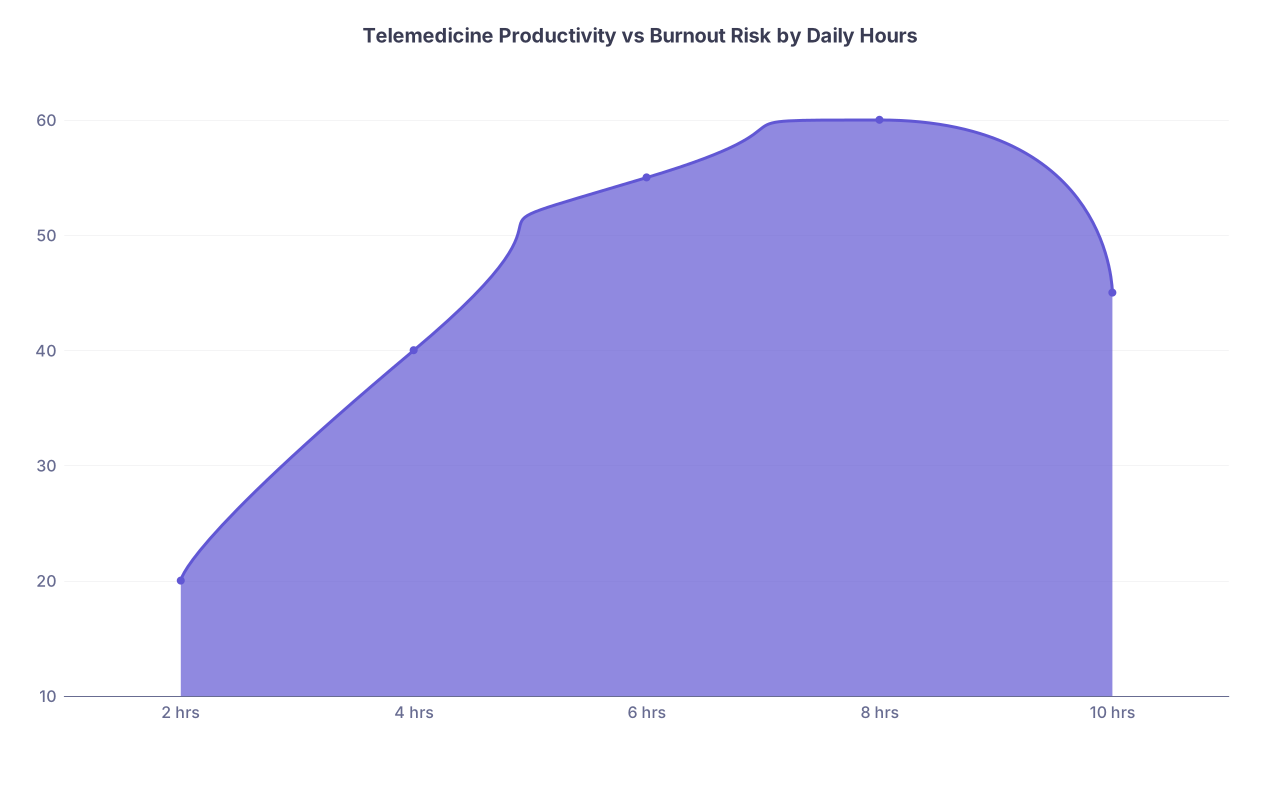
| Category | Value |
|---|---|
| 2 hrs | 20 |
| 4 hrs | 40 |
| 6 hrs | 55 |
| 8 hrs | 60 |
| 10 hrs | 45 |
(That dip at 10 hours? That’s you being less efficient, more snappy, and more likely to miss something.)
Red Flags and When to Prune
Stacking contracts only works if you’re willing to kill some of them.
Watch for:
- You’re consistently finishing notes >30 minutes after shift
- You’re snapping at patients or family after a long telemed day
- You dread one platform’s user interface so much you procrastinate logging in
- You find yourself considering logging into two platforms “just to see” if both have low volume
At that point you should:
- Identify the lowest value platform:
- Lowest effective hourly rate
- Highest headache per visit
- Worst scheduling rigidity
- Cut it or downgrade your involvement:
- Move from “core” to “true per-diem”
- Or offboard entirely with proper notice
Stacking only works long-term if you aggressively protect your schedule and brainpower.
Final Checkpoints: 6 and 12 Months
At 6 Months
At this point you should:
- Have:
- 1 stable anchor (or a deliberate choice to have none)
- 1–2 per-diem platforms you actually like
- Know:
- Your true sustainable telemed hours/week
- Your income per platform and per hour
Do a reset:
- Drop dead-weight contracts
- Renegotiate minimums if possible
- Rebuild your “template week” to match reality, not fantasy
At 12 Months
By one year, the chaos risk is boredom and overcommitment.
- You’ll be tempted to add “just one more” lucrative contract
- You’ll have more state licenses and thus more offers
At this point you should:
- Only add a new platform if:
- It replaces something worse, or
- You intentionally decrease hours elsewhere
- Revisit your hard boundaries:
- Nights
- Weekends
- Total weekly clinical hours
If you’re making good money but feel like a call-center robot, it’s not “working.” Fix it.
Key Points to Walk Away With
- Sequence first, stack second. Pick an anchor, then slowly layer per-diem work into clearly defined calendar blocks.
- Protect your buffers and caps. Hard limits on daily/weekly hours and strict no-overlap rules are non-negotiable if you want to avoid chaos.
- Prune aggressively. The value of stacking comes from dropping bad contracts and keeping only the platforms that pay well, fit your life, and respect your time.