
The biggest mistake physicians make with telemedicine side gigs is thinking it is “just a few extra shifts online.” It is a miniature practice launch. Treat it that way or watch it die in month three.
You asked for a 10‑week, stepwise launch schedule. So here is the timeline I give attendings who want telemedicine income without wrecking their main job or their sanity.
Week 0: Pre‑Decision Reality Check (Before You Commit)
Before the clock starts, you need to decide if this is actually viable for you.
At this point you should:
- Confirm your primary employer allows outside clinical work.
- Decide your clinical niche and intensity.
- Set a concrete income + time goal.
Employer + Contract Check (1–2 days)
Pull out your employment agreement. The relevant phrases are:
- “Outside clinical activity”
- “Non-compete” / “Restrictive covenant”
- “Moonlighting” / “Secondary employment”
You are looking for:
- Whether external clinical practice is allowed at all.
- Whether telemedicine is explicitly mentioned.
- Required approvals (CMO, department chair, compliance).
If the contract is vague, assume you need written permission. Do not guess. I have watched people lose bonuses over an “informal” telemed gig.
Decide the Target
Pick one:
- Extra $1,000–$2,000/month
- Extra $3,000–$5,000/month
- Replaceable future full‑time remote path
Your weekly time budget will follow:
| Goal Type | Typical Weekly Hours | Monthly Income Range* |
|---|---|---|
| Light supplement | 4–6 | $800–$2,000 |
| Moderate second income | 8–12 | $2,000–$5,000 |
| Aggressive build‑out | 12–20 | $4,000–$8,000+ |
*Assumes US‑based physician, mix of per‑visit pay and hourly rates.
Once you know your target and your contract risk is acceptable, start the 10‑week clock.
Week 1: Define Your Telemedicine Niche + Platform Strategy
At this point you should be deciding what you will do and where you will do it, not buying gear or signing contracts.
Days 1–3: Choose Your Telemedicine Model
Pick one primary path for the first 6–12 months:
Marketplace / Gig platforms
- Examples: Teladoc, Amwell, MDLive, SesameCare, Hims/Hers, Nurx.
- Pros: Infrastructure ready, credentialing handled, steady flow once on.
- Cons: Lower control, variable rates, sometimes high charting grind.
Employer‑like W2 telemedicine companies
- Examples: large health systems’ virtual urgent care, regional tele‑ICU, subspecialty teleconsults.
- Pros: Predictable schedules, malpractice covered.
- Cons: Less flexibility, more like second job.
Independent micro‑practice (your own virtual clinic)
- Using platforms like Doxy.me, Jane, SimplePractice, DrChrono, or a white‑label telehealth EHR.
- Pros: Maximum autonomy, better long‑term revenue potential, you set fees.
- Cons: Requires business setup, contracts, policies, far more admin.
If this is your first telemedicine side gig, I strongly recommend:
- Start with marketplace or W2 telemedicine for the first 6–9 months.
- Build your independent setup in parallel slowly if you want it.
Trying to launch fully independent from zero while working full‑time is ambitious bordering on unreasonable for most people.
Days 4–7: Narrow to 2–3 Specific Platforms
Criteria:
- Your specialty is directly used (FM, IM, EM, psych, derm, endocrine, etc.).
- Your state licenses match patient states required.
- Documented pay rates you can live with.
- Reasonable minimum hours.
Create a short list of 2–3:
- One urgent care style (high volume, short visits).
- One longitudinal or specialty (psych, ADHD, weight loss, women’s health).
- Optional: one “backup” platform with slower credentialing.
You want redundancy. One platform will always disappoint you.
Week 2: Licensure, Credentialing Prep, and Admin Skeleton
At this point you should be front‑loading every clerkship‑style requirement that will delay revenue.
Days 8–10: Licenses, DEA, and States Strategy
Confirm:
- Current state licenses (valid dates, clean status).
- DEA registration and address (and whether it matches intended practice state).
- Any telemedicine‑restricted prescribing rules in your primary states.
Then decide:
- Start with only states you are already licensed in, or
- Invest in 1–2 additional high‑yield states.
High‑yield states for telemedicine often include: TX, FL, CA, NY, AZ, CO (depends on platform, but these recur).
Do not apply for 5 new licenses at once. You will burn cash and add months of delay. Start with:
- 1–2 additional states if your current state is low‑volume for telemed.
- 0 additional if your home state is already high‑volume and populous.
Days 11–14: Credentialing Packet Assembly
Every platform will ask for the same things. Build a “credentialing kit” now:
- Updated CV in their format (MM/YYYY dates, no gaps).
- Diplomas: med school, residency, fellowship.
- Board certification certificates.
- State licenses and DEA documents.
- Malpractice history with dates and policy numbers.
- Explanation letters for any gaps, board failures, or investigations.
Create a single encrypted folder on your computer or cloud drive:
- Name files clearly:
Lastname_CV_2026,Lastname_BC_IM_ABIM, etc. - Store scanned PDFs at readable quality.
You will reuse this packet dozens of times. The hour you spend polishing it saves days later.
Week 3: Workspace, Hardware, and Security Setup
Now you start building the actual environment where you will see patients. This is the phase most physicians underestimate.
At this point you should be investing in the basics that will protect you from miserable call quality and privacy complaints.
Days 15–17: Physical Space
Requirements for your telemedicine room:
- A door that closes, with at least basic sound isolation.
- Neutral background (plain wall, simple shelves, no clutter, no personal photos).
- Stable desk and chair set up for 2–3 hour sessions without pain.
Quick checklist:
- Test for echo → clap test. If echo is bad, add rug or soft wall hanging.
- Check noise → stand outside room, have someone talk inside, make sure it is muffled.
Days 18–19: Hardware
Bare minimum:
- Reliable laptop or desktop (8GB+ RAM, decent processor).
- 1080p external webcam (built‑in laptop cameras are usually mediocre).
- USB microphone or headset with noise cancellation.
- Wired ethernet if possible, or strong Wi‑Fi near router.
- Secondary monitor if you plan to chart + video simultaneously.
Optional but strongly recommended:
- Ring light or soft box light.
- Battery backup for modem/router in high‑outage areas.
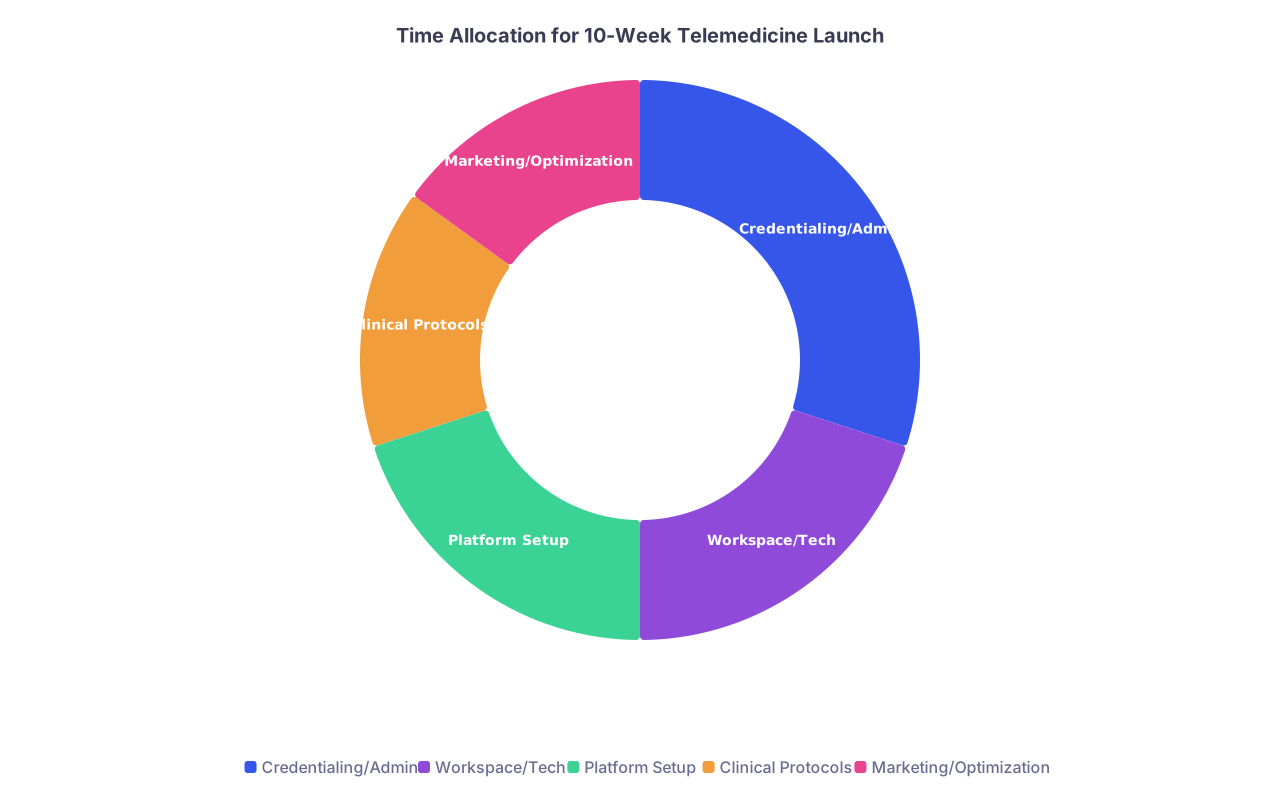
| Category | Value |
|---|---|
| Credentialing/Admin | 30 |
| Workspace/Tech | 20 |
| Platform Setup | 20 |
| Clinical Protocols | 15 |
| Marketing/Optimization | 15 |
Days 20–21: Security and Compliance
You need:
- Password manager (1Password, Bitwarden, LastPass) for platform logins.
- Encrypted storage for PHI (don’t use random cloud folders).
- Screen privacy filters if your space is shared.
If you are doing independent practice:
- Choose a HIPAA‑compliant telehealth platform (BAA provided).
- Verify that video, messaging, and storage are all covered.
Week 4: Apply to Platforms + Start Business Foundations
At this point you should be submitting applications, not “researching someday options.”
Days 22–24: Submit 2–3 Telemedicine Applications
Target:
- 1 major urgent care/primary care platform.
- 1 niche platform aligned to your skills or interests.
- Optional 1 system‑based telemed role if available locally.
Use your credentialing kit. Answer their questions precisely; avoid vague job descriptions. They will verify every date anyway.
Expect:
- Application to initial response: 1–3 weeks.
- Full credentialing: 4–12 weeks.
You are starting now so approval lands around Week 8–10.
Days 25–28: Business Structure (Only if Going Independent)
If you are only doing W2 telemedicine at this stage, skip to Week 5.
Otherwise:
- Decide entity: LLC vs PLLC depending on your state.
- File basic formation docs (often online).
- Apply for EIN via IRS website (free, immediate).
- Open a dedicated business bank account.
You do not need a perfect logo or website now. You do need clean financial separation and a legal shell.
Week 5: Clinical Protocols, Workflows, and Boundaries
By now, paperwork is in motion and hardware is functional. Time to define how you will actually practice.
At this point you should be designing your “telemedicine brain” so that every visit does not feel like reinventing the wheel.
Days 29–31: Visit Types and Red‑Flag Rules
List your common visit types (for urgent care style):
- URI, sinusitis, pharyngitis
- UTI
- Rash
- Conjunctivitis
- Medication refills
- Anxiety/depression follow‑ups
- Simple COVID concerns
For each, define:
- Telemedicine appropriate vs must refer in‑person criteria.
- Default workup you can order (labs, imaging) if your platform allows.
- Clear “no‑go” medications (e.g., no chronic benzos, no chronic opioids, unless your gig specifically does addiction medicine and you are trained/certified).
For specialty work (psych, derm, hormone, etc.):
- Standard assessment template.
- Time‑based vs problem‑based structure.
- Follow‑up timing rules.
Days 32–35: Templates and Macros
Build text templates for:
- HPI by complaint.
- ROS minimal sets.
- Assessment and plan per common diagnosis.
- Safety net / return precautions.
This is where you regain your time.
Example (straightforward case):
URI_TEMPLATE: Age, onset, fever pattern, exposures, vax status, red flag negatives, home treatments tried, sick contacts.
Load these into:
- Platform EHR macros if allowed.
- Text expander tool if independent (e.g., PhraseExpress, TextExpander).
Week 6: Schedule Design and Work‑Life Protection
Credentialing wheels are turning. You are not live yet, but you will be soon. This week you decide when telemedicine happens and when it does not.
At this point you should be drawing lines, not “fitting it in wherever.”
Days 36–37: Time Block Your Week
Pull up your main job schedule. Find:
- 2–3 predictable blocks of 2–4 hours each week.
- Times you are mentally functional (a 4‑hour telemed block after a 28‑hour call is nonsense).
Common patterns that work:
- 1 weeknight 6–10 pm.
- 1 weekend 4–5 hour block.
- Optional short early‑morning block if you are a morning person.
Protect these blocks in your calendar now.
Days 38–42: Boundary Rules
Decide in advance:
- Maximum telemedicine hours per week (hard cap).
- No‑telemed days (e.g., post‑call, certain family days).
- How much time you allow for chart completion after each shift (15–30 minutes).
Write them down. When your platform offers extra shifts, you will be tempted. The written cap protects you from chasing every dollar.
Week 7: Training, Platform Orientation, and Dry Runs
At this point you will probably start getting onboarding materials from at least one platform.
Days 43–45: Complete Training Modules
Do not half‑watch these with Netflix on. You need to learn:
- EHR quirks (clicks that waste time, hidden buttons).
- How labs, imaging, and meds route.
- How to call EMS or local resources if a visit goes bad.
- Prescription rules (controlleds, state‑specific bans).
Keep a one‑page cheat sheet:
- Common codes or visit reasons.
- Contact number for support.
- How to escalate safety issues.
Days 46–49: Technology Dry Runs
Simulate two full “visits” with a friend or family member.
Check:
- Audio/video quality.
- Lighting and camera angle.
- Speed of documentation with your templates.
- How fast you can send prescriptions or referrals (if platform allows testing).
Fix every friction point now. Visiting a patient for the first time while Googling how to send an e‑script is amateur hour.

Week 8: Soft Launch – First Scheduled Shifts
This is where the side gig finally touches real patients.
At this point you should start small, on purpose.
Days 50–52: Schedule First 1–2 Short Shifts
Book:
- 1 shift of 2–3 hours on a low‑stress day.
- Optional second shift later in the week if the first goes reasonably well.
For new platforms, initial volumes can be low. Do not panic if it is quiet. Use downtime to refine templates and learn the EHR.
Days 53–56: Post‑Shift Review
Immediately after your first 1–2 shifts, answer:
- What slowed you down? (click patterns, phrasing, histories)
- Which visit types felt easy vs painful?
- Did your boundary rules hold, or did you run over time?
Adjust:
- Templates to cover charting gaps you saw.
- Lighting / audio if patients could not see/hear you well.
- Your pre‑visit checklist.
Keep a simple log:
- Date, hours worked, number of visits, total pay (if visible).
- Note complex or risky cases to review later.
Week 9: Volume Calibration and Systems Tuning
Now you stop thinking like “someone trying telemedicine” and start thinking like a mini‑business.
At this point you should be tuning for sustainable speed and quality.
Days 57–60: Adjust Visit Load and Types
If Week 8 felt:
- Too slow: Add 1–2 more hours, or open to more visit types you had previously excluded.
- Too rushed: Limit complex visit types (e.g., multi‑issue primary care) until you are more comfortable.
For independent setups:
- Start with established patients or narrow problems.
- Keep visit lengths longer than you think you need. You can shrink later.
Days 61–63: Financial Tracking Setup
Set up a simple tracking sheet:
Columns:
- Date
- Platform
- Hours logged
- Visits completed
- Gross pay
- Notes (slow day, holiday effect, etc.)
You are looking for:
- True hourly effective rate.
- Which platforms pay reliably.
- Which time windows are most productive.
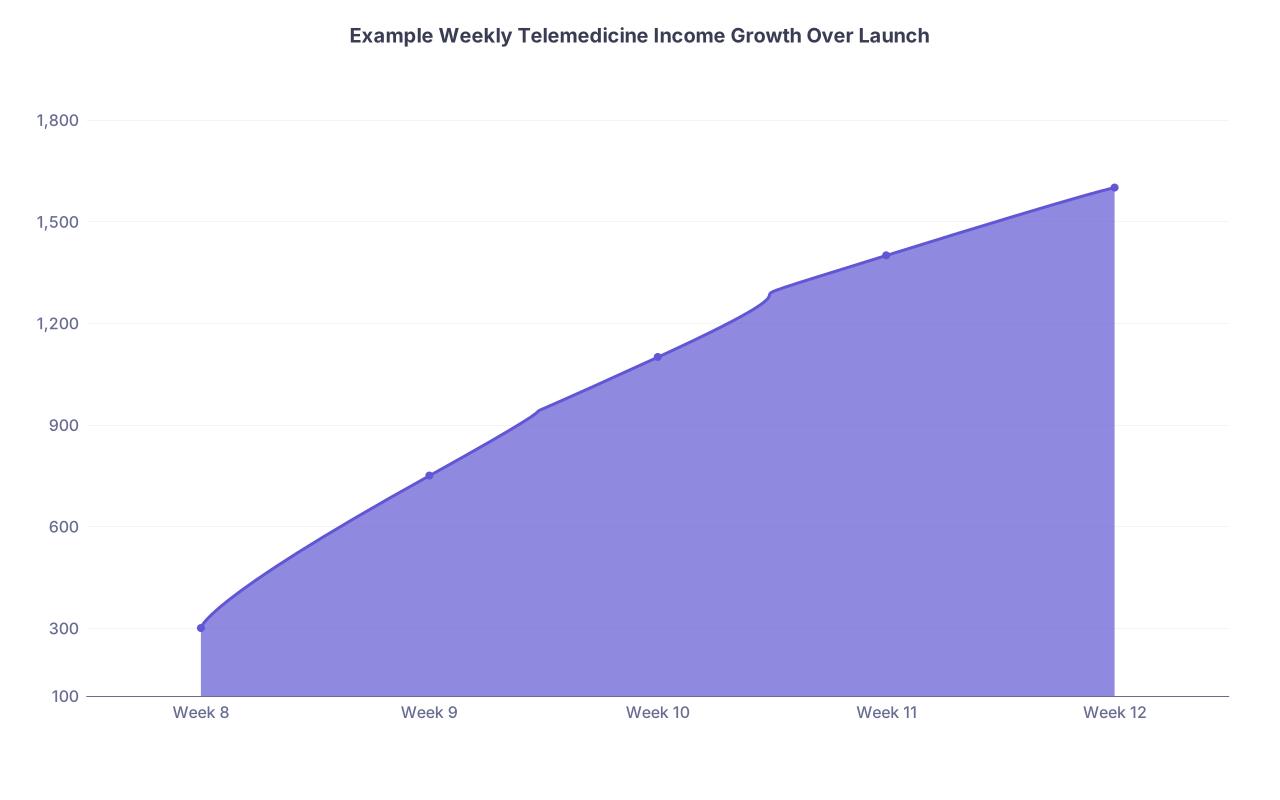
| Category | Value |
|---|---|
| Week 8 | 300 |
| Week 9 | 750 |
| Week 10 | 1100 |
| Week 11 | 1400 |
| Week 12 | 1600 |
Week 10: Stabilize, Decide, and Plan the Next Quarter
You are live. You are seeing patients. The 10‑week launch is almost complete.
At this point you should be making deliberate decisions, not coasting.
Days 64–67: Evaluate Fit and Sustainability
Ask yourself:
- Do I dread these shifts, tolerate them, or enjoy them?
- Does the income justify the time and cognitive load?
- Is this platform worth scaling, or is it just a filler while I find better?
If:
- You hate the platform → keep hours low and start exploring alternatives.
- You like the work but not the pay → consider additional licenses or a second platform.
- You like both → plan modest growth.
Days 68–70: Plan the Next 12 Weeks
Make a simple, concrete plan:
- Hours per week target for the next 3 months (e.g., 6, 10, or 12 hours).
- Platform mix (e.g., 70% urgent care, 30% psych consults).
- System upgrades you will do:
- Better mic or camera.
- Refined templates.
- Additional licenses in 1–2 key states.
If you are serious about eventually going independent:
- Start drafting your own telemedicine policies (consent, privacy, controlled substances).
- Collect patient feedback (through platform reviews) to shape your own future brand.
Sample 10‑Week Snapshot Timeline
To put it all in one place:
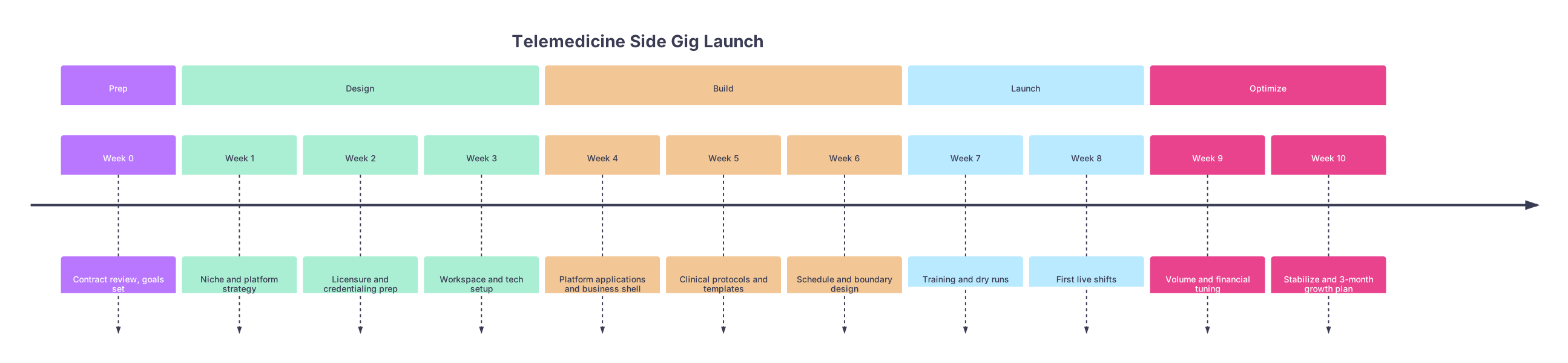
| Period | Event |
|---|---|
| Prep - Week 0 | Contract review, goals set |
| Design - Week 1 | Niche and platform strategy |
| Design - Week 2 | Licensure and credentialing prep |
| Design - Week 3 | Workspace and tech setup |
| Build - Week 4 | Platform applications and business shell |
| Build - Week 5 | Clinical protocols and templates |
| Build - Week 6 | Schedule and boundary design |
| Launch - Week 7 | Training and dry runs |
| Launch - Week 8 | First live shifts |
| Optimize - Week 9 | Volume and financial tuning |
| Optimize - Week 10 | Stabilize and 3-month growth plan |
Two Common Variations (And How the Timeline Shifts)
I see two common deviations from this clean 10‑week plan.
1. The “I Want This to Replace My Day Job” Physician
If you are eyeing full‑time remote in 1–2 years:
- Expand Week 2: aggressively pursue 2–3 extra licenses.
- Extend Week 4: apply to 3–5 platforms, not 2–3.
- Increase Week 6 target hours: aim for 8–12 hours/week by Month 3.
- By Week 10: your next plan should include test runs of 20+ hour weeks on vacation or lighter clinical months.
2. The “I Only Want a Small Cushion” Physician
If your goal is simply $1k–2k/month:
- You can slow some pieces:
- One platform may be enough.
- No extra state licenses initially.
- Still follow the structure.
- Non‑negotiables remain: contract check, workspace, templates, boundaries.
Final Takeaways
Three points matter more than the rest:
- Treat this like a real, staged launch, not occasional extra shifts. The 10‑week structure prevents chaos and burnout.
- Front‑load credentialing, workspace, and templates. Those three determine whether week 8 feels smooth or miserable.
- Lock in boundaries and track your numbers. A telemedicine side gig that quietly consumes your time and gives you no data is not a side gig. It is just another job you cannot evaluate.