
It is your first Monday as a telemedicine physician.
Laptop open. EHR credentials in your inbox. Webcam making you look a little more exhausted than you hoped. There is a schedule full of 15‑minute video visits, a Slack channel buzzing, and a silent fear: “I trained in an ICU… and now I am troubleshooting someone’s microphone.”
This is what the first 90 days in telemedicine actually feel like.
You are not trying to “be perfect.” You are trying to not drown. To not miss red‑flag appendicitis on a grainy video. To not get fired because your RVUs are terrible. To not burn out staring at your own face eight hours a day.
Here is the week‑by‑week survival plan I wish more people had before they started.
Overall 90‑Day Arc: What Changes When
At a high level, your first three months usually break into three phases:
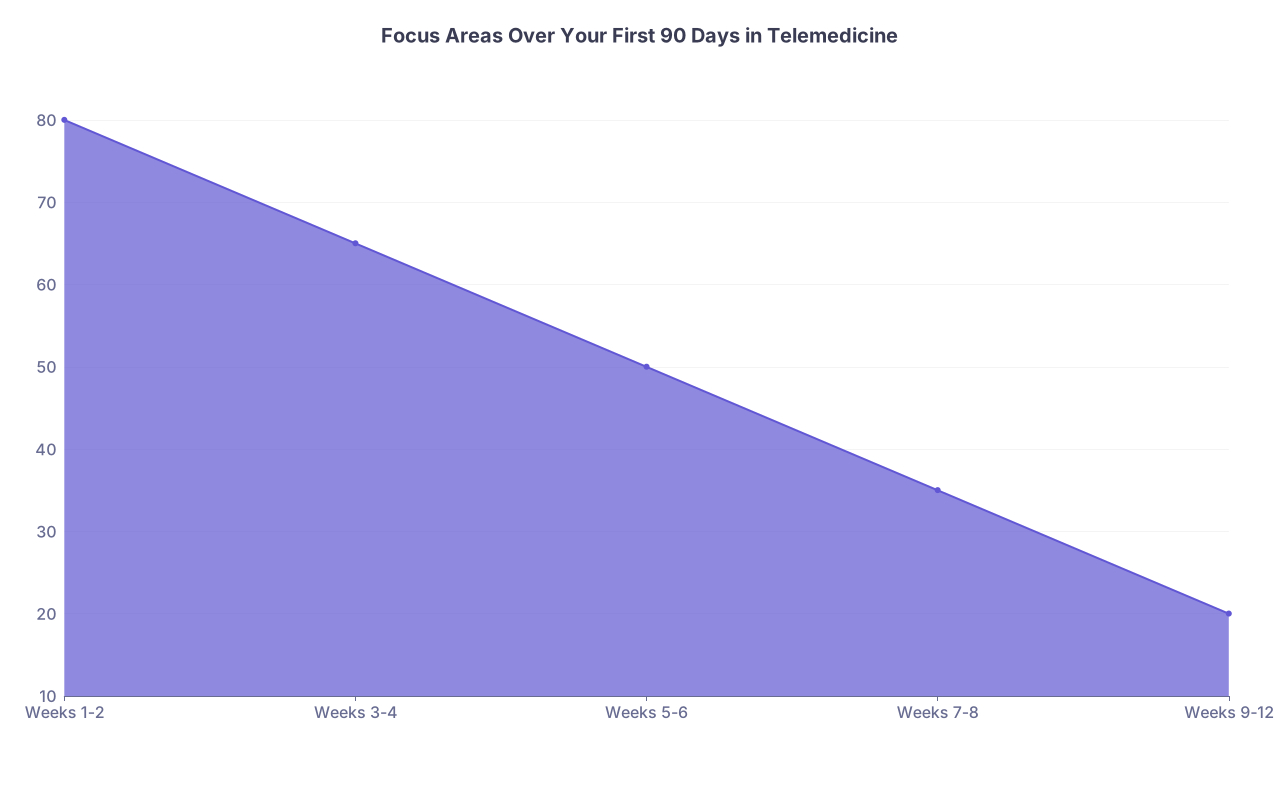
| Category | Value |
|---|---|
| Weeks 1-2 | 80 |
| Weeks 3-4 | 65 |
| Weeks 5-6 | 50 |
| Weeks 7-8 | 35 |
| Weeks 9-12 | 20 |
- Weeks 1‑2: Survival and tech. You are mostly learning platforms, workflows, and what is “telemedicine‑appropriate.”
- Weeks 3‑6: Throughput and boundaries. You work on speed, documentation, and not letting work creep into every corner of your life.
- Weeks 7‑12: Optimization. You push quality, build habits, and decide if this is truly the right clinical setting for you.
I will walk you through week by week. At each point: what you should be doing, watching for, and fixing.
Week 1: Onboarding, Set‑Up, and Not Looking Unprepared
Your goal this week: be technically competent and safe. That is it.
Day 1–2: Systems, Access, Workspace
At this point you should:
- Get full access to:
- EHR (Epic/Cerner/athena/net‑new proprietary system)
- Telehealth platform (Amwell, Doximity, proprietary video, etc.)
- Secure messaging / internal chat
- Knowledge resources (UpToDate, internal protocols)
- Lock down your physical setup:
- Dedicated workspace: door that closes, neutral background, no bed in frame.
- External monitor. If you see more than 6–8 patients a day, one laptop screen is a joke.
- Wired internet where possible. Wi‑Fi is fine until it drops in the middle of chest pain.
- Headset with microphone. Audio quality matters more than video.
Checklist, day 1–2:
- Log in to every required system at least once. No exceptions.
- Do a test video visit with IT or another clinician.
- Test:
- Screen share
- E‑prescribing
- Access to labs/imaging orders
- Ability to send patient instructions and follow‑up messages
If any of that did not work smoothly, you fix it now. Not Friday at 4 p.m. with someone crying on the screen.
Day 3–5: Clinical Orientation and First Real Shifts
Most telemedicine organizations have a “this is what we actually see here” culture that is different from what is written in the job posting.
At this point you should:
- Ask for:
- A list of typical chief complaints and what is expected for each (URI, UTI, rashes, med refills, mental health).
- Clear escalation criteria: what absolutely must go to ED or in‑person.
- Sample chart templates from high‑performing clinicians.
- Shadow:
- At least 2–3 hours of live visits with a senior telemed clinician.
- Watch how they:
- Open each visit
- Handle poor video/lighting
- Set expectations: “I can help with X, but for Y you need in‑person.”
Do your first supervised or lightly supervised visits by day 3–4.
Keep volume low. 2–4 patients per hour at most.
Your mini‑goal per visit this week:
“Did I safely decide tele vs in‑person and document that logic?”
Week 2: Safe Throughput and Basic Telemedicine Judgment
By week 2, you should be doing independent visits with backup available. The fear shifts from “how do I click this button” to “how do I handle volume without cutting corners.”
Early Week 2 (Days 8–10): Build Your Visit Structure
Telemedicine visits collapse fast if you ramble or let patients monologue unchecked.
At this point you should design a consistent visit script:
Opening (30–60 seconds)
- Confirm identity and location. Document it. This is a medicolegal non‑negotiable.
- Confirm audio and video are working.
- Set expectations: “We have about 10–15 minutes together; I will focus on your most pressing concern first.”
Focused history and tele‑friendly exam
- Learn your go‑to tele questions:
- “Show me where the pain is using one finger.”
- “Walk to the far end of the room so I can see your breathing.”
- “Press there with two fingers—does that increase the pain?”
- For peds: coach parents to be your hands.
- Learn your go‑to tele questions:
Risk stratification
- Have simple mental buckets:
- Tele‑appropriate
- Needs in‑person urgent care
- Needs Emergency Department now
- Have simple mental buckets:
Close with specific safety netting
- “If you develop X, Y, or Z, go to urgent care / ED today. Not another tele visit.”
Write your script and actually keep it on a notepad next to you. You will not need it by week 4.
Late Week 2: Reduce Friction, Track Pain Points
By the end of week 2, you want to identify what is slowing you down.
Common culprits:
- Clicking through five different templates to order a basic lab.
- Not having smart phrases for common conditions.
- Spending 5 minutes explaining tech to every patient.
At this point you should:
- Build 5–10 smart phrases (or text expanders) for:
- URIs
- Uncomplicated UTI
- Allergic rhinitis
- Simple med refill with stable condition
- “Red flag” return precautions (URI, GI, chest pain)
- Ask a colleague:
“What 3 templates or phrases do you use the most?”
You are trying to get to 3–4 patients/hour safely by the end of week 2, for standard urgent‑care‑style telemedicine.

Weeks 3–4: Volume, Documentation, and Not Burning Out at Home
By now you are clinically functional. The new problems: fatigue, eye strain, and the realization that telemedicine can easily eat your entire life if you let it.
Week 3: Dial In Workflow and Documentation
At this point you should:
- Standardize pre‑visit routine:
- Skim chart and meds before connecting.
- Open orders and patient instructions windows in advance.
- Post‑visit routine:
- Finish note immediately. Do not “batch” everything for the end of the shift. That is how you end up charting at midnight.
Aim for:
- Notes completed within 3–5 minutes of visit end.
- Clear rationale for every decision to treat vs refer in‑person.
Build a “no‑think” checklist for each visit:
- Confirm ID and location documented
- Document if video inadequate and why
- Document safety‑net instructions explicitly
- Document ED/urgent care recommendation if given, with reason
This is your malpractice shield. I have seen more telemedicine QA reviews hinge on these items than on the actual diagnosis.
Week 4: Boundaries and Schedule Reality Check
By week 4, the honeymoon is over. If you are full‑time, the isolation and screen fatigue will hit.
At this point you should:
- Define hard stop times:
- When your shift ends, you are done. No “just one more message.”
- Build micro‑breaks into the schedule:
- 5 minutes every hour screen‑off, stand, stretch.
- If your employer resists, you do it anyway. Your neck and brain will thank you.
- Physical boundaries:
- If you work from home, leave the room between sessions/blocks. Door closed when off duty.
Ask yourself:
- “Can I maintain this schedule for 6 months without hating medicine?”
If the answer is “absolutely not,” you adjust now—fewer shifts, different hours, or part‑time mix with in‑person work.
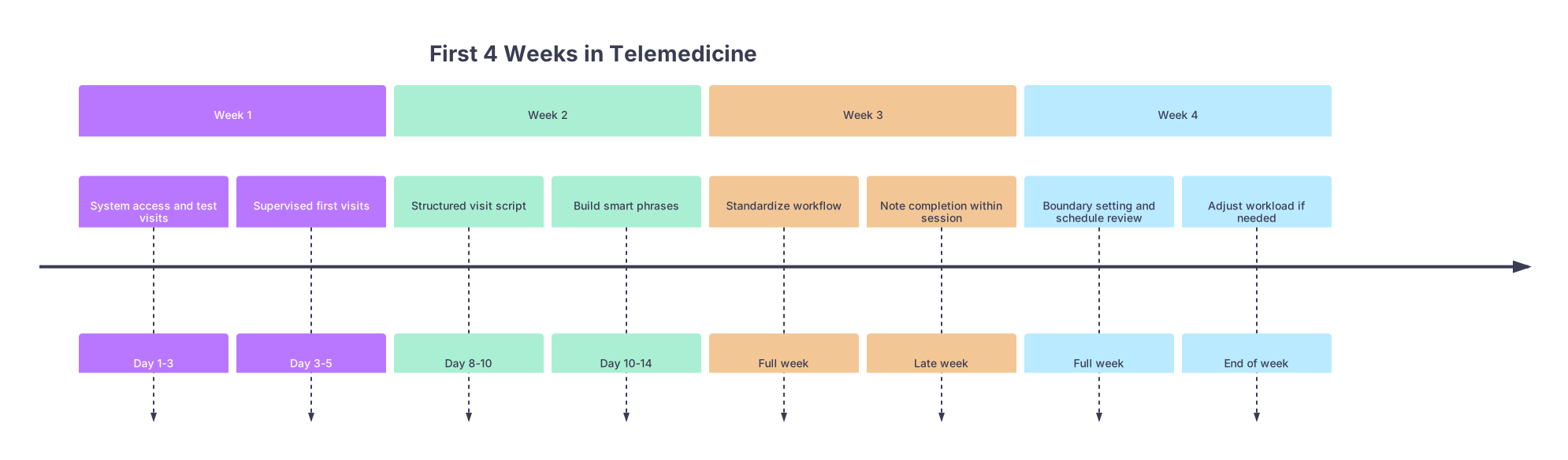
| Period | Event |
|---|---|
| Week 1 - System access and test visits | Day 1-3 |
| Week 1 - Supervised first visits | Day 3-5 |
| Week 2 - Structured visit script | Day 8-10 |
| Week 2 - Build smart phrases | Day 10-14 |
| Week 3 - Standardize workflow | Full week |
| Week 3 - Note completion within session | Late week |
| Week 4 - Boundary setting and schedule review | Full week |
| Week 4 - Adjust workload if needed | End of week |
Weeks 5–6: Quality, Metrics, and Handling Difficult Cases
Now the organization expects you to carry your weight. This is when performance metrics start to matter.
Week 5: Understand How You Are Being Measured
Different companies track slightly different things, but the usual suspects:
| Metric | Typical Expectation |
|---|---|
| Visit Volume | 2–4 patients/hour |
| Documentation Lag | Notes closed same day |
| Patient Ratings | 4.7–4.9 / 5.0 |
| ED/Urgent Referrals | Reasonable but not excessive |
| No‑Show Handling | Quick documentation and outreach |
At this point you should:
- Ask your supervisor directly:
- “What are the top 3 metrics you look at for clinicians?”
- “Where do you want me by the end of this month?”
- Pull your own data if you have access.
- Compare with peers at your level of experience.
Do not guess. I have seen physicians fired from telemedicine jobs who had excellent clinical care but terrible responsiveness to messages or persistent note lag.
Week 6: Improve Patient Communication and Handle Edge Cases
Telemedicine magnifies communication quality. Patients cannot see your body language well. They do see your face and hear your tone.
At this point you should:
- Tighten how you deliver bad news:
- “We cannot safely manage this over video. Here is exactly what I recommend and why.”
- Avoid these two traps:
- Over‑reassurance: “Sounds viral, you are fine” with no red‑flag review.
- Tele‑overreach: treating things that really should be examined in person because you want to be “helpful.”
Build a short list of “don’t treat over video” for yourself based on company policy and your comfort:
- Suspected appendicitis or surgical abdomen
- New focal neurologic deficits
- Vision changes with pain
- Chest pain with risk factors unless clearly noncardiac and protocol supports
- Acute shortness of breath not clearly mild/anxiety with normal vitals (if available)
Write them down. When in doubt, you escalate.
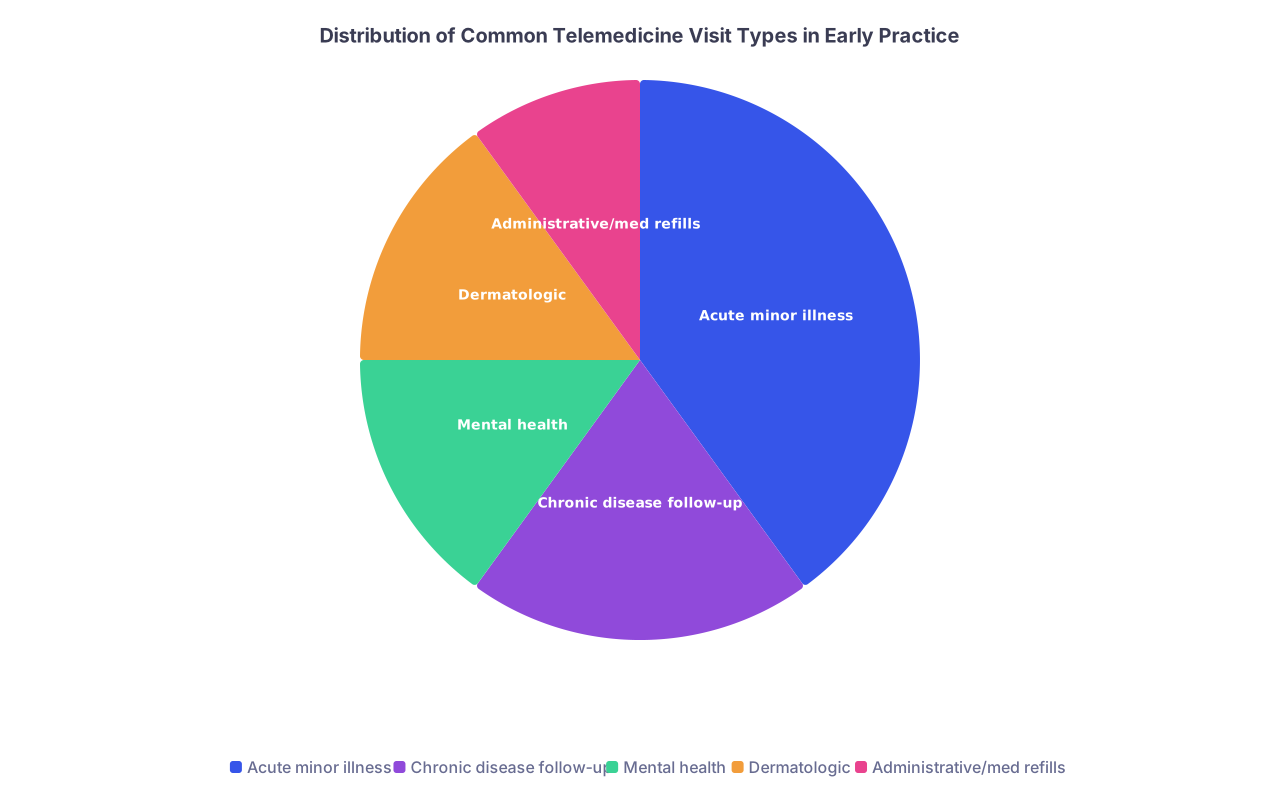
| Category | Value |
|---|---|
| Acute minor illness | 40 |
| Chronic disease follow-up | 20 |
| Mental health | 15 |
| Dermatologic | 15 |
| Administrative/med refills | 10 |
Weeks 7–8: Refinement, Speed, and Professional Identity
At this point you should feel basically competent. Now you refine.
Week 7: Streamline Everything
You are looking for 10‑second annoyances that add up to 30 minutes of extra work.
- Keyboard shortcuts in the EHR.
- Auto‑text for physical exam by complaint type, then customize.
- Running list of your most‑used ICD‑10 codes.
This week, set one concrete goal:
- Decrease average visit + documentation time by 1–2 minutes without reducing quality.
How:
- Do not repeat yourself. If you said it to the patient, paste it into the note with a smart phrase, not fresh typing.
- Build default order sets for common conditions if allowed (e.g., uncomplicated UTI: UA, urine culture, nitrofurantoin with renal check if needed).
Week 8: Reassess Fit and Career Direction
Telemedicine can be a long‑term career, a bridge, or a side job. Do not wait a year to decide which it is for you.
At this point you should ask yourself:
- What parts of this work energize me?
(E.g., behavioral health, quick problem solving, location freedom.) - What parts drain me the most?
(E.g., isolation, lack of procedures, angry patient messages.) - Can I see myself:
- Doing full‑time telemedicine indefinitely?
- Mixing telemedicine with in‑person work?
- Using telemedicine shifts as flexible supplemental income?
If the answer is “I am not sure,” that is fine. But you should at least be honest about whether you are moving toward something sustainable.

Weeks 9–12: Advanced Practice, Risk Management, and Building a Future
You have survived the steepest part of the curve. Now you turn this into a stable, low‑stress, high‑quality clinical practice.
Weeks 9–10: Push Clinical and Legal Safety Up a Level
At this point you should:
- Review any QA feedback or chart audits you have received.
- Identify patterns:
- Are you overusing or underusing ED referrals?
- Are your notes missing any consistent elements?
- Revisit protocols:
- Especially for high‑risk complaints: chest pain, abdominal pain, shortness of breath, pediatric fever.
Consider doing a personal case review:
- Pull 10 cases where you sent to ED.
- Ask:
- “Would I make the same decision again?”
- “Did I document my thought process clearly enough for another clinician to understand?”
Also, take your licensed‑state rules seriously:
- Know exactly:
- Where you are allowed to see patients from.
- What prescribing limitations exist (especially controlled substances).
- If you added new state licenses, confirm your systems are updated.
Weeks 11–12: Long‑Term Career Moves
By the end of 90 days, you are not “new” anymore. This is where you stop thinking like a visitor and start thinking like someone building a career asset.
At this point you should:
- Decide what you want to improve or expand in the next 6–12 months:
- Leadership roles (team lead, QA reviewer, protocol development)
- Subspecialty niches (tele‑derm, tele‑psychiatry, chronic disease management)
- Teaching roles (onboarding new telemedicine clinicians)
- Clarify your schedule strategy:
- Keep full‑time?
- Move to part‑time and add clinic/hospital work?
- Use telemedicine for geographic freedom and lifestyle (e.g., travel, childcare).
Also:
- Clean up your setup:
- Upgrade the things that have been annoying you: chair, camera, lighting.
- Get blue‑light filters or glasses if eye strain is significant.
- Set a 90‑day review meeting with your supervisor:
- Ask what progression looks like for strong clinicians in year 1.
- Get explicit expectations for the next 3–6 months.
Quick Reference: 90‑Day Checklist
| Timeframe | Key Targets |
|---|---|
| Week 1 | Tech access, test visits, safe first cases |
| Week 2 | Visit script, smart phrases, 3–4 pts/hour |
| Weeks 3–4 | Workflow, documentation, boundaries |
| Weeks 5–6 | Metrics, communication, clear escalation |
| Weeks 7–8 | Speed, efficiency, fit and schedule review |
| Weeks 9–12 | QA review, risk management, career planning |