

Virtual backgrounds are not killing your residency chances. But the way most people use them is.
Everyone has an opinion on this. Program directors swap stories about floating heads, green halos, applicants whose hair looks like it’s dissolving into a stock photo of the Golden Gate Bridge. Med students whisper that “someone on Reddit said PDs hate virtual backgrounds” and suddenly it’s treated like gospel.
Let me cut through that.
What Programs Actually Care About (Hint: It’s Not the Beach Behind You)
There’s a persistent myth: “If you use a virtual background, they’ll think you’re unprofessional and rank you lower.” That sounds tidy. It’s also not what the available data – or real interview behavior – supports.
Look at what program directors consistently rank as most important in interviews: communication skills, professionalism, fit with the program, clinical reasoning, ability to work on a team. The AAMC, NRMP, and specialty-specific surveys repeat this over and over.
Your background is not on that list.
But here’s the nuance: your video setup can either support or distract from those core impressions. Background is one piece of that setup. And virtual backgrounds, when used badly, sabotage you by adding distraction, not by triggering some moral judgment about “using Zoom features.”
Most faculty I’ve seen in interview committees are thinking something like this when your video turns on:
- Can I see their face clearly?
- Can I hear them without strain?
- Is there anything extremely off-putting or distracting on the screen?
If the answer to those three is fine, they move on to what you’re actually saying. They’re not pausing to debate whether your fake bookshelf is offensive to medicine.
What the (Limited but Real) Data Shows
No, there is not a giant randomized multi-specialty RCT of “virtual background vs real wall” with match outcomes. Residency-specific data on backgrounds is thin.
But we do have:
- General virtual interview research (med school and residency) on technical quality, perceived professionalism, and distraction.
- Faculty feedback from debriefs and surveys where they list what annoyed them in virtual interviews.
- Controlled experiments from business and HR literature on how background/visual noise affects perceived competence and trust.
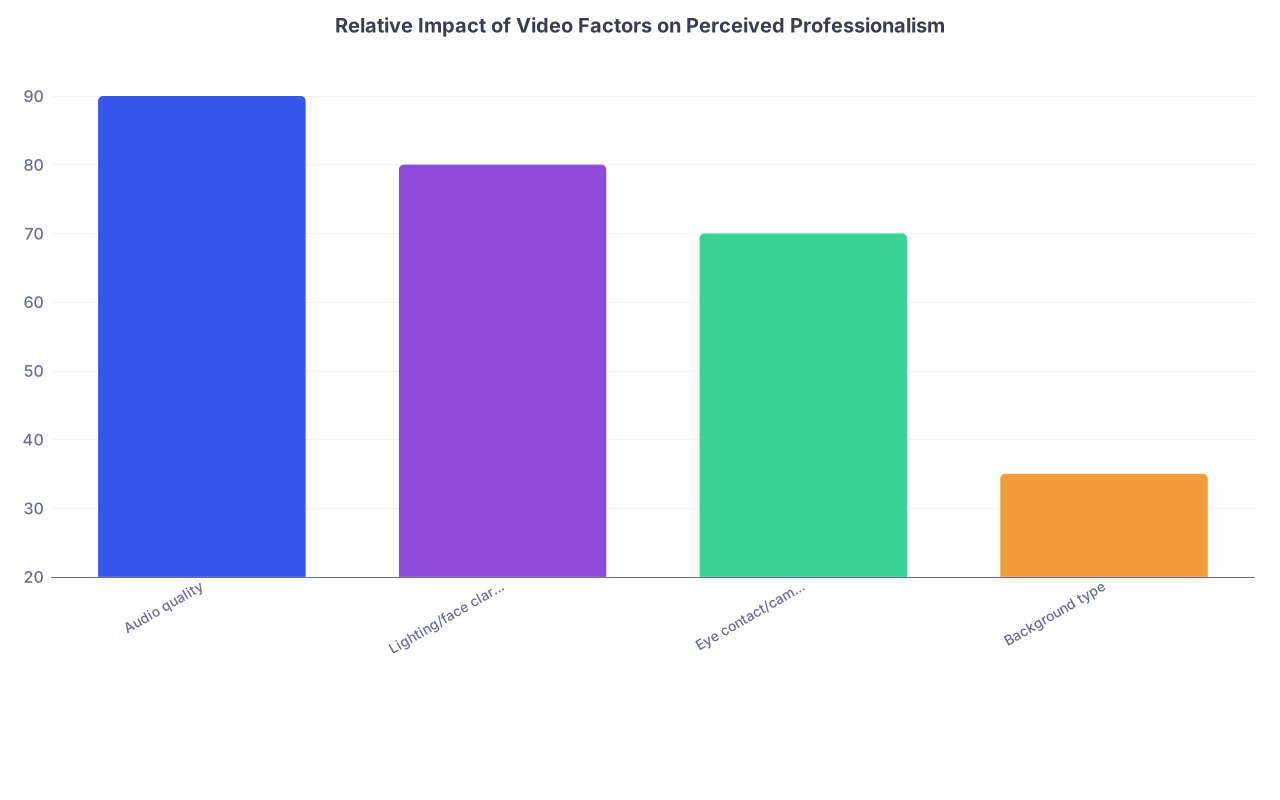
The patterns are pretty consistent.
| Category | Value |
|---|---|
| Audio quality | 90 |
| Lighting/face clarity | 80 |
| Eye contact/camera angle | 70 |
| Background type | 35 |
Interpreting that bar chart in plain language: bad audio or poor lighting hits you much harder than simply “using a virtual background.”
When programs complain, they rarely say “we ranked this person lower because of a virtual background.” They say:
- “The background kept glitching around their head.”
- “There was so much going on behind them I couldn’t focus.”
- “I couldn’t tell where they were – it felt kind of weird and fake.”
So the problem isn’t “virtual” vs “real.” It’s stable and non-distracting vs chaotic and glitchy.
The Three Myths About Virtual Backgrounds
Let’s kill the biggest myths one by one.
Myth 1: “Any virtual background makes you look unprofessional”
No. Low-quality virtual backgrounds make you look unprofessional.
There’s a huge difference between:
- A subtle, neutral, non-branded background with good lighting and a half-decent camera, where the edge detection doesn’t constantly cut through your hair
versus
- A hyper-saturated beach scene at 240p where your chair disappears every time you lean back and your white coat leaves a halo
Faculty notice artifacts: hands disappearing, faces ghosting when you move, words on your slides smeared by Zoom’s processing. That looks rough.
I’ve sat in debriefs where attendings said things like: “I wish he’d just turned off that fake office background; it kept cutting in and out around his shoulders.” Not “he’s unprofessional.” Just “it was annoying, and I lost parts of what he said.”
When the tech struggles, you look less crisp. Not less moral. Less effective. That matters.
Myth 2: “A real messy room is more ‘authentic’ than a virtual background”
This is the kind of advice you get from people who’ve never actually sat on a rank committee.
Authenticity doesn’t mean “show them your laundry pile.” You’re applying for a professional job. If the real background is cluttered, chaotic, dim, or obviously a shared space with people walking behind you, that’s worse than a clean virtual background every time.
Faculty don’t think, “Wow, look how real they are, with their unmade bed and open closet.” They think, “They knew they had months to prepare and this is the environment they chose?”
If your physical space isn’t interview-ready, a well-chosen virtual or blurred background is the responsible move, not a cop-out.
Myth 3: “Programs can tell you’re hiding something if you use a virtual background”
What, exactly, do they think you’re hiding? A studio apartment? A dorm? A shared living room because you’re a medical student and not a tech CEO?
Most physicians interviewing you have taken calls from hospital stairwells, cars, call rooms, and disaster-zone home offices during the pandemic. They know very well that space is a privilege, not a personality trait.
A neutral virtual background often reads as: “They thought about their environment, didn’t want distractions, and made it work with what they have.”
I’ve literally heard program directors praise an applicant for using blur: “Smart choice, you could tell they were in a small space but it kept the focus on their face.”
When Virtual Backgrounds Actually Do Hurt You
Now the part people don’t like: yes, virtual backgrounds can hurt you — but not for the reason the folklore claims.
There are a few very specific failure modes.
1. When the tech can’t handle it
Old laptop, weak processor, bad bandwidth, and you switch on a heavy virtual background? The video lags, audio desyncs, and every time you move your hands, they smear into nothing.
That’s a problem.
For residency interviews, audio and timing matter. If there’s even a half-second delay every time you speak, the conversation gets choppy. People step on each other. You end up talking over the interviewer because the feed isn’t in sync. It subtly makes you look less socially calibrated.
In those scenarios, a simple real background or mild blur is safer and more professional.
2. When the background is a statement piece
Cityscapes. Operating rooms. Hospital logos you don’t work at. Fancy libraries clearly not your house.
These send mixed signals.
You do not need your background to scream, “I am academic, serious, and love cardiology.” That’s what your words are for. Overly branded or obviously fake “prestige” settings come off as trying too hard, or worse, a bit insecure.
If anything, it makes the more cynical faculty think, “Okay, relax. We know you’re applying for residency, not TED.”
3. When the background fights with your lighting
You turn on a dark virtual background, sit in front of a bright window, and let the algorithm try to cut you out. The result: flickering, halos, and constant shimmer.
Every time you lean slightly left, your ear half-disappears. Or your hairline looks like it’s being edited in real-time.
Again, the take-home from faculty isn’t “bad person.” It’s “hard to focus on what they’re saying; this feels low-quality.”
If the tech makes your face less clear, your expressions less readable, and your gestures harder to see, you’re losing points in ways you never intended.
Reality Check: Virtual vs Real vs Blurred
Let me put some structure on this. If you ask, “What’s the actual hierarchy of impact?” it’s closer to this:
| Setup Quality | Example |
|---|---|
| Best | Real tidy room + good lighting |
| Very good | Blur effect + decent lighting |
| Good if executed well | Simple virtual background, stable |
| Risky | Busy real room, visible clutter |
| Actively harmful | Glitchy virtual background, lagging |
And here’s the key: the difference between “real tidy room” and “simple virtual background” is tiny compared to the difference between “clear, stable video” and “artifact-riddled chaos.”
So if you have:
- A plain wall, closed door, minimal clutter, and quiet environment → use it.
- A cramped, shared, or visually busy space → blur or subtle virtual background is absolutely fine.
- A slow laptop or borderline internet → avoid processor-heavy virtual scenes; prioritize stability over aesthetics.
How Faculty Actually Remember You
After a long interview day, here’s how discussion goes:
- “She had great clinical stories and seemed very team-oriented.”
- “He answered the ethics question very well.”
- “She seemed genuinely interested in our patient population.”
- “I had trouble hearing him; his mic was really muffled.”
- “Her internet kept freezing, that was tough.”
Notice what’s missing? “He used a virtual background, automatic no.” I do not hear that. Ever.
What I do hear occasionally: “That background was so glitchy, it was distracting.” Not fatal, but if you’re borderline otherwise, any annoyance nudges you downward.
Programs are ranking dozens of applicants. Tie-breakers are often vibe-level: who seemed calm, clear, easy to talk to. Your background should contribute exactly nothing to that calculation. That’s the goal: be visually unremarkable so your content stands out.
The Minimalist Playbook: What Actually Works
You don’t need an elaborate production setup. You just need to not shoot yourself in the foot.
Here’s the stripped-down, real version of what to do.

| Step | Description |
|---|---|
| Step 1 | Check your room |
| Step 2 | Use real background |
| Step 3 | Use subtle virtual or blur |
| Step 4 | Declutter small area or adjust camera angle |
| Step 5 | Prioritize stability over effects |
| Step 6 | Plain, quiet, tidy? |
| Step 7 | Hardware & internet strong? |
Then:
- Test on the actual platform (Zoom vs Webex vs Teams). Some handle backgrounds better than others.
- Move a bit, gesture, tilt your head during the test. See if the edges freak out.
- Ask one brutally honest friend or resident to say, “Do you notice my background after 10 seconds?” If the answer is yes, fix it.
If you want one-line advice: choose the least noticeable option your space and hardware can support.
A Quick Word on Specialty Paranoia
You’ll hear things like:
- “Surgery hates virtual backgrounds.”
- “Psych doesn’t care.”
- “Radiology expects you to have multiple monitors in the shot” (this one is just stupid, by the way).
Reality: most of this is rumor-lore passed down without evidence.
Surgeons, internists, pediatricians – they all interview humans on video now. The standards are converging. If anything, highly academic programs are more forgiving about backgrounds because they’ve sat through a thousand terrible Zoom calls themselves and know the pain.
If a program is writing you off because you used blur instead of a white wall, you dodged a bullet. They’re selecting for aesthetics over substance. That’s not a place you want to do 80-hour weeks.
FAQs
1. Is it safer to just never use a virtual background?
No. It’s safer to avoid bad backgrounds. If your real space is clean, quiet, and boring, use it. If not, a well-executed blur or subtle virtual background is better than a messy, distracting room. The absolute worst is a glitchy virtual scene that your laptop can’t render smoothly.
2. Are blurred backgrounds better than full virtual ones?
Usually, yes. Blur is lighter on processing, preserves natural edges, and doesn’t scream “fake.” If your platform’s blur looks clean and your space isn’t truly chaotic, blur often hits the sweet spot: privacy + minimal distraction.
3. Do programs see a virtual background and assume I’m less serious?
No. They’re not psychoanalyzing your choice of Zoom setting. They’re noticing whether they can see your face clearly, hear your voice, and focus on your answers. Seriousness comes from preparation, thoughtfulness, and how you talk about patients and training—not from whether there’s a fake office behind you.
4. If my school gives us branded virtual backgrounds, should I use them?
If they’re simple, high-resolution, and non-distracting, they’re fine. If they’re busy, logo-heavy, or create noticeable artifacts around your head, skip them. You don’t earn bonus points for advertising your school in the background. You earn points for being clear, composed, and easy to talk to.
Two things to remember:
- Virtual backgrounds do not inherently hurt you; distracting, glitchy visuals do.
- Your job is not to impress them with your room. Your job is to make it impossible for them to remember anything about your setup—because they were too focused on how strong you were as an applicant.



