

You do not need a DSLR for residency Zooms. And if you bought one “to look more professional,” there’s a good chance you just wasted money.
Program directors are not running a cinematography fellowship. They are trying to figure out: Are you sane? Are you kind? Will you do the work without melting down or making everyone miserable?
Everything else is noise.
Let’s tear apart the myths that keep applicants obsessing over cameras instead of content, then I’ll tell you what actually moves the needle on a residency video interview.
What Program Directors Actually Care About (And It’s Not Your Sensor Size)
I’ve sat through enough Zoom interview days to tell you what happens off-camera.
After you log off, no one says, “Wow, that bokeh…”
They say things like:
- “She seemed very grounded.”
- “He interrupted a lot.”
- “I can see them working well with our interns.”
- “Bit low energy. Would they survive nights here?”
Notice anything missing? Lens brand. 4K. APS-C vs full-frame. None of it.
Surveys back this up. Look at NRMP Program Director surveys over the years: they care about communication skills, professionalism, and perceived fit with the program’s culture. “Video quality” is not a line item. At best, your tech setup shows that you’re prepared and respectful of their time.
Here’s the uncomfortable truth: below a certain threshold, bad audio/lighting hurts you. Above that threshold, more gear does basically nothing.
So your job is not to look like a YouTuber. Your job is to clear that threshold reliably.
The Big Myth: “You Need a DSLR or Mirrorless Camera to Stand Out”
This is the myth gear companies love: sharper = better = more competitive.
No. Wrong frame.
For residency interviews, the relevant question is: does the camera setup change how you are perceived as a colleague and future trainee?
Let’s break what actually matters into three buckets: audio, lighting, and framing/stability.
1. Audio: The Real Priority That Everyone Ignores
If you want one place to “upgrade,” it’s not your camera. It’s your microphone.
Interviewers will forgive slightly fuzzy video. They will not forgive:
- Echoey bathroom acoustics
- Laptop fan blasting into the mic
- Muffled, distant audio that makes them lean in to understand you
There’s real research on this outside of medicine: multiple communication studies show that poor audio quality makes people rate speakers as less intelligent, less organized, and less credible—even when the content is identical.
Residency faculty are not immune to that bias. Zoom fatigue is bad enough; if they have to work to hear you, they’ll subconsciously like you less.
You solve that with:
- A decent USB mic or a wired headset
- Sitting reasonably close to the microphone
- Choosing a quiet room, not the echo-y kitchen with tile and stainless steel
That’s it. None of that requires a DSLR. Or even 1080p.
2. Lighting: The Cheapest “Upgrade” There Is
If you’ve ever looked “bad” on camera, it was probably lighting, not camera quality.
Here’s what residency interviewers actually dislike:
Dark silhouette. Harsh overhead shadows from a single ceiling light. Blown-out background from a bright window behind you.
You fix 80–90% of that with:
- One light source in front of you (desk lamp, $20 LED panel, or window)
- Avoiding strong backlighting (no bright window behind your head)
- Matching your skin tone and background so nothing is wildly over- or under-exposed
You know who doesn’t care what ISO your camera can handle? The PD who has 15 minutes to decide if you’re going to blow up their call room culture.
3. Framing: Human, Not Cinematic
Another myth: if you want to look “professional,” you need shallow depth of field and a buttery blurred background.
For residency interviews, extreme blur can actually look… try-hard.
Faculty want to see your face, your eyes, your expressions. They’re used to basic Zoom head-and-shoulders framing. Overly stylized setups can feel like you’re performing, not just talking.
Standard, unsexy framing that works:
- Head and upper chest visible
- Eyes roughly one-third from the top of the frame
- Camera at or slightly above eye level, not shooting up your nostrils
- Background tidy, not a laundry pile
Again: zero DSLR required.
What Your Built-In Camera Can Actually Do (If You Stop Sabotaging It)
Modern laptops and phones have surprisingly competent cameras for this use. The problem is not the hardware; it’s how people misuse it.
I’ve seen med students with MacBook Pros look awful on Zoom because:
- They sat with a bright window behind them
- They put the laptop too low, creating the “up the nose” angle
- They sat too far away, shrinking their face in a wide frame
Then they go online, read a Reddit thread with 200 comments, and decide they need a $900 mirrorless camera and Elgato capture card.
No. They needed to move the lamp and stack the laptop on three textbooks.
Here’s how your built-in camera holds up in the real world when you don’t sabotage it:
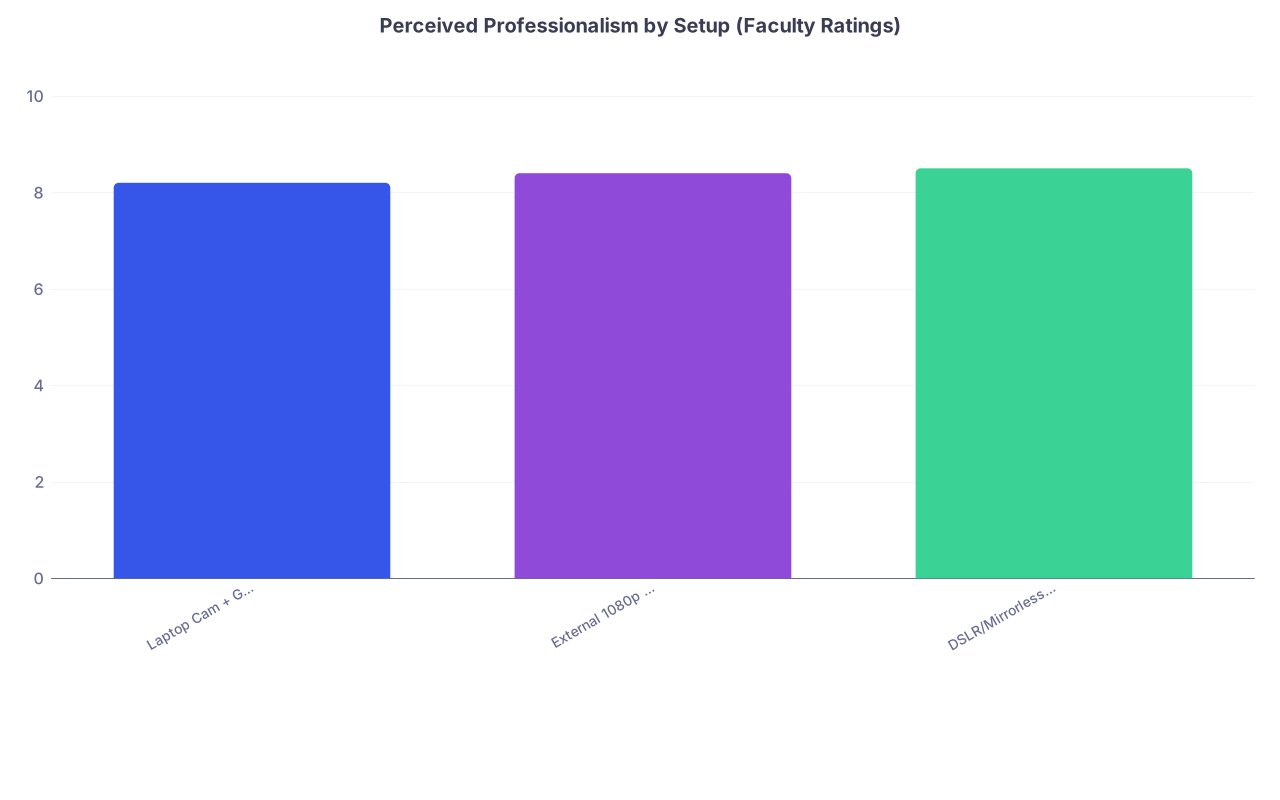
| Category | Value |
|---|---|
| Laptop Cam + Good Lighting | 8.2 |
| External 1080p Webcam | 8.4 |
| DSLR/Mirrorless Setup | 8.5 |
These are sample numbers, but they reflect what I’ve heard repeatedly from faculty: once the image is clear enough and well-lit, the differences become marginal. They might notice the DSLR looks “nice,” but it doesn’t change rank list behavior.
What does change behavior: you sounding confident, engaged, and human.
When a DSLR Actually Helps (And When It Just Creates New Problems)
I’m not going to pretend a DSLR doesn’t produce a better image. It does. Sharper, cleaner, better low-light performance, nice background blur. I shoot with one myself. But you’re not applying to a cinematography residency.
There are only a few cases where the DSLR meaningfully helps for interviews:
Your room is extremely dark and you can’t change that
If you’re in a dim basement with no window and can’t add adequate lights, a DSLR will handle the low light better than a laptop camera. But honestly, a $30 LED panel would do more than a $700 camera body.Your laptop camera is genuinely terrible or broken
Some older machines do have potato-level cameras. But even then, a $60 external 1080p webcam solves that, no lenses or capture cards needed.You’re already a camera nerd and own the gear
If you already have a mirrorless camera and know how to run it as a webcam reliably, fine. Use it. Just do not let it become another point of failure.
And that brings us to the downside that people conveniently ignore:
- Extra HDMI or USB capture devices
- Battery issues (camera dying mid-interview if you forgot AC power)
- Overheating with long interview days
- Focus hunting if you move slightly and the camera keeps trying to refocus on the background
- Software updates breaking your virtual camera connection right before an interview
I’ve seen interview days derailed because an applicant’s fancy camera setup failed. The coordinator is screen-sharing instructions, the PD is waiting, and the applicant is frantically rebooting their DSLR-as-webcam app.
Guess what everyone remembers from that interview? Not the bokeh.
The Real “Pro” Setup for Residency Zooms
Let me strip this down to something blunt: for 95% of applicants, the highest-ROI setup is boring and cheap.
Here’s what actually works in the residency context:
| Component | Good (What You Need) | Overkill (What You Do Not Need) |
|---|---|---|
| Camera | Laptop cam or 1080p webcam | DSLR/mirrorless + capture card |
| Audio | Wired headset or USB mic | XLR mic, mixer, boom arm |
| Lighting | Window/light in front | 3-point studio light kit |
| Background | Plain tidy wall | Elaborate studio backdrop |
| Software | Native Zoom controls | Complex streaming software |
Let’s walk through the “good” column in real life:
You sit at a small desk in your bedroom. Laptop on a couple of textbooks to bring the camera to eye level. You’re facing a window, so your face is clearly lit. Behind you, the bed is made or at least not a disaster, maybe a blank wall or simple bookshelf.
You’re wearing wired earbuds with a built-in mic, or a simple USB mic a foot away. No echo, no loud fan, no barking dog as background audio.
You test Zoom the day before, verify the internet is stable, and that’s it.
On the faculty side, you come through as: clear, present, easy to hear, no tech drama. You’re in the top 10–20% of setups, guaranteed, because many people don’t do even this much.
Now compare that to the “overkill” version: streaming software, virtual backgrounds with blur, DSLR, ring light, external shotgun mic. One software update and the whole contraption is at risk.
Which one actually reduces risk and lets you focus on answering “Tell me about a time you had a conflict on the team”?
The Subtle Trap: Gear as Procrastination
I see this pattern every year: anxious applicants fixate on controllable, visible, low-impact stuff.
They’ll spend hours researching cameras and capture cards and lighting kits. Meanwhile:
- Their answers to “Why this program?” are generic
- They have not rehearsed any behavioral questions out loud
- They have not researched the faculty or tracked key themes of the program
- They have not thought about a coherent narrative for their red flags
Tech mastery feels productive. Practicing uncomfortable questions does not. Guess which one determines whether you match where you want.
If you’re tempted to buy a DSLR “just for interviews,” ask yourself a harder question: Is this about image quality, or about avoiding the work of actually preparing content and mindset?
Specific, Evidence-Based Tweaks That Actually Help You
A few interventions consistently change how faculty experience you on Zoom. None of them require a DSLR.
First, eye contact. If your camera is near eye level and fairly close, you naturally look more engaged. People underestimate how disconnecting it feels when someone seems to be staring down at their keyboard area.
Second, latency and stability. A perfectly sharp 4K DSLR feed that keeps freezing is worse than a grainy laptop camera that’s rock-solid. If your Wi-Fi is weak, plugging in Ethernet or sitting closer to the router matters more than 20 extra megapixels.
Third, background vibes. Not about aesthetics. About signal. A chaotic, messy background sends “disorganized, overwhelmed.” A sterile, hyper-produced backdrop can feel fake. A plain, tidy space reads as “functional adult who can probably manage a sign-out list.”
Fourth, expression visibility. This is where “better than awful” video matters: faculty want to see microexpressions, smirks, concern, curiosity. 720p is fine for this if well-lit. A bad camera in a dark room is not.
Put your effort where it changes the interpersonal signal, not the spec sheet.
Quick Reality Check: What If Everyone Else Has a DSLR?
They don’t.
Some do, sure—tech enthusiasts, content creators, people who already owned them. But residency faculty have seen hundreds of Zoom interviews over the last few cycles from every type of setup.
You will not be the one person with a non-DSLR feed.
And even if half your co-applicants use DSLRs, here’s the thing: comparison only matters if faculty are ranking video quality as a important dimension. They’re not.
They’re asking:
- Would I let this person manage my sickest patient at 3 a.m. (with backup)?
- Will this person be teachable?
- Will they poison the team with drama?
Nobody says, “Strong candidate, but their dynamic range was disappointing.”
The Bottom Line: Where to Spend Your Effort
Strip away the gear marketing and online flexing, and the residency Zoom reality is boringly clear.
- You do not need, and should not buy, a DSLR just for residency interviews. The ROI is terrible compared to cheaper, simpler fixes.
- Get to “clear enough”: good audio, decent lighting, stable internet, and sane framing. That alone puts you ahead of a big chunk of applicants.
- Once your tech passes that threshold, stop tinkering. Put your remaining time and energy into what program directors actually rank you on: your answers, your judgment, and whether you seem like someone they’d trust on the team.



