
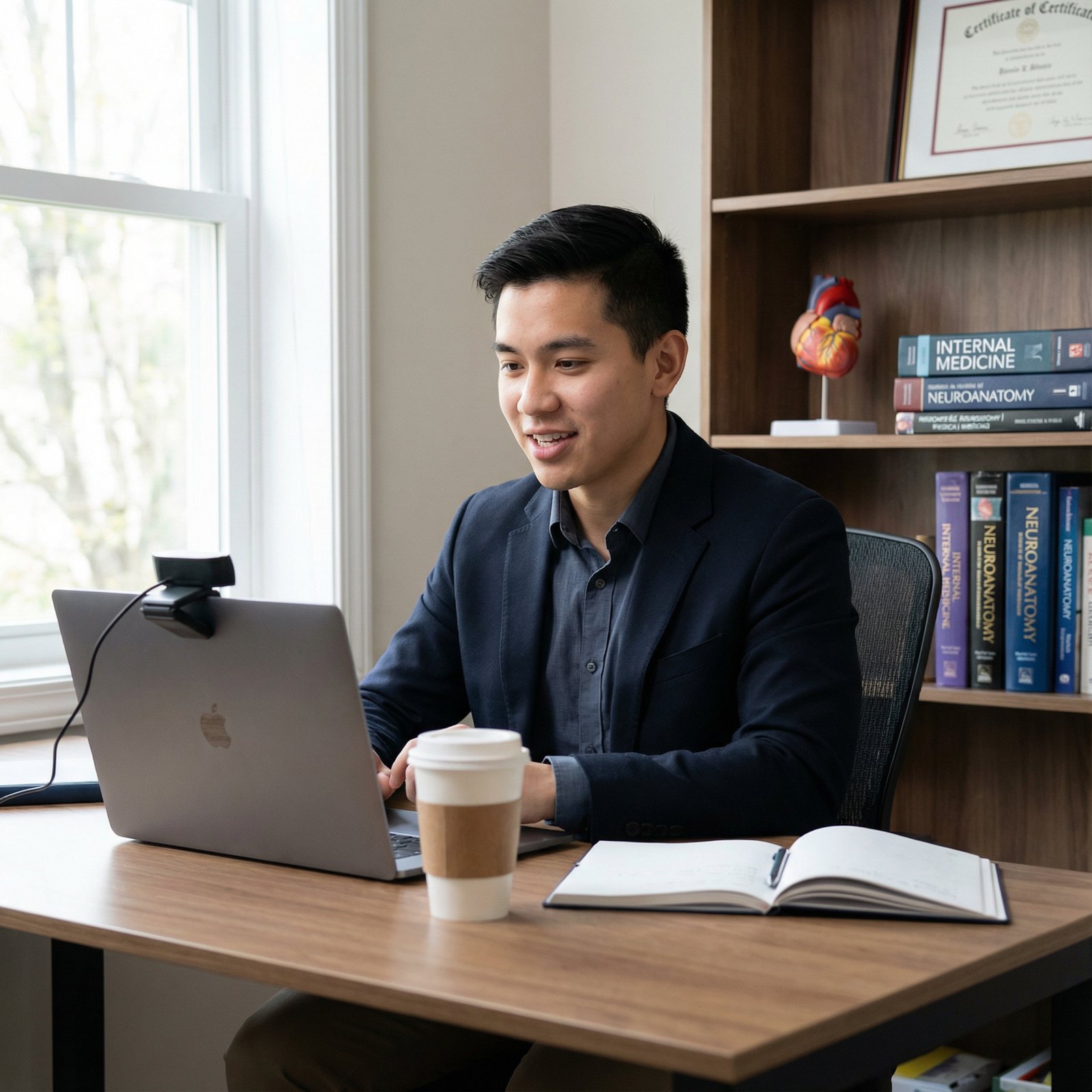
Eye Contact on Zoom: Micro-Skills to Align Gaze with the Webcam
You are in your apartment at 6:55 AM, 5 minutes before your first big residency interview. Zoom is open. Your suit jacket is on the back of the chair. You do a quick test call with a friend.
They say the worst thing you can hear right then:
“You look… kind of shifty. Like you’re talking to the corner of your screen.”
This is the core problem: your eyes are on their face, but the camera is somewhere else. On Zoom (and Thalamus, and Teams, and Webex), eye contact is not intuitive. It is engineered. And if you do not engineer it, you look disengaged, anxious, or uninterested—no matter how good your words are.
Let me walk you through the micro-skills that actually fix this. Not vague “look at the camera more” nonsense. Concrete, testable tweaks that align your gaze with the webcam and make you look present, confident, and trustworthy on screen.
Why Eye Contact on Zoom Feels Wrong (and Why Programs Care)
Eye contact in person is automatic. You look at their eyes and you’re done. On Zoom, if you look at their eyes on your screen, your gaze is usually angled 5–20 degrees away from the camera. To them, you look like you’re staring slightly down and away.
Program directors will not consciously say, “This applicant had misaligned gaze so I ranked them lower.” But here is what I’ve actually heard in post-interview debriefs:
- “She seemed a bit checked out.”
- “He looked nervous, like he was constantly looking at his notes.”
- “Something about his presence on camera felt off.”
That “something” is often just this: your eyes are not where they expect them to be.
On screen, “eye contact” is a visual illusion. You manufacture it by aligning your gaze with a piece of plastic 2–5 mm wide (the webcam) instead of the human face you’re talking to. That feels unnatural, so you need specific systems and micro-habits.
Step 1: Fix Your Physical Setup So Eye Contact Is Actually Possible
If your webcam is in a dumb position, no amount of “try harder” will fix your gaze. You have to handle the hardware and geometry first.
1. Raise and center the camera to eye level
Rule: the webcam lens should be roughly at your eye height and centered horizontally.
If you use a laptop:
Put it on a stable stack of books or a laptop stand. You want the top third of the screen roughly at or slightly below your eye level. That way, when you look at the camera, your head and neck are in a natural position.If you use an external webcam:
Mount it directly above the screen you are using for the interview. Not off to the side on a second monitor. Not clipped to the top of a big external monitor while the Zoom window is on your laptop below.
Bad setup example I see repeatedly:
Laptop on the desk, you’re looking slightly down, the camera is below your eye line pointing up at an unflattering angle. Your gaze to the screen is steeply downward; your gaze to the camera is awkwardly high. That split kills natural eye contact.
2. Choose one primary screen and commit
If you have multiple monitors, fine. But during the interview:
- Put Zoom on the screen that has the camera.
- Do not drag the Zoom window to a side monitor while your camera stays on the laptop. That guarantees you will look like you’re talking to someone off-screen.
If you insist on using a second monitor for notes or a CV, put it directly below the main screen (or as close as physically possible), not off to the side. Vertical displacement is less visually jarring than horizontal displacement.
3. Shrink and position the Zoom window strategically
You want the interviewer’s face as close as possible to the webcam on your screen.
- Shrink the Zoom window so it occupies maybe 1/4 to 1/3 of your screen.
- Drag it up so the interviewer’s face is directly under the webcam lens.
- If you can, align their eyes on screen within 1–2 cm of the camera.
Now, when you “cheat” by looking slightly below the lens at their eyes, your gaze will still appear almost dead-on to them.
This sounds trivial. It is not. I have seen applicants run a whole season with the interviewer’s video tile in the bottom-left corner. Then they wonder why every recording makes them look disengaged.
Step 2: Micro-Skills to Train Your Own Eyes
Once the physical setup is sane, you have to retrain your eye behavior. You are undoing decades of instinct to look at the human face, not a black dot.
1. The 80–20 eye-contact rule (for Zoom only)
No, you do not stare at the camera 100% of the time. That looks robotic and creepy.
A good rule for interviews:
- 70–80% of the time: Look at or near the camera lens
- 20–30% of the time: Glance down at the interviewer’s face, notes, or slides
Translated to behavior:
While you are talking:
Spend most of your time looking at the camera (or slightly below it if you have placed the interviewer’s face there).While they are talking:
You can look more often at their face on screen, but keep coming back up toward the camera every few seconds so they see your eyes “checking in.”
This gives the impression of steady, engaged eye contact without forcing you into full “lens-staring psycho” mode.
2. Use a “camera anchor” for your gaze
Your brain needs a target, not a vague “look up more.”
Pick a physical reference point right at or next to the lens:
- A tiny sticky dot or translucent sticker just below the webcam.
- A very small Post-it arrow pointing to the lens.
- A tiny bit of colored tape next to the camera.
Then practice: your “default” is staring at that anchor when you are speaking. Not at the middle of the screen. Not at your own video.
Over a few practice sessions, your brain starts to associate “I am talking” with “anchor gaze.”
3. Turn off self-view (most of the time)
Self-view is a massive distraction. Your eyes keep darting to check your hair, angle, or micro-expressions. Each glance makes you look like you are avoiding eye contact.
During serious practice and for actual interviews, I recommend:
- Keep your video ON (obviously).
- Hide or disable self-view so you do not see your own box.
- If you are anxious about how you look, check once in the pre-interview tech check, then close it.
I have watched people’s eye-tracking on recordings. The moment self-view is off, their gaze stabilizes dramatically.
4. Practice “camera reading” instead of “screen reading”
If you use notes, bullets, or a notepad, the way you look at them matters more than whether they exist.
Bad: reading full sentences off a Word document on a second screen to the side. Your eyes sweep horizontally away from the camera. Any PD watching will notice.
Better:
- Use a few short bullet phrases, not full sentences.
- Place them in a small window directly under the camera on the same screen.
- Or use a physical notepad positioned just below the laptop, close to the camera line.
Then, when you glance, it looks more like a momentary thought check than “I am reading a script.”
Step 3: The “Illusion of Eye Contact” Drills You Should Actually Do
You are not going to suddenly become great at this mid-interview. You need discrete drills, like you would for OSCEs or procedures.
Drill 1: 30-second camera monologues
Setup: open your laptop, turn on the camera, record yourself with any app (QuickTime, Zoom “New Meeting” + record, etc).
Task:
- Look at the camera anchor and talk for 30 seconds about anything (why you chose internal medicine, your favorite rotation, does not matter).
- Do not look away. Do not check self-view.
- Then watch the recording and ignore content. Only judge eye contact.
What you are training: building comfort with sustained camera-facing gaze and seeing that it does not look as extreme as it feels internally.
Repeat 3–5 times daily for a week. Keep it short so you actually do it.
Drill 2: Camera–screen oscillation (for more natural behavior)
You do not want to lock into the camera forever. You just want the pattern of your gaze to look natural.
Task:
- Start recording.
- For 5–10 seconds: speak while looking at the camera.
- Then 2–3 seconds: glance at the person’s “face” (which you pretend is in a box below the camera).
- Back to camera for another 5–10 seconds.
- Repeat.
This trains a habit: camera is home base, occasional glances down are normal, then you return.
When you later watch the recording, check:
Do the downward glances look like quick, thoughtful breaks? Or long, anxious searching? You want the former.
Drill 3: Q&A simulation with a friend + eye-tracking feedback
This is the closest to the real thing.
- Get a friend or co-applicant to do a 15–20 minute mock Zoom.
- Ask them specifically: “Watch my eyes. I want you to tell me after where I seemed to look most of the time.”
- If possible, record the session and watch with the sound off.
You will see your actual habits under mild stress:
Do you stare at the corner with the clock? Do you stare at your own name? Do you squint down at a Google Doc every time a behavioral question comes up?
That is where you refine.
Step 4: Handling Notes, CVs, and Prompts Without Losing Eye Contact
This is where a lot of strong applicants sabotage themselves. They build elaborate note systems, then spend half the interview visually glued to them.
1. Convert walls of text into glanceable prompts
Do this the same way you prep for an OSCE: you do not write full scripts for every patient encounter. You write brief triggers.
Instead of:
“During my sub-internship in the MICU, there was a particularly challenging patient with septic shock where I learned the importance of interprofessional communication…”
Use:
- MICU – septic shock – team communication
- Role: med reconciliation + family updates
- Lesson: clarity + stepping up early
You can see this entire “script” in one 1-second glance. Then your eyes can go back to the camera while you speak naturally.
2. Put high-yield prompts in one consistent spot
Do not slap Post-its everywhere. Your eyes will ping-pong.
Options that work:
- Digital notes: a narrow notes window docked immediately below the webcam.
- Physical notes: a single sheet of paper taped just below or next to the laptop, centered, not off to the far right of the desk.
Then train yourself: when you need a prompt, you glance down (1–2 seconds), then return to the camera. The distance between camera and prompt should be as small as you can manage.
3. Stop scrolling mid-answer
Nothing screams “I am reading from my notes” like repeated scroll movements and downward eye sweeps while answering.
Rule: for each answer, you get one quick glance at notes before starting, or one mid-answer. Not both.
If you find yourself scrolling constantly during practice, that is not an eye-contact problem. It is a content-prep problem. You do not know your own stories well enough yet.
Step 5: Special Cases That Break Eye Contact (and How to Fix Them)
There are a few predictable situations during residency interviews where people lose all their gaze discipline.
Case 1: Screen-sharing or slide-based questions
Some programs show you schedules, case vignettes, or shared documents. Suddenly all the visual action is in the middle of the screen, far from the camera.
What you do:
When they are talking through a slide:
You can look at the slide most of the time. Just briefly flick your eyes back up toward the camera every 5–10 seconds. Those micro-returns signal, “I am tracking you, not just reading.”When you are responding to a question about the slide:
Take one look at the key data. Then shift your eyes back toward the camera while you give your answer. If you need to refer again, quick glance, back up.
You are basically alternating: information gathering (screen) and connection (camera).
Case 2: Panel interviews with multiple tiles
You have 3–6 faces in a grid. Often one person’s tile is talking while another is probably the PD. And your camera is above all of them.
Even more reason to shrink and reposition the window.
Practical strategy:
- Drag the entire video grid up so the top row of faces is just below the webcam.
- If there is a clear “main interviewer,” put their tile in the top middle (you can drag tiles in Zoom).
- Default your gaze to that top center zone. That keeps your eye line near the camera, even when you focus on different people.
You will not perfectly fake eye contact with everyone at once. Aim for “I look roughly at the group, near the camera” rather than darting around each tile like a tennis match.
Case 3: Looking at your rank list, program notes, or browser tabs
Some of you have 8 other windows open: FREIDA, your rank spreadsheet, program websites, a PDF with hospital call schedules. I see this in mock interviews constantly.
Every time you alt-tab away, your eyes drift away, your facial expression changes, and there is a subtle lag. On their end, it reads like: checking email, looking bored, distracted.
For the actual interview block:
- Close all nonessential windows and tabs. Not minimize. Close.
- Consolidate anything you truly need into one document or note, placed near the camera.
- Accept that you are not going to reorganize your rank list mid-interview. You can handle that after.
Step 6: Lighting, Framing, and How They Affect Eye Contact Perception
You can have perfect gaze alignment and still look “off” if your lighting and framing are terrible. Because they change how your eyes appear on screen.
1. Light your eyes, not your ceiling
You want front-facing, soft light that illuminates your eyes clearly.
Bad setups I see over and over:
- Overhead ceiling light only → heavy eye shadows, hollowed look.
- Bright window directly behind you → you turn into a silhouette, your eyes disappear.
- One harsh desk lamp from the side → one eye blown out, the other in shadow.
Simple, cheap fix:
- Face a window if you have one, with indirect daylight coming toward your face.
- If not, use a basic ring light or desk lamp placed behind your screen, shining toward you, preferably at or slightly above eye level.
- Aim for enough light that your eyes are clearly visible and catch a small reflection (“catchlight”). That makes eye contact feel much more real.
2. Frame yourself so your eyes are in the top third
On camera, your eyes should sit in the upper third of the video frame.
- Too low (lots of headroom): you look diminished and childlike.
- Too high (cropping off hair): you look cramped and slightly odd.
Proper framing also prevents you from subconsciously hunching or tilting your chin, both of which alter how your eye contact feels.
Combine this with the camera-at-eye-level rule and your gaze will look direct and comfortable.
Step 7: Mental Scripts to Keep You from Slipping Back Into Old Habits
The biggest leak is psychological. When you start worrying about your answer content, your Step scores, or whether your cat will jump on the desk, you forget the camera exists.
You need a simple cognitive cue.
1. “Talk to the person behind the lens”
Imagine there is an actual human sitting just behind the webcam. Not on the screen. Behind the little black circle.
Before each interview starts, remind yourself:
“The PD is right there, just behind that lens. That is who I am talking to.”
This helps you fight the instinct to look at the moving face rather than the camera.
2. One body cue per interview
Pick one physical behavior as your anchor. For example:
- Every time you start an answer, you slightly straighten your posture and bring your eyes up to the camera anchor.
- Every time you hear, “Tell me about a time…,” you give yourself that 1-second reset to look directly at the lens before starting.
You tie eye contact to question transitions. That way, even if you drift occasionally during long answers, you keep re-centering.
3. Accept 90% perfection
If you obsess about maintaining eye contact 100% of the time, you will look stiff and over-controlled.
You want mostly good eye contact with natural micro-breaks. That reads as confident and relaxed. Minor slips—glancing away to think, looking slightly down for a second—are not a problem. They are human.
The point of all these micro-skills is not to become a robot. It is to eliminate glaring problems: staring at a corner, reading off-screen, or never once appearing to look at your interviewer.
A Simple Pre-Interview Eye Contact Checklist
Use this 3–4 minutes before each interview block.
| Item | Check |
|---|---|
| Camera at eye level, centered over main screen | ☐ |
| Zoom window shrunk and positioned under camera | ☐ |
| Self-view hidden, or moved close to camera | ☐ |
| Notes consolidated near camera, not on side screen | ☐ |
| Lighting from front, eyes clearly visible | ☐ |
Then do one 30-second camera monologue as a warm-up before you log in. It resets your brain: “I talk to the lens.”
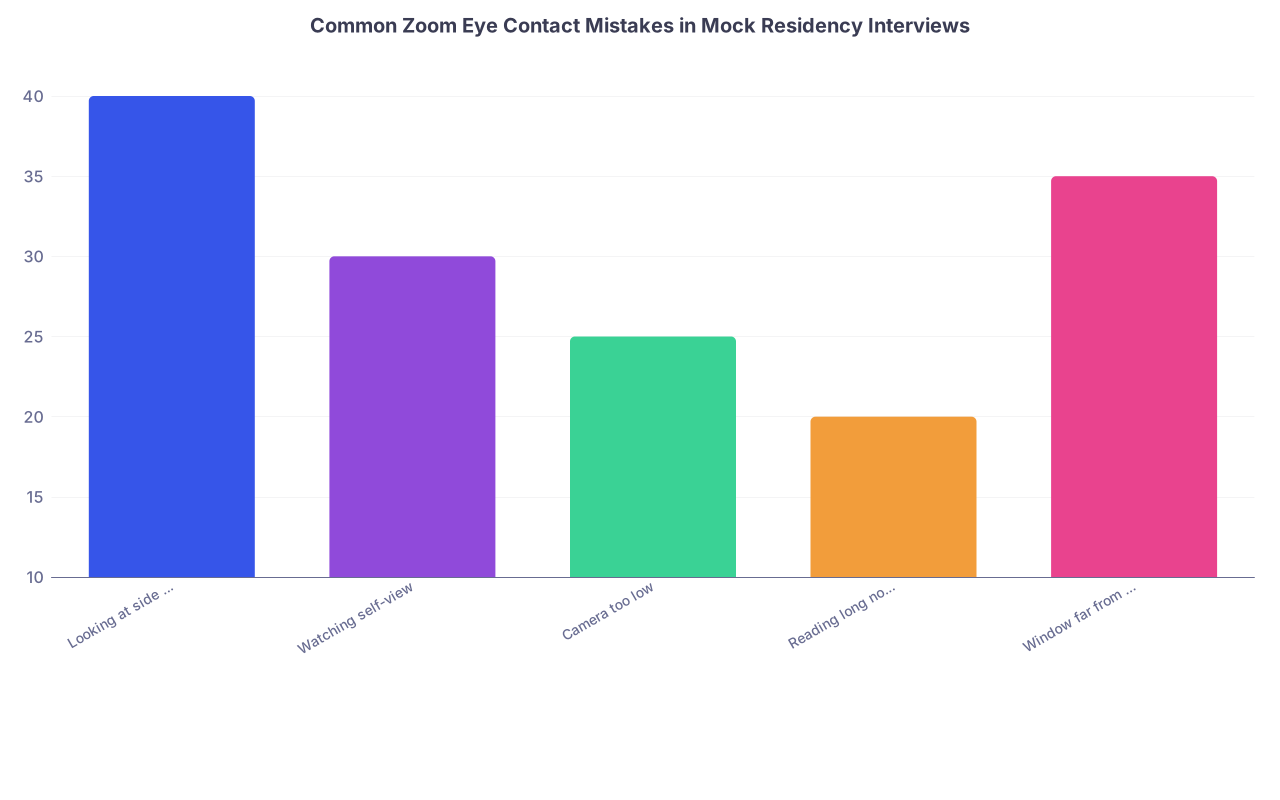
| Category | Value |
|---|---|
| Looking at side monitor | 40 |
| Watching self-view | 30 |
| Camera too low | 25 |
| Reading long notes | 20 |
| Window far from camera | 35 |

| Step | Description |
|---|---|
| Step 1 | Start Setup |
| Step 2 | Align Camera at Eye Level |
| Step 3 | Position Zoom Under Camera |
| Step 4 | Adjust Lighting on Face |
| Step 5 | Place Notes Near Camera |
| Step 6 | Hide Self-View |
| Step 7 | 30s Camera Warm-Up |
| Step 8 | Join Interview |
Bottom Line
Three things to carry into your next interview:
- Eye contact on Zoom is an illusion you create by aligning your gaze with the webcam, not by staring at faces on the screen. That requires a deliberate physical setup.
- Train specific micro-skills: anchor your gaze near the lens, use the 70–80% rule, hide self-view, and keep notes short and close to the camera so your glances are brief and non-disruptive.
- Practice this like any other clinical skill. Short daily drills plus a quick pre-interview checklist will put you ahead of most applicants, whose “strategy” is just hoping their eyes behave when the waiting room opens.



