
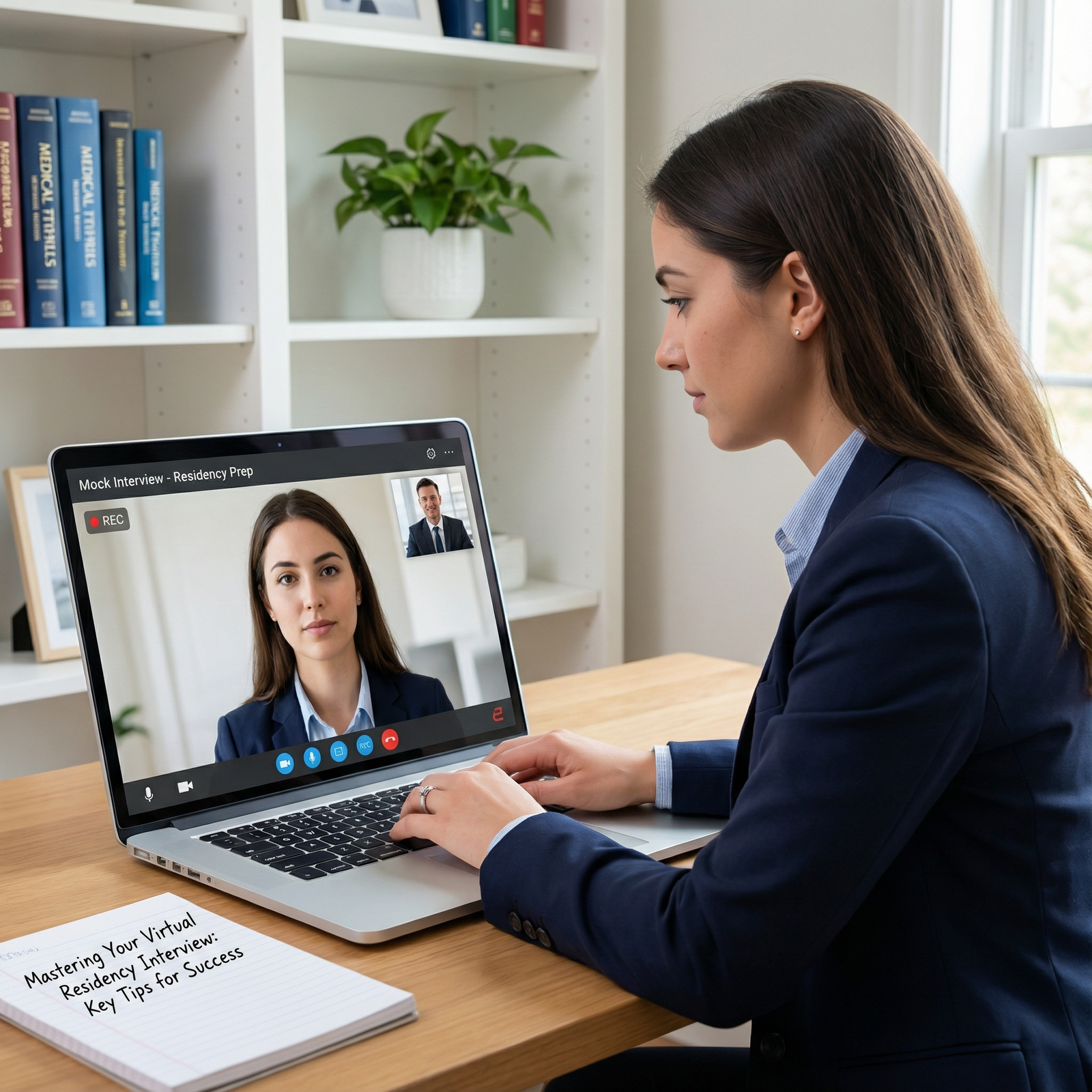
It’s 9:12 a.m. on your big interview day. You finally get into the Zoom room after three failed attempts, your video freezes mid-sentence while you’re answering “Tell me about yourself,” and when it comes back, the PD is just… staring. You hear your own voice echoing. Someone’s saying, “We can’t hear you.” Your heart is pounding, and you’re thinking:
Did I just tank my interview because of my Wi‑Fi?
Let me tell you what actually happens on the other side of that screen. Because I’ve sat in those debrief meetings. I’ve watched PDs, APDs, and faculty react to every possible tech disaster you can imagine—from total disconnects to the resident’s toddler walking into the frame during your answer.
You’re worried you’ll be judged on things you can’t control. The truth is more nuanced. You are not being judged on the glitch. You are being judged on how you handle the glitch.
Let’s break down exactly how PDs interpret different types of technical problems, which ones legitimately hurt you, which ones do not, and how to pivot in real time so the glitch becomes a non-issue—or even a small positive.
What PDs Actually Care About (Hint: Not Perfection)
Here’s the first behind-the-scenes truth: every program had at least one catastrophic tech failure on their side during the first virtual seasons. They know this stuff breaks. They’re not expecting a TV studio.
What they’re screening for during a tech mishap is not your equipment quality; it’s your professionalism under stress.
In PD language, that means:
- Does this applicant stay calm or do they spiral?
- Do they problem-solve or just freeze and apologize?
- Do they communicate clearly about what’s happening?
- Do they show respect for other people’s time?
On debrief calls, when your name comes up, no one is saying, “Her upload speed seemed suboptimal.” What they say is more like:
- “He had some tech issues but handled it really gracefully.”
- “Her sound kept cutting out and she seemed flustered the whole time.”
- “We lost him for 5 minutes, but he emailed the coordinator immediately and was very professional.”
The glitch is a trigger. The evaluation is about your response.
The 4 Main Types of Glitches and How PDs Read Them
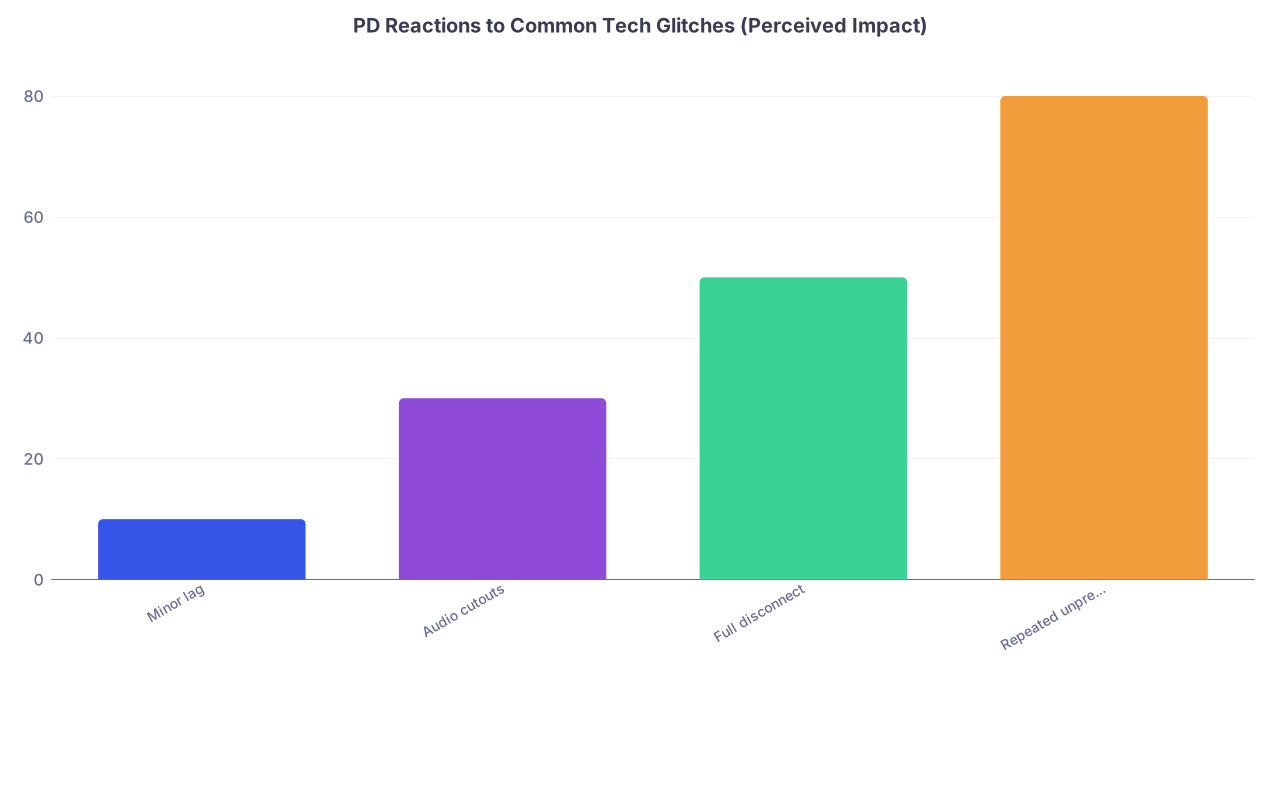
| Category | Value |
|---|---|
| Minor lag | 10 |
| Audio cutouts | 30 |
| Full disconnect | 50 |
| Repeated unprepared issues | 80 |
Those numbers aren’t from a paper. They’re the rough “annoyance/concern levels” I’ve heard in real PD meetings over the last few virtual seasons. Here’s how the patterns actually play out.
1. Mild Video Lag, Occasional Freeze
This is the most common issue. Slight delay, your lips not perfectly synced, video freezing for a second or two.
How PDs interpret it:
They barely care—unless you let it derail you.
What I’ve heard in real time:
- “Looks like their internet’s a little slow, but it’s fine.”
- “Just give him a second, I think it’s lag.”
And then they move on.
What helps you:
- Brief acknowledgment: “I think there’s a slight delay; let me know if you miss anything and I’m happy to repeat.”
- Slowing your speech by 10–15%. You sound calmer, and the lag feels less chaotic.
- Pausing after questions so you don’t talk over them.
If you stay composed, this is a non-factor in your file. No one dings you for it.
2. Audio Problems (Cutting Out, Echo, Background Noise)
This one matters more than video. If they cannot hear you, they cannot assess you. And many programs explicitly commented post-season that the hardest part of virtual interviews was “candidates with terrible audio.”
How PDs interpret it:
- If you notice it quickly and fix it: “They had a bit of audio trouble at first but handled it smoothly.” Usually no penalty.
- If you talk for 45 seconds without realizing we’re hearing 1 out of every 5 words: this will hurt you.
I’ve sat in interviews where you’re clearly talking, your lips are moving, and we’re catching: “… really shaped my interest… ICU… longitudinal…” And when you finally stop, someone has to say, “Sorry, we didn’t catch most of that.”
That’s a bad look. Not because of the glitch. Because you anchored on your script and ignored the room.
PD’s internal thought in that moment: “How will this person communicate on the wards? Will they notice when people don’t understand them?”
What PDs like to see:
- You stop yourself early: “I’m not sure if the audio cut out there—were you able to hear me?”
- You proactively switch: “Let me try using wired headphones, one moment.”
- You offer a concise recap of what was lost: “I’ll give a quick summary of what I just said in case part of that didn’t come through.”
You’re showing situational awareness and adaptability. That’s what gets written down.
3. Full Disconnects / Getting Kicked Out of the Room
You get booted from Zoom. Your Wi‑Fi dies. Power blips. You sit there staring at the reconnection wheel, feeling your career slipping away.
Reality check: every single program had applicants disconnect. This is not rare. This is not automatically fatal.
How PDs interpret it depends almost entirely on what happens next.
Scenario A: You drop for 2 minutes, come back, briefly apologize once, then get right back into the conversation.
Evaluation: “We lost her for a minute but she came back and we finished. No big deal.”
Scenario B: You drop for 10–15 minutes, don’t email or message the coordinator, and show up flustered with a long story about Xfinity and your landlord.
Evaluation: “That was a mess. He didn’t really recover and we didn’t get much out of the interview.”
What PDs and coordinators notice:
- Did you communicate promptly? A quick email or message: “I lost connection—trying to reconnect now. If I can’t get in, please let me know the best way to proceed.”
- Did you avoid oversharing? They don’t need your entire infrastructure saga. “I lost internet and had to reconnect using my hotspot, thank you for your patience” is enough.
- Did you make good use of the shortened time? Or spend half of it apologizing?
I’ve seen PDs happily offer a short make-up interview for someone who had a genuine outage and handled it like a professional.
4. Repeated, Preventable Problems (This Is Where People Get Burned)
Now the harsh part.
If across multiple rooms the faculty are writing:
- “Applicant couldn’t figure out unmute.”
- “Spent 5 minutes adjusting camera; we saw mostly ceiling.”
- “Was obviously interviewing in a busy café / noisy shared space.”
That does hurt you. Because that does not read as “tech glitch.” It reads as lack of preparation and respect.
What PDs say behind closed doors:
- “Everyone knew these were virtual. Why are you in a Starbucks?”
- “She clearly didn’t test her setup; that worries me about her attention to detail.”
- “If you can’t figure out basic Zoom, how are you going to navigate Epic and order sets?”
Is that entirely fair? Maybe not. But it’s the reality. And it’s also preventable.
How Programs Actually Document Tech Issues In Your File
You probably imagine some complex scoring system where “tech quality” is a line item. It almost never is.
Here’s how it usually goes.
After interview day, each interviewer submits a short evaluation. At many places it looks something like this:
| Category | Typical Scale | Where Tech Shows Up |
|---|---|---|
| Overall Impression | 1–5 or 1–9 | Indirectly, via professionalism |
| Communication | 1–5 | Impacted by audio issues |
| Professionalism | 1–5 | Impacted by how glitches handled |
| Fit/Alignment | 1–5 | Not tech-related |
| Comments | Free text | Where glitches are mentioned |
No one is scoring your internet speed. But your tech issues can bleed into three domains:
Communication: If they couldn’t hear your answers, the score may drop simply because they don’t have enough data or felt the interaction was choppy.
Professionalism: Words you never want in this section: “unprepared,” “disorganized,” “distracted,” “disrespectful of time.”
Overall Impression: If the entire interaction feels like chaos, some interviewers unconsciously rank you lower even if they intellectually know it was “just the tech.”
On the other hand, I’ve seen comments like:
- “Severe audio issues at start, but applicant remained very composed and we rescheduled later in the day. Excellent communication skills.”
- “Major connectivity issues not applicant’s fault; would not hold this against them.”
Those comments matter in rank meetings. And yes, PDs do read them.
How To Turn a Glitch Into a Subtle Positive
Here’s the part almost no one tells you: you can actually come out looking better after a glitch than if the interview had been perfectly smooth.
Why? Because you just got a built-in stress test, and you passed in front of them.
Programs are constantly trying to infer: “How will this person handle sign-out when they’re post-call and everything’s going wrong?” A tech failure is a low-stakes simulation.
If you:
- Stay calm
- Communicate clearly
- Problem-solve efficiently
- Respect their time
You’ve demonstrated exactly what they want from an intern when the EMR goes down at 3 a.m.
Concrete example:
Applicant A: No glitches, decent answers, a bit flat affect. Neutral impression.
Applicant B: Wi‑Fi dies midway, sends quick email, returns on phone hotspot, says, “Thank you for your patience—I switched over to my hotspot so we shouldn’t have further issues. I’ll keep my answers concise so we can cover everything you’d hoped to.” Then gives strong, crisp answers.
Who leaves a stronger impression? Often B.
I’ve heard PDs say verbatim: “She had some tech issues but handled it better than some senior residents I know.”
That’s not nothing.
What PDs Expect You To Have Done Before Interview Day
There’s a line between “unfortunate glitch” and “you didn’t bother to prepare.” PDs draw that line earlier than you think.
Here’s the behind-the-scenes expectation list they assume you’ve met:
- You tested your platform.
If they’re using Thalamus, Webex, or some Frankenstein custom hospital portal, they expect you to have done the test link and sorted out basic access.
If multiple faculty write: “Applicant couldn’t get the platform to work,” you look unserious.
- You picked a quiet, neutral environment.
Everyone knows not everybody has a private office. But if you show up:
- In a moving car
- In a noisy shared space
- In a room where people repeatedly walk behind you
It absolutely gets mentioned. And it gets interpreted as a judgment call on your part.
- You did at least a basic camera + audio check.
Camera at eye level. No backlighting that makes you look like a silhouette. Sound that doesn’t echo like you’re broadcasting from a bathroom. None of this requires money. It requires 10 minutes and one practice call.
Programs know some of you are on older laptops, limited space, etc. They aren’t grading production value. But when it’s clear you didn’t even check how you looked or sounded, that bleeds into “attention to detail” in their minds.
What To Say In the Moment: Scripts That Work
A lot of people panic and start oversharing or apologizing on a loop. That hurts you more than the glitch.
Here’s exactly how PDs prefer you handle it—because I’ve heard them say, “I loved how she handled that.”
When the audio cuts out
“I think my audio may have cut out there. I’ll repeat the last part briefly.”
Then you give a concise, 1–2 sentence recap. You don’t restart your entire 4‑minute monologue.
When you freeze/disconnect briefly
“Thank you for your patience—I think my connection froze for a moment. I’m back now, and I believe you were asking about X?”
You orient them. You signal you’re ready to move on. You don’t spend 90 seconds apologizing.
When it’s clearly your hardware (for example, your cheap headphones die)
“My headphones seem to be malfunctioning. I’m going to switch to my laptop microphone; please let me know if you have any trouble hearing me.”
You take control. You solve it. Then you move on.
When It Is Worth Alerting The Program Afterward
Most of the time, you don’t need to send a post-interview tech-disaster manifesto. But there are a few situations where a brief, targeted note through the coordinator actually helps you.
These include:
- You missed an entire interview block (for example, PD room) because of a true, severe outage.
- A major portion of your interview was unusable (they literally could not hear you for 10+ minutes).
- The program itself had significant tech failures affecting multiple applicants and they’re obviously scrambling.
In those cases, a short message like:
“Dear [Coordinator Name],
Thank you again for organizing today’s interview. Unfortunately, during my session with Dr. [X], I experienced a significant connection issue and was unable to complete most of the interview. I wanted to express my appreciation for everyone’s patience. If it would be helpful to the program, I’d be glad to be available for a brief follow-up conversation at a later time.
Best regards,
[Your Name]”
Notice what you’re doing:
- You’re being factual, not dramatic.
- You’re offering a solution without demanding one.
- You’re framing it as helpful to them, not as them owing you.
Programs often say yes to a short follow-up with the PD or an APD when they feel they truly didn’t get to evaluate you. I’ve seen this swing someone from “unknown” to “rankable.”
The Harsh But Honest Line: When Glitches Really Do Hurt You
Let me be blunt. There are scenarios where tech problems do real damage:
- Multiple interviewers document “could not hear most answers” and there’s no follow-up or attempt to fix.
- You appear flustered, irritated, or unprofessional in response—eye-rolling, visible frustration, snappy comments about the platform.
- You obviously didn’t prepare a decent environment and blame everything on “tech.”
In those cases, the programs don’t write “bad Wi‑Fi” in your cons list. They write:
- “Hard to assess, limited content.”
- “Did not seem to handle minor stress well.”
- “Questionable professionalism.”
That’s what lowers your rank position. Not the glitch itself.
So if you remember only one thing from this entire article, make it this:
PDs don’t dock you for things you can’t control. They dock you for how you behave when those things happen.

| Step | Description |
|---|---|
| Step 1 | Tech Glitch Occurs |
| Step 2 | Viewed as Positive Stress Test |
| Step 3 | Neutral, Usually No Penalty |
| Step 4 | Seen as Lack of Preparation |
| Step 5 | Negative, Lowers Rank |
| Step 6 | Applicant Response |
FAQs
1. Will a single bad disconnect ruin my chances at a program?
Almost never. One disconnect that you handle calmly is background noise. PDs have seen it dozens of times. If you come back, communicate briefly, and give solid answers in the remaining time, most faculty will not hold it against you at all.
2. Should I mention tech issues in my thank-you emails to faculty?
Usually no. If it was minor and resolved, let it die. Rehashing it in every email keeps the glitch front and center. The only time to briefly reference it is if an interviewer explicitly seemed worried they didn’t hear your answer and you want to cleanly restate one short point: one line, max.
3. I had terrible audio in one specific room. Should I ask for a re-interview?
Don’t directly ask for a “re-interview.” Instead, send a brief note to the coordinator stating there were significant audio issues and that you’d be happy to be available for a brief follow-up if it would help the program. Some will take you up on it; some will not. Either way, you came across as professional, not entitled.
4. How much does background setting really matter if my content is strong?
More than you want it to. You don’t need a ring light and a fake bookshelf, but you do need a quiet, non-distracting, private-enough space. Interviewing from a car, public location, or chaotic environment absolutely colors faculty impressions, even if your answers are decent. They may question your judgment and planning.
5. What’s the single most important thing I can do to avoid tech-related dings?
Do a full mock interview with your actual setup—same room, same device, same headset—at the same time of day. Record it, check how you look and sound, and stress-test your connection. Then, if something still goes wrong on game day, focus on being the calmest, clearest person in the room. That professionalism is what PDs remember.
Key points to walk away with:
- PDs don’t care about perfection; they care about how you handle the inevitable glitches.
- Audio and your response to problems matter far more than image quality or momentary lag.
- Preparation plus calm, concise communication turns a tech failure from a liability into a quiet asset in your favor.



