

Most applicants stare at their own video box and completely miss what actually matters: the interviewer’s micro-cues.
If you treat a residency video interview like a monologue, you will burn engagement without even realizing it. On Zoom, Webex, Thalamus, whatever platform your program uses, the real game is reading how “with you” the interviewer is — and adjusting in real time.
Let me break this down specifically.
The Core Idea: Engagement Is Visible, Even Through a Webcam
On video, engagement leaks through three channels:
- Eyes and micro-expressions
- Head and upper-body movement
- Voice and timing (turn-taking, interjections, pauses)
You are trying to answer one question every 10–15 seconds:
“Is this person still with me, or did I just lose them?”
This is not about mind-reading. It is about pattern recognition. You will not catch everything, but if you watch for the right cues, you will be correct often enough to matter.
Think of it as three buckets:
- “Green light”: they are with you — keep going, maybe deepen.
- “Yellow light”: partial engagement or cognitive overload — simplify, anchor, invite them in.
- “Red light”: you have lost them — shorten, pivot, or explicitly check in.
Visual Micro-Cues: What Their Face Is Telling You
Most applicants over-focus on content and under-read the face. On video, the face is 70–80% of your usable data.
Eyes: The Fastest Signal of Engagement
Here is the hierarchy:
- Eyes directly toward camera / you on screen
- Eyes briefly moving to notes / keyboard / second monitor
- Eyes drifting off-screen for long stretches
- Eyes glazing: blink rate changes, “dead” look, no micro-movements
What “with you” looks like:
- Frequent but natural blinking
- Tiny saccades (eyes moving slightly as they track your face or think)
- Occasional brief glances away when they are processing, then back to you
- When you hit something important, they often lock in for a beat
What “I’m gone” looks like:
- Prolonged gaze off to the side (email monitor) while you are talking
- Eyes down and stay there, with no return to you for 10–15+ seconds
- Blink rate suddenly slows and eyes look “fixed”
- You see rapid horizontal eye movements consistent with reading
If you see 2–3 of those “gone” behaviors in a row, treat it as a yellow-to-red engagement signal.
Mouth and Jaw: Micro-Reactions You Can Use
You are not doing FBI interrogation analysis here. Just basic human pattern reading.
Positive / engaged:
- Slight upward pull at corners of mouth when you say something resonant
- Quick half-smile or smirk at a light joke or self-aware comment
- Subtle lip purse right before they interject with a question
- Jaw slightly relaxed, not clenched
Disengaged / skeptical:
- Lips pressed tight for more than a couple seconds
- Asymmetric tightening of one side of the mouth after a statement (skepticism)
- Brief smile that never reaches the eyes, followed by gaze drop and silence
- Chewing or obvious drinking as you hit key points, repeatedly (they are not fully tracking you)
Brows and Forehead: Confusion vs Interest
Eyebrows are often the clearest “I lost them” cue on small video windows.
Engaged / curious:
- One or both brows slightly raised while they maintain eye contact
- Occasional brow “flash” (quick raise) when you say something surprising
- Subtle forehead wrinkling while they nod — they are mentally working with your answer
Confused / unconvinced:
- Brows drawn together and stay that way while you keep talking
- Repeated tiny head tilts plus furrowed brow with no verbal follow-up
- Brows up but eyes drifting away → “I heard a buzzword but I am done listening”
When you see sustained furrowing while you talk through a complex answer and they do not jump in—assume you over-complicated it.
Head, Posture, and Hands: The “Body Language” That Survives Video
You only see chest-up. That is fine; it is enough.
Nods, Tilts, and Micro-Movements
Healthy engagement usually looks like:
- Small, frequent nods as you progress through your point
- Occasional side head tilt when something is especially interesting
- Micro-movements: tiny shifts, small adjustments, not large fidgets
Signals of drift:
- Head drops into hand and stays there while you go on monologuing
- Sudden lean back combined with crossing arms and a neutral face
- Repeated shifts in chair, glances away, then full recline
Notice combinations. One cue means nothing. Three together usually does.
Distance From the Camera
Closer usually equals more engaged, with a caveat.
Engaged:
- They lean slightly in when you share something personal (burnout, difficult case, growth moment)
- They move closer when they are about to ask a follow-up
Disengaged or defensive:
- Lean back and stay back right after you mention something controversial or odd on your application (LOA, gap, low score)
- They retreat and cross arms; the screen suddenly shows more of their torso and background
Hands and Objects
You will not always see their hands. When you do, notice:
Engaged:
- Occasional hand gestures that mirror your rhythm
- Pen in hand, jotting one or two things while still visually oriented toward you
- Hands relaxed on desk or lightly clasped
Disengaged:
- Repeated phone glances; thumb movements below screen line (yes, they are texting or scrolling)
- Constant pen clicking, object fiddling while gaze is away from you
- Hands on keyboard, eyes on second monitor, minimal facial reaction
Vocal and Turn-Taking Cues: Sound Tells You What Video Misses
Video platforms kill some nuance, but you still have enough.
Their Voice: Tone, Tempo, and Energy
Engaged:
- They vary pitch and speed when they ask you something
- They respond with “Yeah,” “Right,” “Okay” in the middle of your answers
- Their follow-up questions reference something you just said, not just the list in front of them
Disengaged:
- Flat, monotone “Okay… next question” after long answers
- Long pauses before their next question as they scroll or reorient
- They repeat the exact wording from a template, ignoring what you said
Pay attention to how quickly they come in after you stop. A rapid, content-linked follow-up = good. A long, awkward silence followed by a totally unrelated question = they checked out mid-answer.
Your Turn-Taking: Where Engagement Dies
Most applicants talk too long. That is the single biggest engagement killer I see.
If your answer consistently runs past 90–120 seconds without a natural “breathing point,” you force the interviewer into either:
- Actively interrupting you, or
- Mentally leaving while you keep going
Build mini-pause points into your answers. Example:
“…That experience really changed how I think about cross-cover. I can pause there, or I am happy to give a specific example if that would be helpful.”
You give them an easy exit or an easy invitation to deepen. Both maintain engagement.
Platform-Specific Realities: Zoom vs Thalamus vs Mystery Hospital Software
Not all video interview setups are created equal. Some kill your ability to read cues more than others.
| Platform | Typical Use Case | Cue Visibility |
|---|---|---|
| Zoom | Most university programs | High |
| Webex | Some academic centers | Medium |
| Microsoft Teams | Hospital systems | Medium |
| Thalamus | Centralized interview days | Variable |
On Zoom / Teams / Webex:
- Gallery vs speaker view matters; most programs put you in speaker view
- Pop-up chat windows, shared screens, and note-taking can obscure part of the face
- If they are screen-sharing (schedule, PowerPoint, etc.), move their video panel somewhere you can actually see it
On Thalamus or browser-based systems:
- Video quality can be worse; micro-expressions are harder to see
- There may be lag — so mouth and audio slightly out of sync
- You rely more on bigger cues (nods, clear body movement, obvious gaze shifts)
If you notice consistent lag:
- Stop over-analyzing split-second cues; cable-news-level lip reading will mislead you
- Focus on big movements, voice tone, and the content of their follow-ups
Practical Reading: Green, Yellow, and Red Engagement States
Let’s categorize what you are actually seeing.
Green Light: Keep Going (Strategically)
Green cluster might look like:
- They are mostly facing you, with periodic nods
- Eyes return to you quickly even if they look away briefly
- They echo your words: “You mentioned moral distress…”
- Micro-smiles or eyebrow lifts at key points
In green state:
- You can safely give a 60–90 second answer
- You can add one “depth detail” — a concise example, not a full case report
- You can occasionally ask: “Does that align with how your program approaches X?”
Yellow Light: Adjust on the Fly
Yellow cluster:
- Eye contact intermittent, nods less frequent
- Brows slightly furrowed without follow-up
- They give short, neutral “Okay” or “Alright” responses
- Body posture more still, less reactive
This is where you need to earn back engagement:
- Shorten your next answer by 30–40%
- Use concrete specifics instead of generalities (“On our MICU, we…” rather than “I value teamwork”)
- Drop a deliberate check-in: “I can keep this high-level, or if it helps, I can walk through one representative case.”
That last line often re-engages them because you are giving them a choice.
Red Light: You Lost Them (Salvage Mode)
Red cluster:
- They are clearly working on something else: typing, reading, looking away for long stretches
- Flat affect, no nods, very slow responses
- They skip any commentary and move straight through a question list
Your goal here is not to “win them back” fully. That is unrealistic. Your job is to stop making it worse and leave a professional, concise impression.
Practical moves:
- Cut all non-essential detail; answers 45–75 seconds max
- Use very clear structure: “Three things: first… second… third…”
- End one or two answers with a targeted question that forces them to re-engage cognitively:
“From your perspective, what makes interns successful in your MICU rotation?”
Even a disinterested interviewer will often respond out of habit to a direct, reasonable question. That gives you one more shot at real interaction.
Specific Scenarios You Will Actually See
Let me walk through patterns I have seen repeatedly on residency interview days.
Scenario 1: The Silent Nodding Attending
You get an attending who barely smiles, rarely interjects, and mostly nods. Applicants panic here and start yapping.
Typical cues:
- Neutral face, very small nods
- Eyes on you 80–90% of the time
- Few “Mm-hm” or “Yeah,” but no obvious distraction
Interpretation: This is often just a terse personality. Not disengagement.
What to do:
- Keep answers structured and within 60–90 seconds
- Do not try to “liven them up” with forced humor
- Ask one or two direct content questions at the end:
“What do you wish more incoming residents understood about your service?”
If they are engaged but quiet, they will give you thoughtful, content-rich answers. That is your clue.
Scenario 2: The Program Director Multitasker
PD has 30 interviews. You are one of them, and they are also answering messages.
Cues:
- You see eyes moving horizontally as if reading
- Occasional quick glances back with “Right, right”
- They jump to the next question very briskly
Interpretation: Cognitive split. Not personal. But it affects how much of you they actually register.
Your moves:
- Stop using long narratives. Think “board-review answer plus one human detail.”
- Front-load your main point in the first sentence:
“The main thing I learned from that remediation was how to create systems to prevent missed tasks.” Then one supporting example. - When you get a tiny opening, anchor something to their program:
“That is part of why your structured morning sign-out really appeals to me.”
You are giving them something easy to remember. They may only truly hear 20–30 seconds of each answer.
Scenario 3: The Resident Interviewer Who Loves You (Or Thinks They Do)
Sometimes the senior resident is extremely animated and clearly on your side.
Cues:
- Big smiles, fast nods, lots of “Yes!” or “Same here!”
- They talk more than you, sharing their experiences
- Body forward, eyes bright, high vocal energy
Great, right? Mostly. But you can overplay this.
What to do:
- Match but do not exceed their energy. You are not on a first date.
- Keep your answers disciplined; their enthusiasm can lure you into rambling.
- Use their energy to drill into specifics about program culture, call, support, not to launch into extended personal tangents.
I have seen residents go to bat for applicants they “vibed” with, but PDs still see the notes: “A bit long-winded” or “Not very concise.” Do not earn that label.
How to Train Yourself to Read Micro-Cues Before Interview Day
You will not magically develop this on the morning of your first interview. You need reps.
Step 1: Record Yourself Talking to a Real Person on Video
Set up a mock interview with:
- A co-resident, chief, or faculty member
- Camera on both of you, side-by-side on your screen
Record 15–20 minutes. Then do this:
- Watch once with sound off, eyes only on them
- Mark time stamps where they look clearly more / less engaged
- Then re-watch with sound and see what you were saying at those points
Patterns will jump out:
- You lose them whenever you stack too many abstractions
- They light up when you give specific scenarios
- Their confusion spikes when you use unexplained acronyms or jump steps
Step 2: Practice Intentional Pauses
Most medically-trained people are uncomfortable with silence. Which is why they bulldoze.
Deliberately practice:
- Answering a question, then pausing a full 1–2 seconds
- Using “Does that address what you were asking?” as a check
- Giving them the chance to interject mid-answer at built-in pause points
Watch their micro-reactions in those pauses. You will start seeing shrugs of satisfaction, nods of “keep going,” or faint confusion that you can address in real time.
Step 3: Desensitize Yourself to Your Own Face
If you keep staring at your own little video box, you will miss everything. Period.
- Turn off self-view whenever possible
- If you cannot, move your video box near where the interviewer’s image is, so when you look at them, you also look roughly at the camera
- Do two or three practice calls in this layout so it feels less weird on interview day
Your attention must be on them, not on whether your hair is sitting right.
Using Micro-Cues to Adjust Answer Structure
Reading engagement only matters if you do something with it. Here is how you adjust your content.
Condense When You See Cognitive Overload
Signs: Brows furrowing, eyes drifting, posture freezing.
Instead of plowing through a full STAR story, you:
- Give the “headline” first: “Short version: I learned how to escalate early and use my senior effectively.”
- Then one sentence each for situation, what you did, and result.
- End with a clean landing: “That experience really reshaped how I approach night float now.”
You can always expand if they ask.
Deepen When You See Genuine Curiosity
Signs: Leaning in, brows up, direct continuous gaze, clear follow-up questions.
You can:
- Add one extra detail that shows your thought process, not just actions
- Briefly tie your story to their context: “From what I have read about your night float system, I think that mindset would translate well.”
Engagement buys you permission to go deeper. Use it, but do not abuse it.
Re-Anchor When You Sense Drift
If they seem half-gone:
- Start your next answer with their program: “At your program, the emphasis on early autonomy in the ICU really fits with how I like to learn. One example of that from my own training was…”
- Ask a short, specific question midway: “How does your team handle that on long-call days?”
- Use their response to shorten your follow-up; you do not need another monologue.
Quick Visual Summary of Energy vs Detail
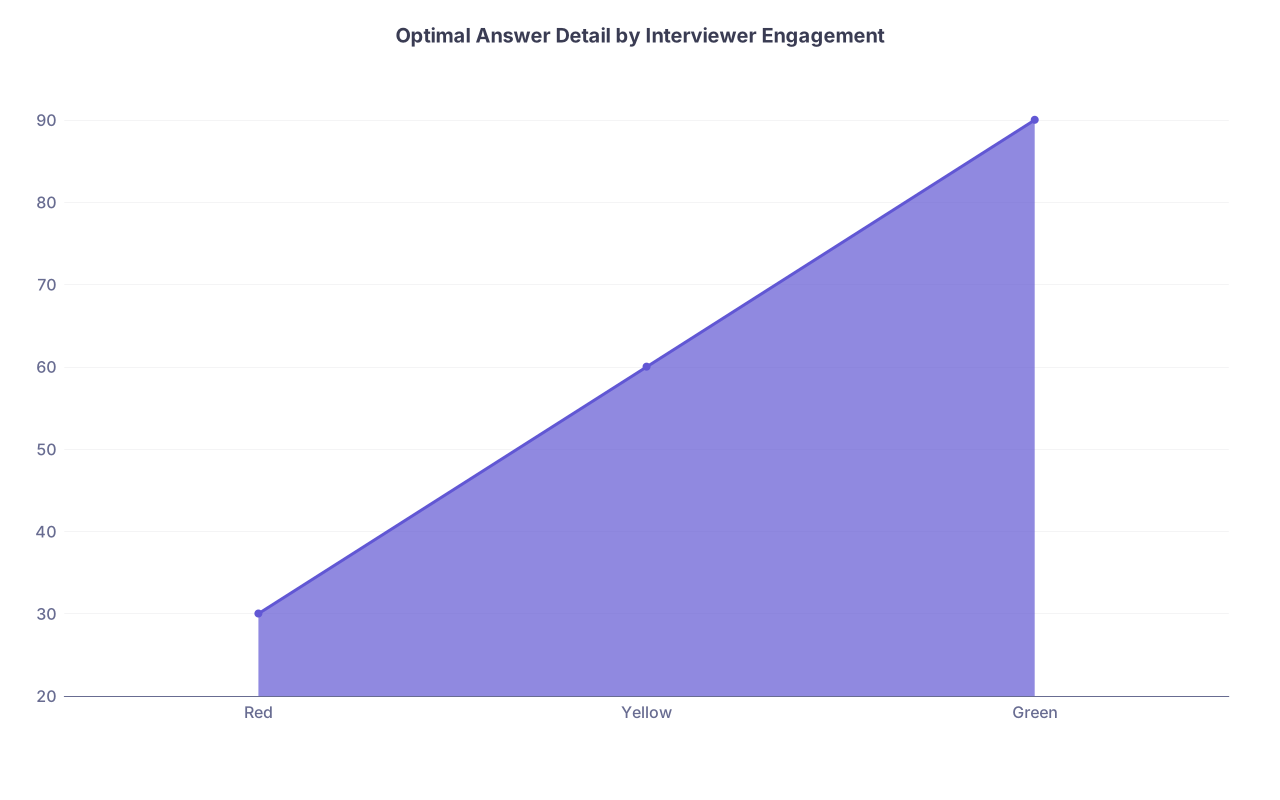
| Category | Value |
|---|---|
| Red | 30 |
| Yellow | 60 |
| Green | 90 |
Think of “detail length” roughly like this (seconds):
- Red: ~30–45 seconds
- Yellow: ~45–75 seconds
- Green: ~60–90 seconds
This is not rigid. It is a mental guardrail so you stop giving 3-minute answers to someone already in their email.
Common Mistakes That Kill Your Ability to Read Cues
I keep seeing the same errors.
- Staring at your notes instead of the interviewer. Your eyes are down. You cannot see them.
- Over-shared screen real estate. Multiple documents open, chat windows, clock… you shrink their video to a tiny thumbnail. Then you blame “bad video” for missing cues.
- Treating every interviewer the same. The quiet attending, hyped resident, multitasking PD, and exhausted APD require different pacing.
- Assuming a flat affect = dislike. Some people are just low-expressive. Watch follow-up questions and attention, not smiles alone.
- Over-analyzing single cues. One glance away means nothing. You are looking for clusters and trends over a minute or two.
A Simple Mental Model to Carry Into Each Interview
Right before you log on, remind yourself:
“I am here to have a conversation, not to deliver a speech. My job is to keep checking: Are they with me? If yes, great. If not, adjust.”
If you hold that frame, you naturally:
- Watch their face instead of your own
- Build answers with natural pause points
- Use questions to reset engagement rather than filling every second with words
That mindset alone puts you ahead of a large chunk of applicants who treat video interviews like they are reading the answer key into a void.

| Step | Description |
|---|---|
| Step 1 | Start Answer |
| Step 2 | Maintain Depth & Length |
| Step 3 | Shorten & Clarify |
| Step 4 | Condense & Re-anchor |
| Step 5 | Pause for Check-in |
| Step 6 | Observe Cues |
FAQ (Exactly 5 Questions)
1. How much should I try to “mirror” the interviewer’s body language on video?
Light mirroring is helpful; heavy mirroring looks fake. Matching basic energy level and speaking pace is enough. If they are calm and measured, you do not need to become hyper. If they are animated, you can loosen up slightly. Do not copy their exact gestures or posture. That reads as mimicry, not rapport.
2. What if the video quality is so bad that I cannot see micro-expressions at all?
Then you shift your weighting to vocal and content cues. Focus on how quickly they respond, whether their follow-up questions connect to what you said, and any changes in tone. Also, keep your answers on the shorter, more structured side; in low-bandwidth situations, concise and clear always beats “rich but rambling.”
3. Is it rude to ask, “Does that answer your question?” after I respond?
No. Used once or twice, it signals respect for their time and intention to be responsive. It also gives them a chance to redirect if they feel you missed the mark. Just avoid tacking it on after every single question, or it will sound like a verbal tic rather than a genuine check-in.
4. How do I handle it if an interviewer looks openly bored or hostile the entire time?
You do not rescue every room. Keep your professionalism. Shorten answers, stick to clear structures, avoid over-sharing, and ask one or two pointed questions about the program. You are managing damage and preserving your own composure, not converting a hostile skeptic into a fan. Some of those people are like that with everyone.
5. Can I practice this without recording real mock interviews?
You can, but it is less effective. As a compromise, watch recorded panels or talks where a speaker is being interviewed on Zoom or YouTube. Mute the audio and practice calling out when the interviewer looks more engaged or less engaged. Then turn sound back on and see what the speaker was saying at those times. It is not as tailored as your own mock, but it sharpens the same muscles.
Key points: Interviewer engagement on video is visible if you know where to look. Watch clusters of eye, face, and posture cues, not isolated movements. Then match your answer length and depth to their current state — green for depth, yellow for clarity, red for concise professionalism.



