
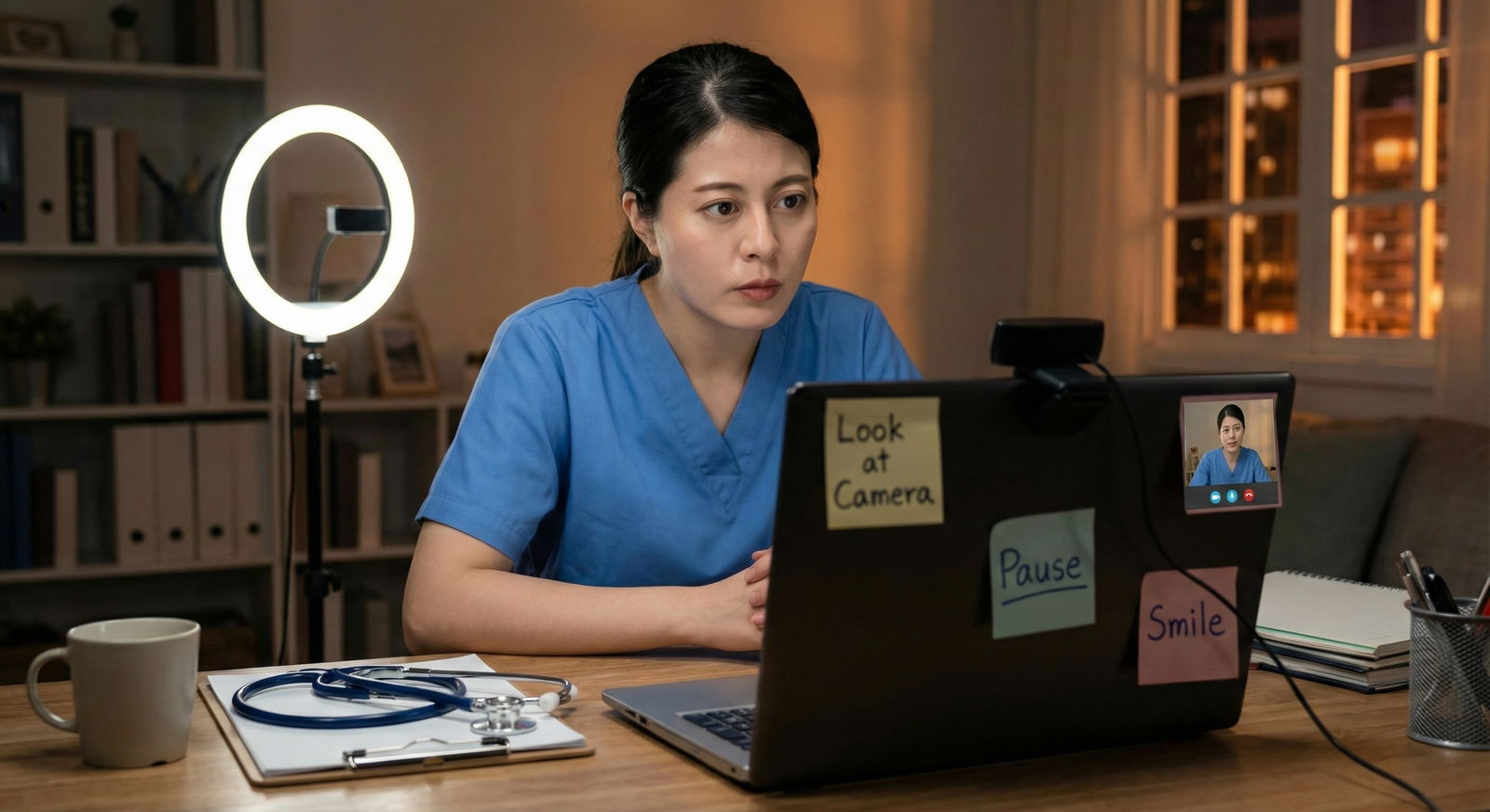
The way most applicants sound on video would get them paged about for “tachycardia, rule out anxiety” if they were patients.
Your voice on a residency video interview is a clinical sign. Programs read it—consciously or not—as a proxy for how you will be on the wards at 3 a.m., with an angry family, a crashing patient, and a tired nurse watching you.
Let me break this down specifically: pace, tone, and pauses are not “communication style.” They are your emotional vital signs on camera. And they can be trained.
Why Your Voice Matters More on Video Than In Person
On Zoom or Thalamus or Webex, programs lose a lot of data they rely on in live interviews: full body language, the micro-interactions walking between rooms, how you are with staff. What gets amplified instead?
Three things:
- Your face
- Your voice
- Your background / tech
The voice does two huge jobs at once:
- Conveys content (what you are saying)
- Conveys state (how regulated, thoughtful, and safe you are to work with)
Attendings are not sitting there with a rubric for “vocal prosody,” but they are absolutely thinking:
- “Would I want to round with this person every day?”
- “Do I believe them when they say they handle stress well?”
- “Will this person escalate appropriately or crumble?”
Your vocal delivery answers those questions faster than your CV.
This is why a perfectly fine answer, delivered in a rushed, breathy, monotone torrent, gets mentally scored as “nervous, not totally ready” while a slightly less polished answer with calm pacing and grounded tone lands as “solid, reliable, safe.”
What “Calm” Actually Sounds Like on a Residency Video Interview
“Sound calm” is useless advice. You need parameters.
Programs are listening for something that sounds like:
“Thoughtful upper-level resident presenting on rounds, not a terrified M3 on first OSCE.”
That usually means:
- Pace: slower than normal conversation, but not dragging
- Tone: warm, steady, with modest variation (not flat, not theatrical)
- Pauses: short, controlled breaks that frame ideas, not gaps that scream “I forgot my script”
- Volume: comfortably audible, just under what you would use in a busy team room
- Articulation: clear consonants, finished words, minimal mumbling
Here is the simple heuristic I use with applicants:
If you sound like you are trying to get through the story before you forget it, you are too fast.
If you sound like you are reading an angry letter, you are too flat.
If you never pause, you sound like you are trying to sell me something, not talk to me.
Let us dissect the three levers you can actually train: pace, tone, and pauses.
Pace: Slowing Down Without Sounding Bored or Unsure
Fast speech on video reads as anxiety. I have watched highly qualified applicants torpedo impressions simply by speaking at “USMLE question read-through” speed.
You need a clinical middle ground: calm, deliberate, but not sedated.
The Target Pace: “Consult Note Dictation” Speed
Picture yourself dictating an important consult note into Dragon or over the phone. You are:
- Aware someone is capturing your words
- Careful enough to be clear
- Still natural and conversational
That is about the pace you want on video.
If we quantified it, we would be talking roughly in this ballpark:
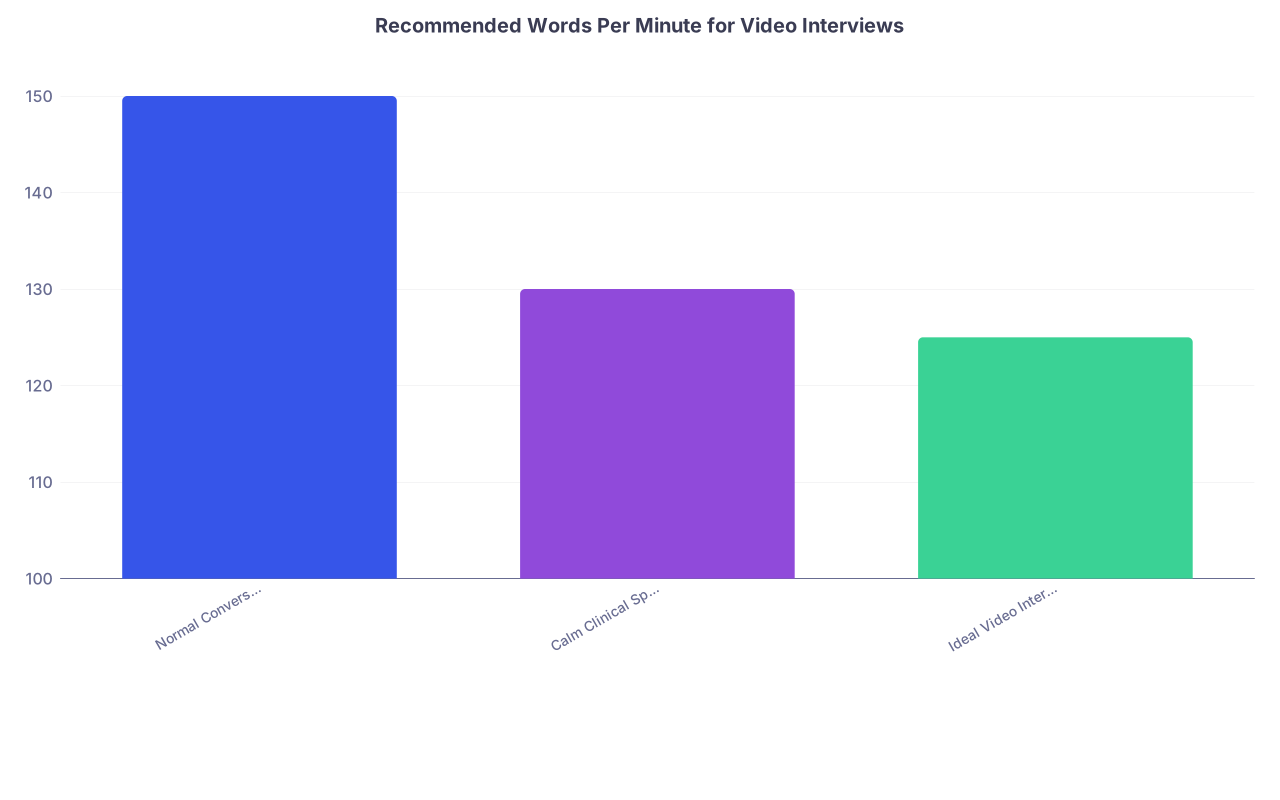
| Category | Value |
|---|---|
| Normal Conversation | 150 |
| Calm Clinical Speech | 130 |
| Ideal Video Interview | 125 |
You do not need to measure WPM. But you should recognize the feeling: you are speaking a little slower than your default “chat with a friend” speed, and much slower than your “trying to make a point fast in sign-out” speed.
Common Pace Problems—and Fixes
Problem: Verbal sprinting at the start of every answer
Pattern: Question ends → you launch immediately → first 1–2 sentences are too fast and tangled.Fix: Install a mandatory 1-second buffer. Literally.
Question ends → inhale → slight nod or “sure” → start.
That single breath will slow your first line and signal to your nervous system: this is not rapid fire.Problem: Rushing through your best material
You know your “strengths,” “why this specialty,” and “failure” answers. You over-rehearse them. On interview day, you blast through them like a memorized speech. It sounds fake and jittery.Fix: Script beats, not sentences.
For “Tell me about a time you had a conflict on the team,” your outline should be:- Brief context
- What the conflict was
- What you did
- Outcome + what changed in your behavior
Then you talk through it like you are explaining to a co-resident, not reciting.
Problem: Speeding up under time pressure
With 60–90 second structured responses, people panic and speak at Step question-reading speed.Fix: Prioritize depth over breadth.
It is better to tell one clean, well-paced story than cram three bullet points in a blur. Programs judge maturity, not throughput.
The Metronome Drill
If you are serious about fixing pace, do this. It feels silly. It works.
- Open a metronome app and set it around 60–70 bpm
- Answer a standard question (“Why this specialty?”, “Tell me about yourself”)
- Time your natural pace
- Now answer again, matching your phrase starts to every other beat (so roughly one meaningful phrase every 2 seconds)
You will feel slightly slowed and more intentional. That is the goal. After several repetitions, you can drop the metronome and record. You will hear the difference.
Tone: How You Sound When You “Walk Into the Room” on Video
Tone is where a lot of unmatched applicants fall down without realizing it. They obsess about content while sounding either:
- Flat and robotic (“I’m trying to be professional”)
- Over-amped (“I’m trying to sound enthusiastic”)
- Uncertain and apologetic (“I’m trying not to overstate anything”)
Programs do not want a TED Talk. They want:
- Grounded
- Warm
- Competent
- Not irritating at 5 a.m.
The Emotional Profile You Are Aiming For
Think of the best senior resident you have met. The one who:
- Made patients feel safe
- Made juniors feel supported
- Did not freak out when something went weird at 2 a.m.
How did they sound?
Usually:
- Mid-range pitch, rarely at the very top of their register
- Smooth transitions between sentences, not choppy
- A bit of tonal lift on important points, then back to baseline
- No constant nervous laughter or verbal apologies
- Emphasis where it matters (patient outcomes, teamwork, learning), not randomly
That is your template.

Fixing the Three Big Tone Mistakes
The Flat Robot
Sound: Monotone, almost like reading a note.
How it lands: Disengaged, possibly burned out, hard to read.Fix:
- Mark your written prep: underline 1–2 words in each answer that you will intentionally lift slightly or emphasize (“particularly meaningful,” “challenging moment,” “what I learned”).
- Record yourself exaggerating emphasis by 20–30%. It will feel over the top to you but will sound merely “engaged” on playback.
The Over-Enthusiast
Sound: Too bright, too high, too “OMG I love medicine!!” for 45 minutes straight.
How it lands: Inauthentic, exhausting, sometimes immature.Fix:
- Lower your baseline pitch slightly. Before interviews, do 2–3 slow exhalations with a gentle “hmmm” at the end, feeling resonance in your chest rather than your throat.
- Anchor your enthusiasm in specifics, not volume. “I was really excited about that outcome” in a calm tone is more credible than “I was SO EXCITED!” in a high, breathy voice.
The Apologizer
Sound: Trailing off, qualifying every statement, “kind of,” “sort of,” “I guess,” “hopefully.”
How it lands: Lacks confidence, might have trouble owning decisions.Fix:
- Strip fillers in your written prep. Literally delete “kind of,” “I guess,” “hopefully,” and replace with clean statements: “I learned…,” “I realized…,” “I now do…”.
- Practice ending sentences on a downward inflection instead of upward (no “uptalk”). Record and listen. You should hear your statements sound completed, not like questions.
A Quick Tone Calibration Trick
Record two 60-second answers:
- Version A: Talk like you are briefing a tired attending who is two hours behind.
- Version B: Talk like you are explaining your specialty to an interested M1.
Your ideal tone for video interviews is closer to Version B, with just a bit of Version A’s economy and calm. You can literally slide your tone between those mental images.
Pauses: Where Calm Actually Lives
If I could only fix one thing for most applicants, it would be this: their relationship with silence.
On video, people fear silence. They interpret even half a second as “I look stupid.” So they:
- Fill everything with “um,” “like,” “you know”
- Run sentences together without breathing
- Start talking before they know where the answer is going
The result is cognitive noise. Programs cannot see your thought process; they just see verbal turbulence.
Calm applicants do something different: they use micro-pauses to signal thinking and control.
Three Types of Pauses You Need
Pre-Answer Pause (0.5–1.5 seconds)
When the interviewer finishes the question, you:- Breathe in once
- Maybe nod or say “Sure” or “That is a great question” if it feels natural
- Then start
You are not wasting time. You are showing that you can absorb, consider, then respond.
Structural Pause (0.3–0.7 seconds)
Used to separate sections of your answer. Example:“One experience that really shaped my interest in internal medicine was working on the inpatient COVID service… [pause] I came onto the team as an MS3 when the census was extremely high… [pause] What stood out to me most was how the residents managed uncertainty…”
These tiny breaks help the listener follow your story and make you sound more organized than you might actually feel.
Reflective Pause (0.7–2 seconds)
Used after a heavy or personal point, especially for “failure,” “conflict,” or “resilience” questions.“That was the first time I had to call a family and update them about a deteriorating situation… [pause] It forced me to rethink how I prepare for those conversations.”
That small stillness reads as mature, not awkward.

| Step | Description |
|---|---|
| Step 1 | Interviewer asks question |
| Step 2 | Pre-answer pause |
| Step 3 | Opening sentence |
| Step 4 | Structural pause |
| Step 5 | Main story/details |
| Step 6 | Structural pause |
| Step 7 | Reflection/insight |
| Step 8 | Reflective pause |
| Step 9 | Brief closing line |
How to Practice Pauses Without Sounding Stilted
- Take one answer you already know cold (for example, “Tell me about yourself”)
- Write it in short chunks on the page, where each line is where you will insert a tiny pause
- Read it aloud 3–5 times, honoring every line break with a micro-pause
- Record once with the pauses, once without, and compare
You will hear it: the version with pauses sounds older, calmer, and more senior.
If you struggle with fillers (“um,” “like,” “you know”), the fix is not “try not to say um.” The fix is: replace filler with silence. Filler is just your brain refusing to let there be air. Training yourself to tolerate a 0.2 second silence is the actual skill.
Putting It Together: A Simple Vocal Training Plan for Residency Video Interviews
You do not need a voice coach. You need a structured 2–3 week process with deliberate reps.
Here is a clean plan.
| Week | Focus | Primary Goal |
|---|---|---|
| 1 | Pace | Slow torrent speech to calm delivery |
| 2 | Tone | Shift to warm, grounded, confident |
| 3 | Pauses + Integration | Use silence to structure and calm |
Week 1: Pace Work
Day 1–2: Baseline
- Record 3 questions:
- “Tell me about yourself.”
- “Why this specialty?”
- “Tell me about a challenge you faced on rotations.”
- Do not script. Just answer.
- Listen once with a single goal: how often do you feel like saying “slow down”?
Day 3–5: Metronome + Scripted Beats
- Pick 2 answers and break into 4–5 “beats” each (main ideas).
- Use a metronome at 60–70 bpm to pace starts of phrases, as described earlier.
- Practice 5–10 minutes per day.
Day 6–7: Realistic Runs
- Record a 15-minute mock (5–7 questions).
- Watch it at 1.25x speed. If it still feels borderline-too-fast at 1.25x, your real-time pace is fine. If it feels like a normal conversation at 1.25x, you are probably slow enough already and just need clarity.
Week 2: Tone Work
Day 1–2: Two Modes Exercise
- Record:
- “Briefing a rushed attending” version
- “Explaining to an M1” version
- Listen and mark what sounds more like the kind of colleague you would want. Aim for that in subsequent practice.
Day 3–4: Emphasis and Warmth
- Take 3 answers. Mark 1–2 words per answer for mild emphasis.
- Practice delivering each, consciously adding a slight lift or weight on those words.
- If you tend to be flat, exaggerate. If you tend to be theatrical, pull back 20%.
Day 5–7: Feedback Run
- Send a short 10-minute clip to a friend or mentor and ask just two questions:
- “Do I sound like myself?”
- “Would you want to work with this person overnight?”
- Listen for any mention of “tired,” “robotic,” “too hyped,” “too intense.” Adjust accordingly.
Week 3: Pauses and Integration
Day 1–2: Filler Replacement
- Pick one common filler (“um” or “like”).
- Record a 5-minute session where your only goal is: whenever you are about to say that filler, you pause instead.
- Expect to fail a lot at first. Then it rapidly improves.
Day 3–4: Structured Answer Practice
- Use the pause structure from the mermaid chart:
- Tiny pre-answer pause
- Structural pauses between story segments
- Reflective pause for insight
- Practice with 3–4 behavioral questions (“Tell me about a time…”).
Day 5–7: Full Mock with Conditions
- Do a 20–25-minute mock with someone else or using a list of standard questions.
- Record.
- Evaluate yourself on three things only:
- Did I ever sound rushed?
- Did I sound like a human or like I was reading?
- Did I allow brief silences instead of panicked fillers?
If you are scoring yourself honestly on those three axes and iterating, you will be well above the average applicant in vocal delivery.
Small Technical Tweaks That Affect How Your Voice Lands
You can sabotage a good voice with bad setup. Fix these basics.
Mic and Distance
- Use wired earbuds or a decent laptop mic. Avoid Bluetooth lag and spotty AirPods if your connection is unreliable.
- Position yourself 12–18 inches from your mic, slightly off-axis if your “p” and “b” sounds pop.
Body Position
- Sit with both feet on the floor. Rooted.
- Sit slightly forward on your chair, not slumped back. This opens your diaphragm and stabilizes breath.
- Do not clamp your jaw. A lightly relaxed jaw and tongue gives you clearer articulation and less throat strain.
Environment
Background noise changes how you speak. If you are subconsciously trying not to disturb others, you will speak too softly and too tensely. Get:
- A private room with the door closed
- A sign on the door or message to roommates if needed: “Interview in progress”
- Test recording at actual interview time of day; HVAC and outside noise can vary
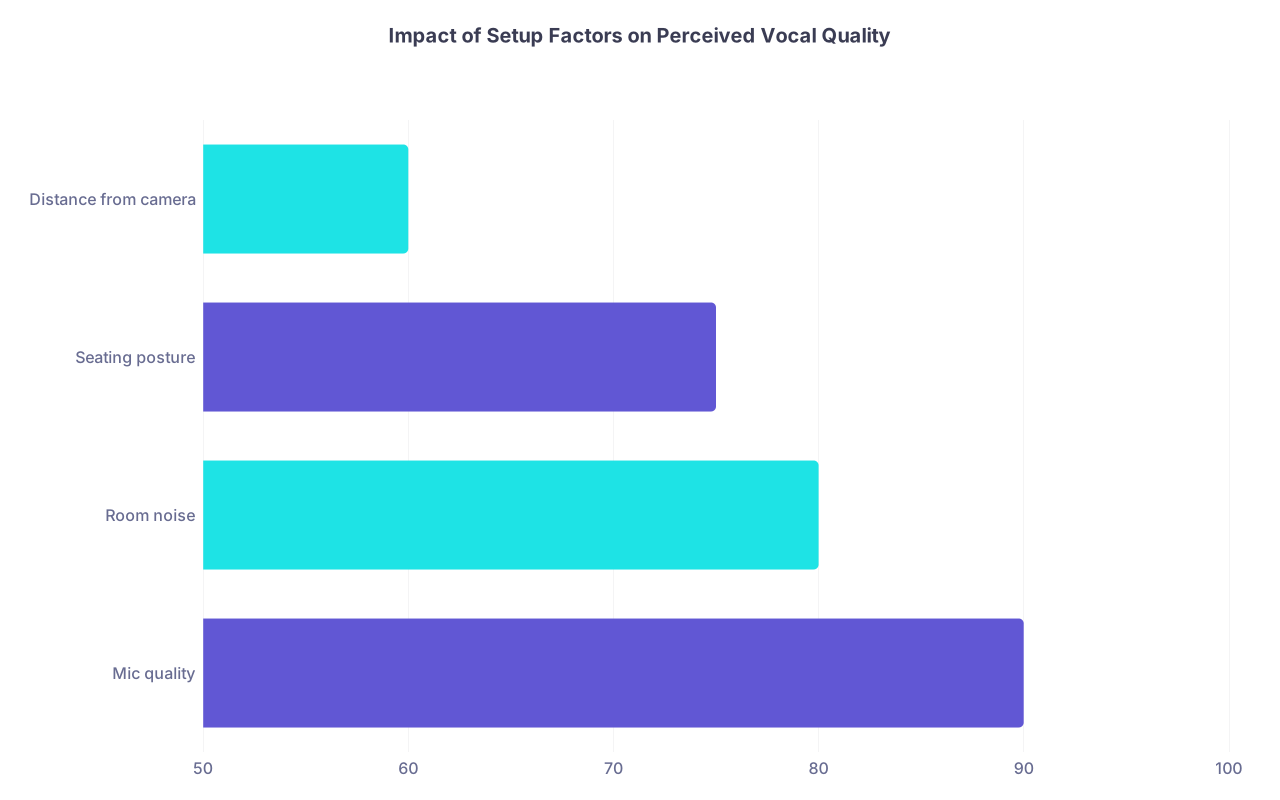
| Category | Value |
|---|---|
| Mic quality | 90 |
| Room noise | 80 |
| Seating posture | 75 |
| Distance from camera | 60 |
(The percentages here are a rough sense of how often I have seen each factor materially affect how a candidate sounds on recordings.)
How This Plays Differently in Asynchronous Video Platforms
Some of you will be dealing with asynchronous / on-demand video interviews (Kira Talent, SparkHire, Altus, program-specific platforms). These are worse for anxiety because you:
- See yourself on screen
- Have fixed prep and response times
- Often get only 1 shot per question
The vocal principles are the same, but the execution is stricter.
Specific Adjustments
- Use the full prep time for a deep breath and to silently outline 2–3 beats. Do not stare at the countdown in panic. Look slightly away from the camera as you outline, then back.
- Lock your opening line for common question types (“One experience that really shaped…”, “There are two main reasons…”, “A challenge that stands out is…”). This reduces the rushed, scrambled first sentence.
- Treat the camera as a patient, not a lens. Imagine you are explaining something calmly to a worried family member just off-screen.
If you find yourself speeding up because of the timer, over-correct: intentionally speak 10–15% slower than feels comfortable. Timers make most people overshoot; your final pace will actually be about right.
FAQ: Voice, Calm, and Residency Video Interviews
1. I have an accent and worry programs will think I am less competent. Should I slow down even more?
No. The problem is rarely the accent itself; it is speed plus mumbling. Your goal is not “sound American.” Your goal is “be easily understood.” Focus on:
- Slightly slower pace
- Finishing consonants at the ends of words
- Avoiding long, run-on sentences
Record with a trusted friend and ask only: “Is there any part you had to replay because you did not understand?” Fix those parts, not your entire natural speech pattern. Programs are used to accents; they are not used to applicants they cannot follow.
2. What if I naturally talk fast in real life? Will slowing down make me sound fake?
You probably talk faster with friends than with attendings already. You modulate based on context. This is the same. Calmer pace on video is a professional register, not an act. If you feel painfully slow, record and play it at normal speed. Ninety percent of the time, it sounds just “clear,” not weird.
3. How much “enthusiasm” is too much for an interview? I do not want to seem flat.
If every sentence has the same level of high energy, it is too much. Enthusiasm should spike at genuine points: a meaningful patient story, a favorite rotation, a research topic you enjoyed. The rest of the time, you want steady, grounded tone. Think: 80% calm, 20% energized highlights.
4. I say “um” constantly. Is that an automatic red flag?
Occasional “ums” are human. Constant filler is distracting. The fix is not to chase each “um”; it is to build comfort with microscopic silences. Do 5 minutes a day where you answer questions slowly and force a 0.2–0.3 second silence whenever you feel an “um” coming. That habit retrains faster than you think.
5. Should I memorize my answers to control my voice better?
No. Memorized answers almost always come out rushed and unnatural because your mouth is chasing a script. Script structures, not sentences: 2–4 key beats you must hit. Then speak to those beats as if explaining to a colleague. Your voice will automatically sound more real, and you will have enough cognitive bandwidth left to monitor pace, tone, and pauses.
Key takeaways:
First, programs are reading your voice as a proxy for how you will be on call; your pace, tone, and pauses are nontrivial selection signals. Second, calm delivery is trainable in a few weeks with targeted work on slowing down, warming your tone, and using micro-pauses instead of fillers. Third, you do not need to sound like a TED speaker—you need to sound like the senior resident everyone trusts at 3 a.m.



