

The awkward silence on Zoom isn’t your enemy. The way you react to it is.
Most applicants either panic, overtalk, or stare at the screen like a deer in headlights. Programs don’t care that there was a pause. They care whether you look rattled and disorganized, or calm and professional.
Let me walk you through exactly what to do so those silences stop freaking you out and actually start working for you.
First: Figure Out What Kind of Silence It Is
Not all Zoom silences are the same. If you treat them all like disasters, you’ll look anxious and inexperienced.
Here are the main types you’ll see:

The “lag” silence
They finished talking, you answered, and now… nothing. Nobody moves. Sometimes everyone is waiting for someone else to talk, sometimes it’s just internet delay.The “processing” silence
You just gave a detailed answer. They’re writing notes, scrolling through your ERAS, or thinking of the next question.The “tough question” silence
They ask something like, “Tell me about a conflict with a co-resident” and you pause to think.The “group dynamics” silence (for multiple mini or group interviews)
Everyone’s waiting to see who jumps in first. Or the interviewer expects you to steer the conversation.The “technical issue” silence
Their audio drops. Your connection stutters. You see mouths move but hear nothing.
Each type needs a slightly different response, but the mindset is the same: assume positive intent, stay composed, and show you can handle ambiguity without spiraling.
Core Rule: Don’t Fill Every Silence With Nervous Rambling
Programs are watching for maturity and poise, especially on video. Overcompensating is one of the biggest tells of anxiety.
Things that look bad in awkward silences:
- Rapid-fire “uh, so yeah, and um…” after you’ve already answered well
- Repeating your main point 3 different ways because they didn’t respond instantly
- Apologizing for normal thinking time (“Sorry, I’m just thinking, sorry!”)
- Weird jokes out of nowhere (“Wow, this is more awkward than my first date, haha…”)
You’re better off with 1–2 seconds of quiet than 20 seconds of verbal flailing.
A Simple Script for Most Zoom Silences
If you remember nothing else, remember this 3-step move:
- Pause for 1–2 seconds after you finish a response.
- Maintain eye contact and neutral expression with a slight nod or small smile.
- If the silence passes ~4–5 seconds and still nothing, use a brief, professional check-in line.
Examples of good check-in lines:
- “I’m happy to clarify anything if I wasn’t clear.”
- “Did I answer your question, or would you like me to expand on a part of that?”
- “I can give a quick example if that would be helpful.”
That’s it. Short, controlled, confident. You’re signaling, “I’m comfortable here, and I’m willing to help you out.”
How to Handle Each Type of Awkward Silence
Let’s run through the main ones with what to say and what not to say.
1. The “Lag” Silence (Common on Zoom)
This is the one where you both start/stop talking at the same time, or nothing happens due to delay.
What to do:
- Give a 1–2 second buffer after you finish before jumping in again. Zoom punishes people who jump in too fast.
- If you both talk at once, smile lightly and say:
“Sorry, please go ahead.”
or
“You go ahead—I’ll follow.”
If there’s a long silence after your answer (like 4–6 seconds) and they’re staring at the screen:
- Keep your expression open and relaxed.
- Then say something like:
“I’m happy to add more detail if that would be useful.”
What not to do:
- Don’t start a new, unrelated point just to “fill the air.”
- Don’t immediately assume you said something wrong.
2. The “Processing” Silence (They’re Taking Notes)
This one gets misread all the time. You give a strong answer, and they immediately look down and type or write. Silence. Applicants panic, start talking again, and ruin a perfectly good response.
Better move:
- Notice what they’re doing. Are they looking down, typing, or scrolling? That usually means: “Good answer, I’m documenting.”
- Do nothing. Just hold a neutral, attentive expression.
- If the silence goes 5+ seconds and they still haven’t spoken, you can lightly say:
“I can share a brief example to illustrate that if you’d like.”
That tells them you’re ready with more, without undoing your clean finish.
3. The “Tough Question” Silence (You’re Thinking)
Here’s the big mistake: people treat thinking like a failure. It’s not. It’s actually a green flag if you handle it correctly.
When they throw something complex at you:
- “Tell me about a time you received critical feedback.”
- “Why this program specifically?”
- “What’s your biggest weakness as a resident?”
Use this structure:
Buy yourself 2–3 seconds on purpose.
- “That’s a really good question; let me think for a moment.”
- “I want to give you an honest answer—just a second.”
Think quietly for 2–4 seconds. Don’t stare off into the void; keep your gaze near the camera.
Then answer in a structured way.
- “I’d say there are two main things…”
- “One example that stands out is…”
This moves you from “awkward silence” to “deliberate reflection.” Programs like that. It reads as maturity.
4. The Group Silence (Who Talks First?)
In multi-interviewer or group formats, silence often means, “We’re seeing who leads.”
If there’s an obvious question hanging and nobody else jumps in:
- Lean slightly forward and say:
“I’m happy to start if that’s okay.” - Then give a concise, organized answer.
If multiple applicants are present and the silence is clearly directed at the group (“Any thoughts on that scenario?”):
- Wait 1–2 seconds. If no one talks:
“I can share how I’d approach that.”
You’re not dominating; you’re showing initiative and comfort.
5. The “Technical Issue” Silence
This one you have to manage explicitly. If you don’t, you look confused or disengaged.
Signs: mouths moving with no sound, frozen faces, delayed responses.
When you suspect tech issues:
- After 1–2 seconds of obvious mismatch, say:
“I think the audio might be cutting out a bit on my end—would you mind repeating that last part?”
or
“I lost you for a second there. The last thing I heard was ‘tell me about a time…’”
If you freeze or drop out and then return:
- Don’t over-apologize. One clean acknowledgment is enough:
“Sorry about that, my connection glitched for a second. I’m back now. Would you mind repeating the question?”
Own it, fix it, move on.
What Your Body Language Should Do During Silence
On Zoom, silence feels 10x louder because you’re staring at your own anxious face. Your body language becomes the entire story.
Use this baseline:
- Eyes: mostly at the camera, with occasional natural glances down (notes) or sideways (thinking).
- Face: slight half-smile or neutral, soft expression. Not forced cheerful, but not blank or irritated.
- Head: small nods signal engagement.
- Posture: sit slightly forward, feet planted, shoulders relaxed.
During a silence:
- Don’t slump back, sigh, or roll your eyes.
- Don’t suddenly look to another monitor for a long time; it looks like you’re distracted or Googling.
- If you’re thinking, it’s okay to glance slightly away for a couple seconds, then come back to the camera when you start speaking.
Practice This Before Interview Day (Not During)
You can absolutely train your brain not to freak out at silences.
Here’s a quick drill that works well:

| Step | Description |
|---|---|
| Step 1 | Record Mock Interview |
| Step 2 | Answer Question |
| Step 3 | Pause 3 Seconds After Answer |
| Step 4 | Watch Replay |
| Step 5 | Check Body Language in Silence |
| Step 6 | Refine Phrases and Expressions |
Record yourself on Zoom (alone) answering common residency questions.
Force yourself to pause 2–3 seconds after each answer before stopping the recording.
Rewatch and focus only on the silence:
- Do you look panicked?
- Are your eyes darting around?
- Do you immediately fill the gap with extra fluff?
Practice short check-in phrases out loud until they feel natural:
- “I’m happy to elaborate.”
- “I can give an example if that helps.”
- “Let me think about that for a moment.”
Yes, it will feel weird. Do it anyway. That’s how you won’t freeze on interview day.
Quick Comparison: Good vs Bad Responses to Awkward Silences
| Situation | Unskilled Response | Skilled Response |
|---|---|---|
| After strong answer, they’re silent | Ramble and restate points | Hold eye contact, brief check-in if >5s |
| Tough question, you need time | “Um… uh… I don’t know…” | “Great question—let me think for a second.” |
| Tech cut out mid-question | Say nothing, look confused | Briefly name issue, ask to repeat |
| Group silence | Wait passively, stare | “I can start if that’s okay.” |
| Both talk at once | Awkward stop-start multiple times | “You go ahead, then I’ll jump in.” |
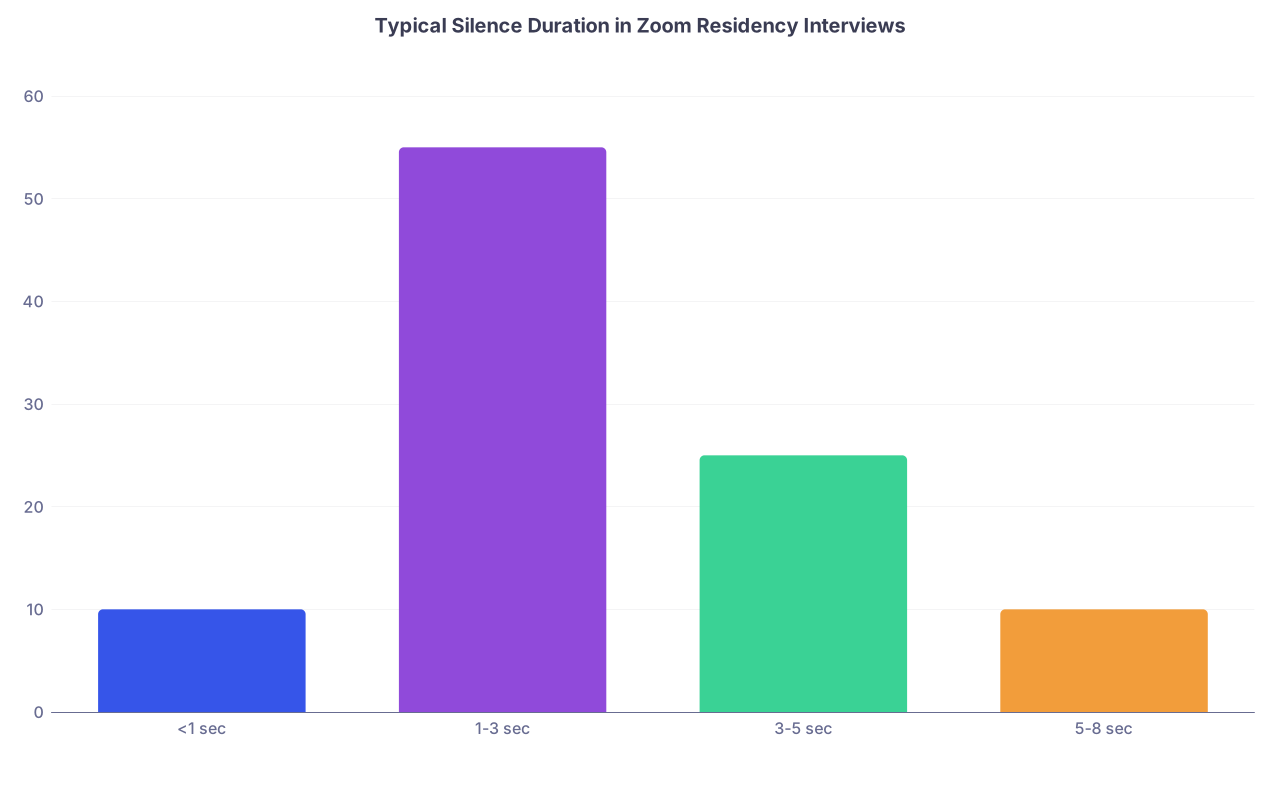
How Much Silence Is Actually Normal on Zoom?
More than you think.
| Category | Value |
|---|---|
| <1 sec | 10 |
| 1-3 sec | 55 |
| 3-5 sec | 25 |
| 5-8 sec | 10 |
Most interviewers leave 1–3 seconds after you finish to see if you’ll add anything. Another 2–3 seconds can be them typing notes. So a 4–5 second silence isn’t a problem. It’s standard.
The only time you really need to intervene verbally is when:
- You sense confusion (“Did my answer land?”)
- You suspect tech issues
- The silence is stretching into 6–8 seconds of sustained weirdness with eye contact
Then you use a short, professional line and keep things moving.
Micro-Scripts You Can Steal and Use
I’ll give you a short list you can literally copy into your prep notes:
When you need to think:
- “That’s a great question—give me just a moment to think.”
- “Let me take a second to think of a specific example.”
When you finished and they’re quiet:
- “I’m happy to clarify anything if that wasn’t clear.”
- “Would you like me to go into more detail on any part of that?”
When there’s clear lag / audio issues:
- “I think there might be a slight delay—did I catch your question correctly?”
- “I lost audio for a second; could you repeat the last part?”
When the group is silent:
- “If it’s okay, I can start with my perspective.”
Practice these out loud until they don’t sound robotic in your mouth.
The Real Signal You’re Sending With Silence
Here’s what programs actually care about:
- Can you stay composed when things get slightly awkward?
- Do you think before you talk, especially on complex questions?
- Can you handle tech issues without coming unglued?
- Are you able to check in and communicate clearly when something feels off?
That’s it. Silence is just one more way they see your bedside manner and team behavior—without the patient.
If you can sit in a 3-second Zoom pause without panicking, you’re already ahead of a lot of applicants.
FAQ: Awkward Silences on Zoom Residency Interviews
How long is it okay to stay silent when I’m thinking about an answer?
Around 2–4 seconds of quiet thinking is totally fine if you frame it. Say something like, “Let me think about that for a moment,” then pause, then answer. Once you push past 5–6 seconds of total silence, it starts to feel long on Zoom, so either start answering or briefly say, “I’m thinking of the clearest example to share,” then continue.What if I finish my answer and they just stare at me?
Hold eye contact, slight smile, and wait 3–4 seconds. They’re often taking notes or deciding on the next question. If it goes longer and feels weird, use a short line: “I’m happy to elaborate if you’d like more detail.” Don’t start repeating yourself just to fill time.What should I do if we keep talking over each other because of lag?
The first time it happens, smile and say, “Sorry—please go ahead.” If it keeps happening, you can name it: “I think there’s a bit of a delay; I’ll wait a second after you finish before I jump in.” That shows awareness and social intelligence instead of awkward chaos.Is it rude to ask them to repeat a question on Zoom?
No. It’s actually professional. If audio garbles or cuts, say: “I want to make sure I answer properly—I lost part of that. Could you repeat the question?” That’s much better than guessing or answering the wrong thing. Just don’t ask them to repeat every other question.What if I blank completely and the silence stretches?
Own it quickly. “I’m drawing a blank on a specific example right now, but in general here’s how I approach that…” Then give principles or a similar scenario you can describe. Silence is only fatal if you sit there looking panicked and mute.Do programs judge me for needing a second to think?
No. They judge you for rambling, dodging, or giving rehearsed, shallow answers. A brief, intentional pause to think actually makes you look thoughtful and mature. Just pair it with a framing phrase so it doesn’t look like you froze.Should I try to “fill” any silence with small talk or jokes?
Usually no. Forced jokes or random small talk during obvious thinking or note-taking silences comes off nervous. Use small talk between formal parts of the day (at the start or end, during tours, with residents) but treat interview-question silences as either thinking time or note-writing time. Respect the quiet, then speak with intention.
Open your interview prep doc right now and add three phrases you’ll use for silences—one for thinking, one for checking in after you answer, and one for tech issues. Then practice saying them out loud until they feel natural instead of scripted.



