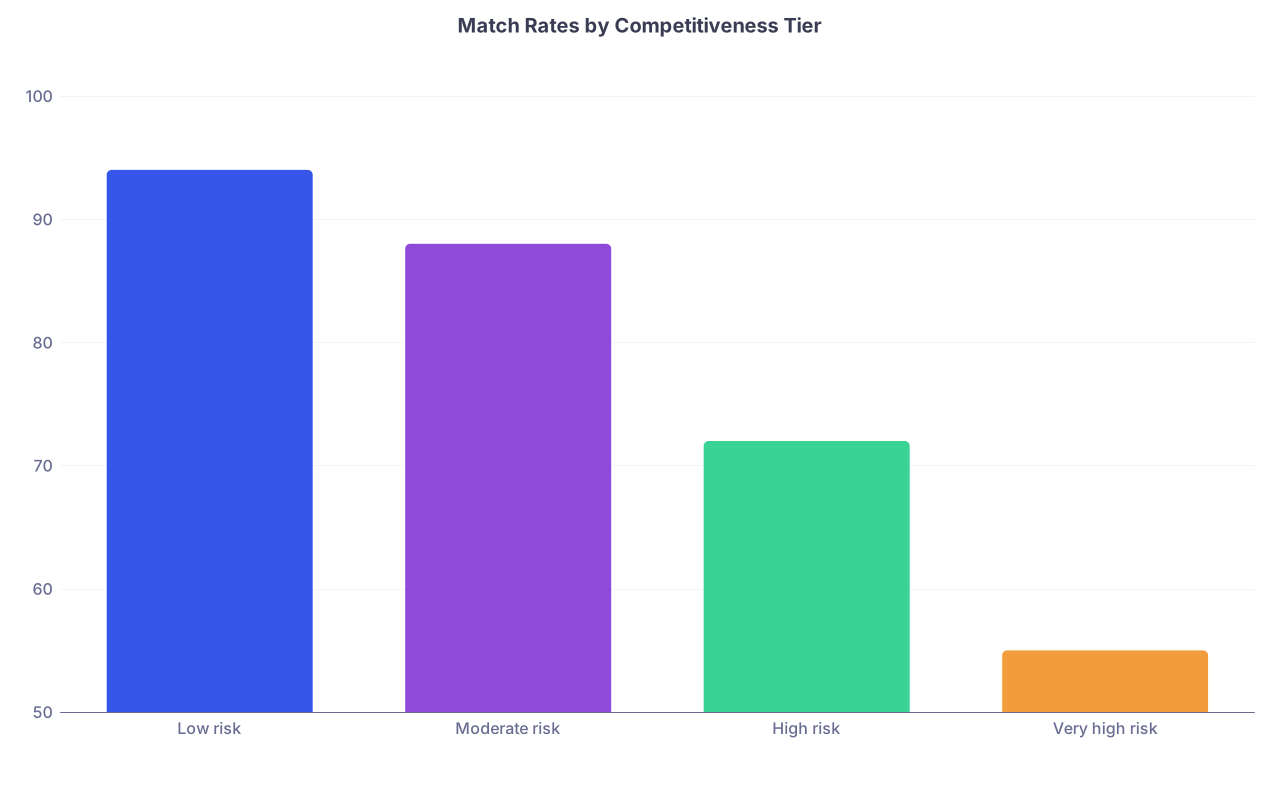
| Category | Value |
|---|---|
| Low risk | 94 |
| Moderate risk | 88 |
| High risk | 72 |
| Very high risk | 55 |
Most applicants build backup plans based on vibes. The data shows that is exactly why many of them go unmatched.
If you are not using NRMP Charting Outcomes numbers to quantify your match risk and design your backup specialties, you are gambling, not planning. The good news: the tables, percentiles, and distributions in those PDFs are more than enough to build a rational, defensible backup strategy.
I will walk through how to do this like an analyst, not a hopeful poet.
1. What Charting Outcomes Actually Gives You (And How To Read It Correctly)
Charting Outcomes in the Match is not a glossy brochure. It is a probability reference manual. For each specialty, you get:
- Match rates stratified by US MD, DO, and IMG status
- Match rates by Step 2 CK score ranges
- Match rates by number of contiguous ranks in that specialty
- Match rates by AOA/Gold Humanism, research products, and advanced degrees
- Score distributions for matched vs unmatched applicants
If you just skim the “average Step score” and “overall match rate,” you are leaving 80 percent of the value on the table.
The core concept: each characteristic you have (score, ranks, research, school type) moves your match probability up or down relative to the baseline for that specialty. You want to know your relative position in the distribution, not whether you “meet the average.”
For backup planning, three Charting Outcomes tables matter most:
- Match rate by Step 2 CK score
- Match rate by number of contiguous ranks
- Distribution of Step scores for matched vs unmatched in a specialty
Those three let you answer, in numeric form:
- “How risky is my primary specialty given my profile?”
- “How much does adding more programs actually help me?”
- “How far above or below the typical matched applicant am I?”
If you cannot answer those, you are not ready to choose backups.
2. Quantify Your Risk in Your Primary Specialty
Let us start with your main target specialty. Before you even think about backups, you need a clear, quantitative sense of your risk.
Here is a structured way to do it.
Step 1: Identify your demographic “bucket”
From the relevant Charting Outcomes document (US MD, DO, or IMG):
- Pick your specialty (e.g., Internal Medicine, Dermatology, EM).
- Use the table for your applicant type:
- US MD senior
- DO senior
- US-IMG
- Non-US IMG
Why? Match rates across these groups differ massively. A 240 Step 2 CK for a US MD in Internal Medicine is a very different risk profile than 240 for an IMG in the same specialty.
Step 2: Locate your Step 2 CK range
Find the specialty table “Match Rates of Applicants by USMLE Step 2 CK Score.” Identify the score band you fall into.
Example pattern (numbers illustrative but realistic):
| Step 2 CK Range | Match Rate (%) |
|---|---|
| 220–229 | 88 |
| 230–239 | 93 |
| 240–249 | 96 |
| 250–259 | 98 |
If you are at 233, you do not have a “240” profile. You have a 230–239 profile. Use the band, not wishful rounding.
Already you have a baseline risk estimate: if nothing else changes and your application is average, your probability is roughly that band’s match rate.
Step 3: Adjust for number of contiguous ranks
Scores are not the only signal. The number of programs you rank in a specialty has a stronger impact than most students realize.
Use the “Match Rates of Applicants by Number of Contiguous Ranks in Preferred Specialty” table. You will see the match probability curve flatten at a certain point.
A very typical pattern for US MDs in a moderately competitive specialty looks like this:
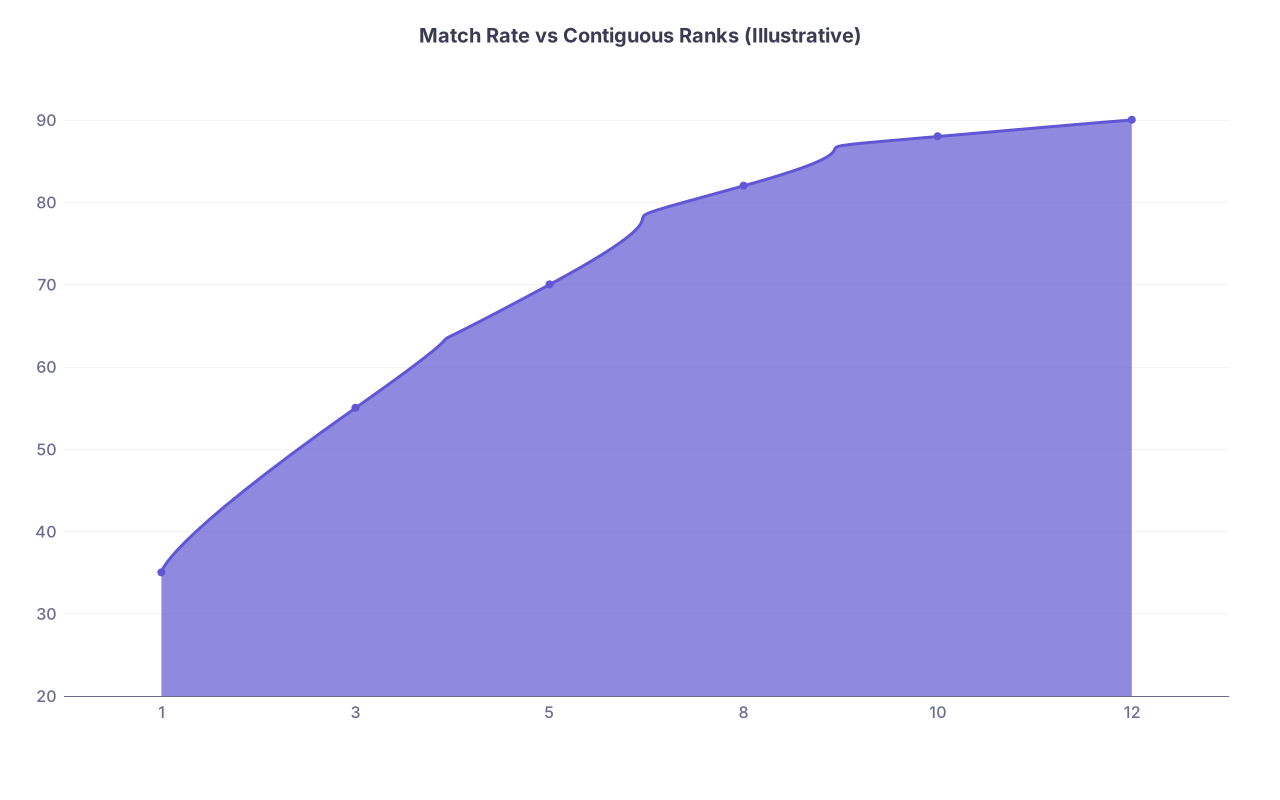
| Category | Value |
|---|---|
| 1 | 35 |
| 3 | 55 |
| 5 | 70 |
| 8 | 82 |
| 10 | 88 |
| 12 | 90 |
Key insight: going from 1 to 5 ranks usually more than doubles your match probability. Going from 10 to 12 barely moves the needle.
Your job is to estimate: with my planned number of ranks, what is my match probability? If the table says 80–85 percent for your rank count, that is your working number. Not 100. Not “should be fine.” About 15–20 percent of people like you do not match into that specialty each cycle.
Step 4: Compare your score distribution vs matched cohort
Next, look at the matched vs unmatched score distribution graph (often boxplot-style) for your specialty. Ask:
- Is my Step 2 CK below the median of matched applicants?
- Am I within the interquartile range (25th–75th percentile)?
- Am I near or below the 25th percentile of matched?
If you sit below the 25th percentile of matched applicants, then by definition, three-quarters of matched people had higher scores than you.
That does not mean you will not match. It does mean your risk is on the higher side of whatever global percentage you saw earlier.
This is where you should start to think in tiers.
3. Define Risk Tiers and Decide If You Need Backup Specialties
You can turn those numbers into simple risk tiers. Here is one data-driven way to do it:
| Estimated Match Probability | Risk Tier | Interpretation |
|---|---|---|
| ≥ 95% | Very low risk | Backup specialty usually unnecessary |
| 90–94% | Low risk | Consider light backup within specialty |
| 75–89% | Moderate risk | Should plan serious backup strategy |
| 60–74% | High risk | Backup specialty strongly recommended |
| < 60% | Very high risk | Backup specialty essential |
Your personal estimate should combine:
- Step 2 CK band match rate
- Number of contiguous ranks planned
- Whether you are below / within / above the typical matched distribution
Example:
- US MD, Planning Dermatology
- Step 2 CK = 243, in a band where match rate is about 55–60%
- Planning to rank 10 programs, where historical match rate for your tier is ~65%
You are clearly high to very-high risk. You need a backup specialty. Full stop.
Contrast that with:
- US MD, Planning Internal Medicine
- Step 2 CK = 248, 96–98% match rate band
- Planning to rank 18 categorical IM programs, where the table shows match rate ~98–99%
You are very low risk in IM. A separate backup specialty may be unnecessary. Your real “backup” is adding a couple more realistic IM programs and possibly prelim medicine spots if you are also chasing a competitive subspecialty path.
The data shows a sharp difference between these two scenarios. Many students treat them the same. That is the mistake you are avoiding.
4. Choosing Backup Specialties with Data, Not Hope
Once you know your risk tier in your primary specialty, then you choose backups. The rule: pick backups whose match probabilities, conditional on your profile, pull your total risk down to a tolerable level.
You are not just picking “something less competitive.” You are aiming for a specific composite risk profile.
Step 1: Identify realistic backup specialties
You need specialties where:
- Your Step 2 CK puts you in a high match-probability band for your applicant type.
- The total number of positions and fill rate are favorable.
- Your rotations, letters, and personal story can be plausibly repurposed.
Charting Outcomes gives you #1 directly. For #2, look at NRMP’s “Results and Data” (fill rates, total quotas). #3 you know from your own CV.
Typical backup patterns that are actually supported by data:
- Dermatology → Internal Medicine (or Transitional + IM backup)
- Orthopedic Surgery → General Surgery (plus preliminary surgery)
- Neurosurgery → Neurology or General Surgery
- ENT → General Surgery or Internal Medicine
- EM (today’s environment is volatile) → Internal Medicine, Family Medicine, or IM-prelim plus backup
You then pull the same tables for these backup specialties:
- Step 2 CK vs match rate
- Contiguous ranks vs match rate
- Matched vs unmatched distributions
Score where you land.
Step 2: Target a combined risk profile
Here is how to think about it numerically.
Suppose:
- Primary specialty: 70% match probability for your profile
- Backup specialty: 92% match probability for your profile
- You apply seriously to both (enough programs in each to roughly approximate those probabilities; ignore correlation for a moment)
Your probability of going completely unmatched is approximately:
Unmatched overall ≈ (1 − 0.70) * (1 − 0.92)
= 0.30 * 0.08
= 0.024 → 2.4%
That is the kind of calculation you want in your head. You are building redundancy.
Now reality is more correlated than this toy model: a weak application can hurt you in both fields. But the structure holds: a high-probability backup specialty dramatically compresses your risk of total non-match.
On the other hand, if you pick a “backup” specialty where your odds are only 75–80%, you end up with something like:
Unmatched ≈ (1 − 0.70) * (1 − 0.80) = 0.30 * 0.20 = 6%
Not catastrophic, but still far from the “I will be fine” story students tell themselves.
The data says: real backups look like ≥90–92% match probability for your profile, not “slightly better than my primary.”
5. How Many Programs to Rank in Primary vs Backup
This is where the “contiguous ranks” charts are invaluable. For each specialty, find the point where the curve starts to flatten heavily.
A common pattern across specialties:
- Huge marginal gain from 1–5 programs
- Substantial gain from 5–10 programs
- Diminishing returns beyond 12–15 for most non-ultra-competitive fields
Consider a surgical specialty example (illustrative, but consistent with NRMP patterns):
| Contiguous Ranks | Match Rate (%) |
|---|---|
| 1–2 | 25 |
| 3–4 | 45 |
| 5–6 | 60 |
| 7–9 | 72 |
| 10–12 | 80 |
| 13–15 | 83 |
If your risk tier is high, pumping your rank list from 12 to 20 in this specialty might move you from 80% to perhaps 85% (check the real table for your field). That remaining 15–20% risk does not disappear.
Your backup specialty might show something like:
- 5 ranks → 88%
- 8 ranks → 93%
- 10 ranks → 95%
Now it is a resource allocation problem.
You have limited interview capacity and application budget. You want:
- Sufficient primary ranks to get you to the “flattened” part of the curve for your risk level
- Sufficient backup ranks to place you in the ≥90–92% probability band
What I have seen work for high-risk primary specialties:
- 10–15 primary specialty ranks if your interviews support it
- 8–12 solid backup specialty ranks at realistic programs for your profile
Again, that is a pattern, not a law. Your numbers from the charts should drive the exact counts.
6. Case Study: Turning Raw Scores into a Backup Plan
Let us walk through a stylized but realistic scenario.
Applicant: US MD senior
Primary interest: Emergency Medicine
Step 2 CK: 237
Class rank: Middle third
Research: Minimal
Preferences: Strong desire to match somewhere rather than reapply
Step 1: Quantify primary EM risk
You open the US MD Charting Outcomes for EM:
- Step 2 CK 235–244 band → suppose match rate ~80% for US MDs
- Contiguous ranks in EM:
- 5 programs → 65%
- 8 programs → 78%
- 10–12 programs → 83–86%
Applicant anticipates 10 EM interviews and plans to rank all. Rough estimate:
- Base risk from score band: 80%
- With 10–12 ranks: around 85%
Call it ~0.85 probability of matching EM.
You also check the score distribution: 237 sits near or slightly below the median matched EM applicant. So risk is not trivial.
Step 2: Evaluate backup options
He considers Internal Medicine as backup.
Pull IM data for US MDs:
- Step 2 CK 235–244 band → match rate ~96–97%
- Contiguous IM ranks:
- 5 programs → 92%
- 8 programs → 96%
- 10–12 programs → 98–99%
If he can secure and rank 8–10 categorical IM programs, his backup match probability is effectively in the 96–99% band.
Now estimate combined risk:
- P(no EM match) ≈ 0.15
- P(no IM match, with strong backup list) ≈ maybe 0.03–0.04 at most
Unmatched overall ≈ 0.15 * 0.04 = 0.006 → 0.6%
That is how you use Charting Outcomes to go from “I hope I match” to “I have under 1% total non-match risk if my interview season behaves roughly like the averages.”
He then builds his interview strategy accordingly:
- Apply broadly to EM, but not at the expense of enough IM programs
- Pursue at least 8–10 realistic IM interviews
- Rank EM first where desired, then IM programs as backup
The numbers justify this plan. Not optimism. Not fear. Data.
7. Strategic Nuances: DOs, IMGs, and Hyper-Competitive Fields
The same logic applies across applicant types, but the risk thresholds shift.
DO and IMG applicants
Charting Outcomes and NRMP “Results and Data” show:
- DO and IMGs have lower match rates in many competitive specialties at the same score levels.
- The number of programs that historically take DO/IMG applicants is smaller in some fields.
That means two things:
- Your true match probability in certain specialties is lower even if your Step 2 CK meets or exceeds the median of matched applicants overall.
- Your backup field should be one where DO/IMG match rates are robust and program openness is clear in historical data.
You must look at your specific applicant-type tables. A 240 for a US MD in Neurology is not equivalent to 240 for an IMG in Neurology.
Ultra-competitive fields (Derm, Ortho, Neurosurgery, ENT, Plastics)
For these, Charting Outcomes shows:
- Even very high scores may only translate into 60–75% match rates for US MDs.
- For DOs/IMGs, match rates in many of these are extremely low regardless of score band.
This is where denial is costly. If your estimated primary match probability is in the 50–70% band and you have no high-probability backup, you are essentially planning to flip a coin with your career.
In these fields, a strong backup specialty with ≥90–95% probability for your profile is not optional.
8. Translating Data into a Concrete Backup Plan
Let us summarize how to convert NRMP data into actual decisions.
Profile yourself numerically.
- Applicant type (US MD, DO, US-IMG, Non-US IMG)
- Step 2 CK score
- Planned number of programs to rank in each specialty
Pull Charting Outcomes for each candidate specialty.
- Step 2 CK vs match probability for your applicant type
- Contiguous ranks vs match probability
- Score distribution for matched vs unmatched
Estimate your match probability in each field.
Use the banded match rate as a baseline and adjust mentally for rank count and where your score sits in the distribution.Assign risk tiers.
- Primary specialty: decide if you are very low, low, moderate, high, or very high risk.
- Backup candidate(s): focus on specialties where your profile moves you into the ≥90–92% band with a realistic rank list.
Design rank list targets.
- Primary specialty: rank enough programs to get you onto the flattened part of the curve.
- Backup specialty: rank enough that your probability approaches the top band (95%+ if possible).
Estimate composite risk.
- Back-of-envelope multiply your non-match probabilities across fields to see your approximate total risk.
- If your combined “unmatched” probability is still >3–5%, consider either more backup ranks or a safer backup specialty.
9. The Bottom Line
Three key points matter:
- Charting Outcomes is a probability toolkit, not trivia. Use the Step 2 CK bands, contiguous rank curves, and score distributions to estimate your actual match chance in each specialty.
- A real backup specialty is one where your personal data places you in a high-probability band (≥90–95%) with a feasible number of ranks. “Slightly less competitive” is not enough.
- Design your application and rank strategy so your combined unmatched probability is acceptably low, not just so your favorite specialty looks hopeful on paper.
If your current “backup plan” cannot be defended with numbers from NRMP charts, you do not have a plan. You have a wish.