
The honest answer: No, you usually do NOT have to stay on video between virtual interview sessions—unless the program specifically tells you to.
Programs are not secretly watching you between rooms like some creepy surveillance experiment. But there are rules, expectations, and a few traps that applicants walk into every year. Let’s go through what’s actually happening and how you should handle it.
The Core Answer: What You’re Really Expected To Do
Here’s the clean version:
- During scheduled interview blocks and required sessions: camera on, fully present.
- During clearly labeled breaks: you can turn your camera off and step away.
- During “optional” or “informal” sessions: it’s technically optional, but turning your camera off and vanishing is usually a bad look.
Most programs will tell you their expectations up front in the interview-day email or orientation slide. The problem is applicants don’t read it closely or they assume all programs work the same way. They don’t.
If the schedule just says:
- “8:00–8:30 am: Welcome & Program Overview (required)”
- “8:30–11:00 am: Interview Sessions (required)”
- “11:00–11:30 am: Break”
- “11:30–12:15 pm: Resident Q&A (optional)”
Then here’s my call:
- Required = camera on the entire time.
- Break = camera off is fine; mute mic; step away.
- Optional Q&A = if you attend, camera on. If you’re not going to attend, just leave the meeting instead of lurking with camera off.
The one rule that never changes: you should never assume it’s okay to disappear on camera during something labeled “required,” “interview,” “orientation,” “closing,” or “group session” without being told it’s fine.
What Programs Actually Do Between Sessions
Let’s demystify what’s going on behind the scenes. Programs typically use one of a few setups:
| Format Type | What It Looks Like |
|---|---|
| Single Main Zoom Room | Everyone stays; breakout rooms used for each interview |
| Multiple Links | Separate meeting links for each interview session |
| Hybrid Main + Breakouts | Main room for intro/Q&A, breakouts for interviews |
| Fully Structured Blocks | Back-to-back timed rooms with minimal breaks |
Most common scenario: a main Zoom room where the coordinator lives all day, and they move you into breakout rooms with faculty.
How video expectations usually work in each:
Main room, welcome, overview, closing
Behave like an in-person conference room. You’re “in the room” with PD, APDs, coordinator, other applicants. Camera on by default. If you need a quick bio break, you can turn camera off for a minute, but don’t vanish for half an hour.Breakout interview rooms
Obviously camera on. Faculty are there to evaluate you. Anything less is bizarre.Official “break” periods
Some programs will kick you out to the lobby (main room) and say, “We’ll take a 15-minute break; you can turn your cameras off.” Take them at their word. Do that.Resident-only Q&A or social hour
Technically “non-evaluative,” but programs notice who shows up and how engaged they are. If you’re there, be present and on video, unless the whole vibe is explicitly “cameras optional” and half the residents are off video too.
How To Know When You Can Turn Your Camera Off
Don’t guess. Use a simple 3-step check:
Read the pre-interview email and itinerary carefully
Most programs write something like:- “You are welcome to turn your camera off during breaks.”
- “Interviews and group sessions are expected to be on video.”
If they took the time to type it, follow it.
Listen at the start of the day
Coordinators often give a quick script:- “We’ll have breaks built in—you can mute and turn cameras off then.”
- “Please remain on camera during group sessions.”
If they don’t say anything, assume: required sessions = camera on, listed breaks = optional camera.
If still unclear, ask one clean, professional question
Example wording that doesn’t make you sound clueless:- “For the breaks and transitions today, is it okay for us to turn cameras off and step away, or would you prefer that we stay on video in the main room?”
That’s it. One question, early. Now you’re aligned.
Common Mistakes Applicants Make (And How To Avoid Them)
I’ve seen the same dumb mistakes every year. None are fatal by themselves, but they stack up.
1. Staying on video when you’re obviously exhausted or eating
No one needs to watch you crush a granola bar or slump into your chair like you just ran a code.
If it’s a labeled break and they’ve said cameras can be off, use it. Turn off video, mute, stand up, breathe, drink water, quick stretch. Don’t tough it out on-screen looking half-dead.
2. Forgetting you’re still on camera
This one ruins days.
You finish a stressful interview. You get dumped back in the main room. You assume you’re “alone.” You roll your eyes, swear, check your phone, slump, whatever.
And your camera is still on. Or your mic is unmuted.
Faculty and coordinators see this more than you think. Don’t be that story.
Concrete habits:
- The moment you leave a breakout room: check bottom left of Zoom/Teams. Are you muted? Is your camera on?
- If you’re between sessions and not actively engaging: mute and turn camera off by default.
3. “Optional” sessions where you ghost halfway through
If you join a resident Q&A, leave your camera on and stay until the end unless you have a stated conflict.
Walking out of a resident session with your camera going dark mid-question gives “I’m done pretending to care.” Residents remember that way more than your polished answer about “diversity and inclusion.”
If you have to leave early (overlap with another program, clinic, whatever), just say at the start in the chat:
“Hi all, I have to sign off at 12:15 for a prior commitment, but I’m really glad to be here for the first part. Thank you for having us!”
Then leave when you need to.
What About When Interviews Are Back-to-Back?
A lot of you have the nightmare schedule: 8:00–11:30 one program, 12:00–3:00 another, then a pre-dinner social for a third. Your social battery is gone by 10:15.
Here’s how to manage video expectations without tanking professionalism.
Between back-to-back interviews in the same program
If the schedule shows five 20-minute interviews with 5-minute “transitions”:
- Don’t assume those 5 minutes are breaks. They might just be tech switching.
- Stay on video unless they explicitly say, “You can relax between sessions.”
- If they say breaks are yours, I’d still keep camera on but you can look away, sip water, or do a micro stretch. Camera off for 5 minutes every 20 can end up looking like you’re constantly disappearing.
Between programs (different Zoom links)
You absolutely should disconnect and fully reset between programs:
- Leave the first meeting.
- Move, bathroom, snack, reset lighting, fix your tie/jacket.
- Join the next link 5–10 minutes early with camera on, mic muted.
Don’t try to sit on two program Zooms at once, both cameras off, pretending you’re “present” in both. That’s how people miss main intros and look disorganized.
Programs That Want You On All Day (And How To Handle It)
Some programs will more or less expect that you’re “in the virtual building” during the whole scheduled block. They may not want cameras off except during labeled breaks.
If they say something like:
- “We ask that you remain logged in and on camera throughout the interview day except for scheduled breaks.”
Then yes, follow that. It may feel a little intense, but it’s no different than being in their physical conference room all morning.
If you have a legitimate reason you can’t (breastfeeding, medical issue, unavoidable delivery, etc.), email the coordinator 24–48 hours before:
“Hi [Name], I’m very much looking forward to interviewing with [Program] on [Date]. I wanted to let you know that I may need to briefly turn off my camera between sessions due to [brief, appropriate reason]. I’ll be present and back on video for all interviews and required group sessions. Please let me know if that’s a problem.”
Most of the time they’ll respond: “No problem at all, thanks for letting us know.”
A Simple Decision Rule You Can Use All Season
Use this quick framework:

| Step | Description |
|---|---|
| Step 1 | Are you in a required session? |
| Step 2 | Camera ON |
| Step 3 | Is it a labeled break? |
| Step 4 | Camera OFF allowed |
| Step 5 | Optional or social session? |
| Step 6 | Camera ON |
| Step 7 | Leave meeting |
That’s it. If you follow this, you’ll be in the safe, professional 90th percentile of applicants.
How Much Does This Actually Affect Your Rank?
Let me be blunt. Programs do not rank you lower because you turned off your camera during a labeled break.
They will remember you if:
- You were visibly annoyed/stressed on camera between sessions.
- You looked disengaged in group sessions (checking your phone, staring away, camera off while everyone else is on).
- You vanished from an entire “required” block without explanation.
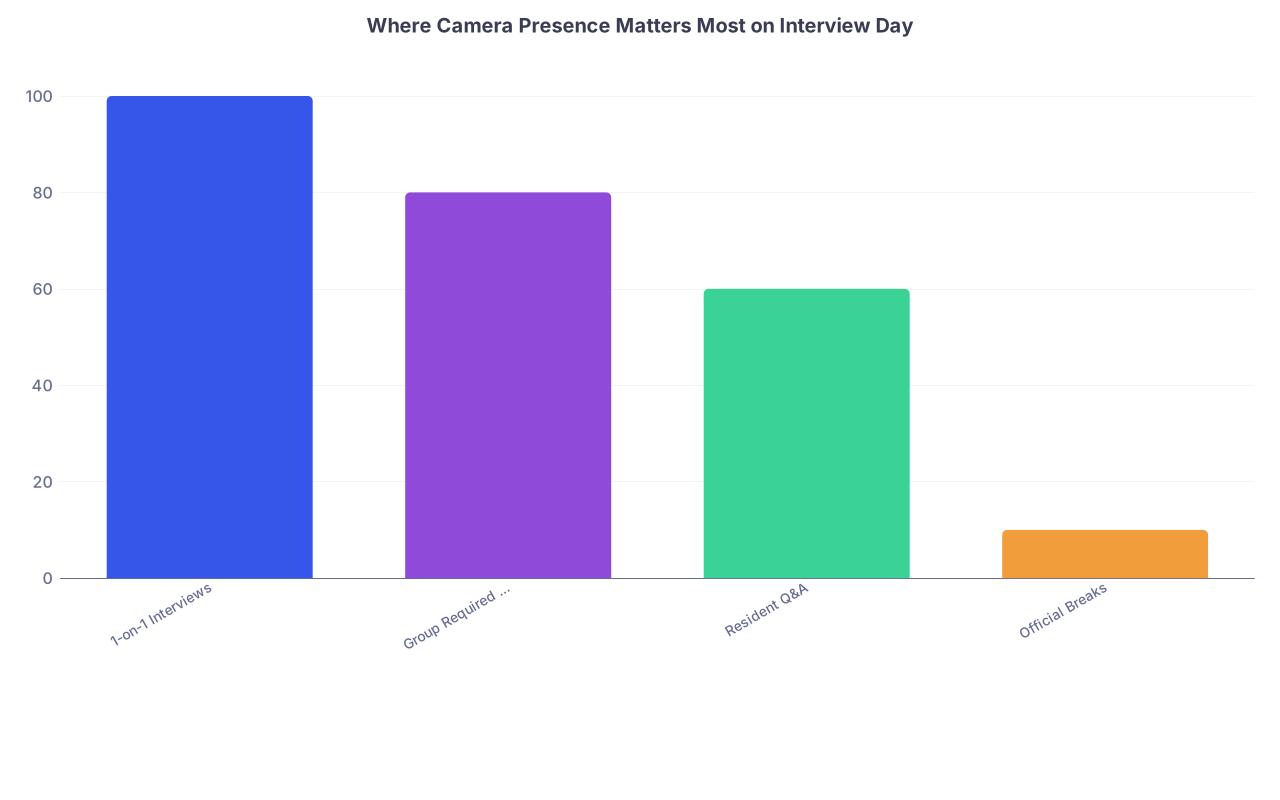
Where camera presence matters most:
| Category | Value |
|---|---|
| 1-on-1 Interviews | 100 |
| Group Required Sessions | 80 |
| Resident Q&A | 60 |
| Official Breaks | 10 |
Translated: interview rooms matter the most, group sessions are close behind, resident Q&A is “soft data” but still noticed, and breaks basically don’t matter as long as you’re not doing anything weird on-camera.
FAQ: Exactly 7 Questions
1. Do I have to stay on video the entire interview day, no exceptions?
No. You don’t. You should be on video for all required sessions and interviews, and off video is fine during stated breaks. If a program specifically asks you to remain on video except for bathroom breaks, follow their instructions—but that’s not the norm.
2. Is it rude to turn my camera off during lunch or a scheduled break?
Not rude at all if the break is clearly labeled. That’s what the break is for. Many applicants turn off video, mute, and step away to eat, stretch, hydrate, and reset. Just don’t do anything on-camera that you’d regret if the PD suddenly appeared.
3. Can I leave my camera off in “optional” resident Q&A sessions?
Technically yes. Strategically, usually no. If you show up with camera off while residents and faculty are on video and engaged, it signals low interest. If you’re there, be present and visible. If you’re too exhausted or have another commitment, it’s better to skip the session entirely than lurk off-camera.
4. What if my Wi‑Fi is unstable and I need my camera off sometimes?
Explain it once, briefly. Something like: “I’m having some bandwidth issues today—if my video drops, it’s just to keep the audio stable. I’m still here and engaged.” Then keep your camera on during interviews as much as possible. Programs are forgiving if you communicate instead of just vanishing.
5. Is it okay to turn my camera off between back-to-back interviews in the breakout “lobby”?
If they’ve announced that you can, yes. Otherwise, safer to keep it on but you can look away, sip water, or rest your face. If you really need to step away, send a quick message to the coordinator in chat: “Stepping away for 2 minutes—will be right back and ready for the next interview.”
6. Will turning my camera off during a break hurt my rank list position?
No. Programs aren’t docking you points for using a break like a normal human being. What can hurt you is appearing disengaged, unprofessional, or annoyed on-camera during required sessions. Focus on being present where it counts, not being a statue on-screen for five hours.
7. What’s the safest default if I’m not sure what the program expects?
Default to: on camera for everything that isn’t clearly marked as a break. Use the pre-interview email and the opening comments for guidance, and if they don’t address it, ask a quick, direct question early in the day. Once expectations are clear, follow them consistently.
Key takeaways:
You don’t have to—and shouldn’t—stay on video nonstop between virtual interview sessions unless a program specifically asks you to. Stay on camera for all required content, use breaks to rest and reset (camera off is fine), and if you attend optional events, be visibly engaged. That’s the level of professionalism programs actually care about.


