

What happens when your interview invite lands… right in the middle of your move?
You’re halfway across the country in an Airbnb. Your white coat is in a box you labeled “misc” at 2 a.m. because you were too tired to care. And now your top-choice residency just emailed you: virtual interview date, two weeks from now, right in the middle of your relocation chaos.
Here’s the problem: programs expect you to look polished, stable, and prepared. But you’re living out of a suitcase, stealing Wi‑Fi from a hotel, and your “desk” is a kitchen counter.
I’ve seen people tank strong applications because they treated “I’m traveling” as an excuse rather than a situation to manage. On the flip side, I’ve seen applicants interview from borrowed offices, parked cars, and half-furnished studios and still crush it—because they planned like professionals.
You’re not getting sympathy points because you’re moving. You’re expected to make it work.
Let’s walk through exactly how.
Step 1: Decide Where You’ll Physically Be (Before You Click “Confirm”)
Do not mindlessly accept interview dates while you’re mid‑flight, mid‑drive, or mid‑move without a plan. Your first task: map your calendar against your travel and relocation.
You need answers to three questions:
- Where will I be physically on that day?
- What internet will I realistically have?
- What backup options can I get in place?
If you’re in one of these situations, here’s how to think:
| Situation | Best Primary Location | Backup Location |
|---|---|---|
| Long road trip / driving days | Friend/family home en route | Library / coworking space |
| Temporary housing (Airbnb, hotel) | Room with desk and hard Wi-Fi | Business center / lobby office |
| Moving into new apartment | Quiet room with door & hotspot | Hospital/clinic office |
| International travel | Hotel business center | Embassy-connected space / office |
| Staying with family | Bedroom or home office | Local library private room |
If you know you’ll be:
- On a long drive that day: Plan your driving so that’s a “light” day and you’re settled at a motel by the night before. Worst case, split the drive and stay two nights in one place.
- Mid‑lease start: Don’t schedule an interview the literal day you get keys. Aim for 1–2 days after, minimum, so you’ve tested power, Wi‑Fi, and noise levels.
- Flying across time zones: Double‑check the interview time in LOCAL time where you’ll be. People screw this up more than you’d think.
If the only dates they offer are terrible (e.g., literally during your flight), email back immediately and directly:
“Thank you very much for the invitation to interview. I’m in the middle of a cross‑country relocation and will be in transit on [date]. Would it be possible to consider an alternative interview date on or after [two reasonable options]? I remain very interested in your program and will be fully available and prepared for the interview.”
You’re not whining. You’re stating a logistical constraint and proposing a solution.
Step 2: Build a “Mobile Interview Kit” Before You Leave
If you’re traveling or relocating during interview season, you don’t get the luxury of “oh, I’ll just grab that from my desk.” You need a small, ruthless kit. It lives in your backpack or carry‑on. It never goes into checked luggage or the moving truck.
Here’s what should be in it:
- Laptop with webcam (updated, tested, charger included)
- Wired earbuds or headset with mic (do not rely solely on AirPods; they fail)
- Phone + charger + portable battery pack
- Small laptop stand (or collapsible riser) OR a plan to stack books/boxes
- Clip‑on or small ring light
- Plain, neutral top (blazer/jacket and shirt) in a garment bag
- Travel-size lint roller
- Mini extension cord / small power strip
- Small roll of painter’s tape (to secure cords or hang a temporary background)
- Printed or offline backup of:
- Program names and notes
- Your ERAS experiences
- Key talking points
- Questions for programs
You should be able to walk into any quiet room, pull out this kit, and have an interview-ready setup in 15 minutes.
If you’re already on the road and don’t have this, your next step after reading this is to build as much of it as you can via a Target/Walmart/Amazon run.
Step 3: Lock Down Internet and Power Like a Paranoid Person
The fastest way to look disorganized: your Zoom cuts out three times and you’re apologizing your way through a 15‑minute answer.
When you’re traveling or newly relocated, Wi‑Fi is the weak link. Treat it like a surgical risk factor. Identify, mitigate, build redundancy.
Your hierarchy of internet options
Best to worst:
Hard‑wired Ethernet into your laptop
If your Airbnb/relative’s place/hotel has a router and you have a USB‑Ethernet adapter, use it. It’s boring but rock‑solid.Strong private Wi‑Fi close to router
Sit in the same room as the router if you can. Ask for the router location when you book an Airbnb or hotel.Your own phone hotspot as backup
Test this at the exact time of day your interview is scheduled. Some networks slow down in evenings.Public/shared Wi‑Fi
Only as backup. If you must use it, try to find an office‑type environment (coworking space, library study room) instead of a crowded coffee shop.
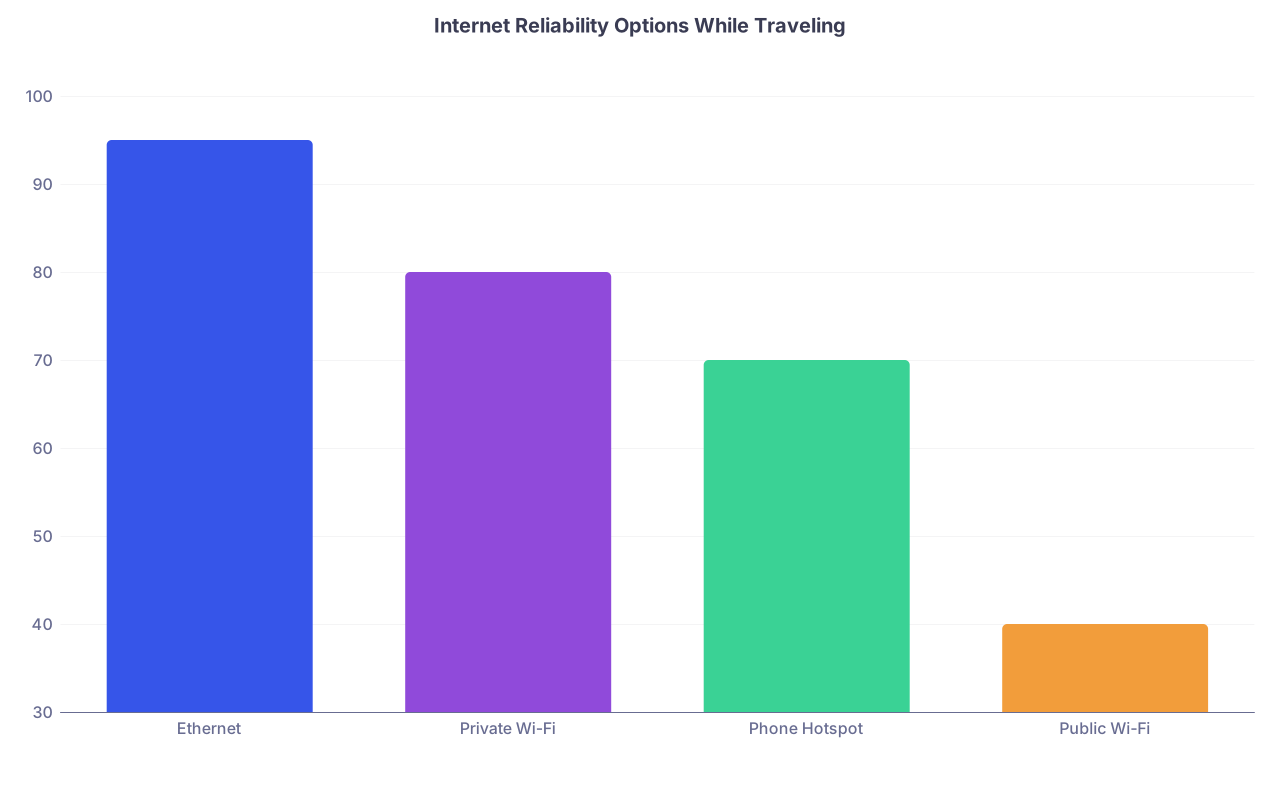
| Category | Value |
|---|---|
| Ethernet | 95 |
| Private Wi-Fi | 80 |
| Phone Hotspot | 70 |
| Public Wi-Fi | 40 |
(Percent values here are not literal guarantees, they’re the “how often have I seen this fail during an interview” scale.)
Power and backup plan
You’re traveling. Outlets are never where you want them to be.
- Plug in your laptop and phone for the entire interview. Don’t risk battery warnings.
- Use the extension cord to set up where the light and background are best, not just where the outlet is.
- Keep your phone on loud (but not next to the mic) with the Zoom/Teams app logged in. If your laptop drops, you can rejoin quickly by phone and say:
“My laptop just dropped connection, I’m reconnecting now—thank you for your patience.”
Pro move: do a full test call (with video) from the exact location, time of day, and network you plan to use. Ask a friend to hop on for five minutes. Better to discover your hotel Wi‑Fi dies when someone starts streaming Netflix than during a PD question.
Step 4: Create a “Professional” Background in a Non‑Professional Space
You might be in a hotel, a guest room with kids’ posters, or an empty apartment with bare walls and echo. You can still make it look good enough.
Your background priorities, in order:
- Neutral
- Non‑distracting
- Well lit
You do not need the Instagram aesthetic. You need “this person looks like an adult.”
Easy temporary setups
In a hotel
Face a window. Sit at the desk or small table. Have the headboard or blank wall behind you. Move the lamp if needed. Hide suitcases out of frame.In an empty apartment
Sit with your back to a blank wall. Put your laptop on a box, chair, or stack of books. Use your ring light or a lamp behind the laptop, facing you, not behind you.In a family home
Use a bedroom or home office. If the decor is chaotic, angle yourself so the wall behind you is mostly blank. You can tape up a simple neutral sheet or curtain if needed—just iron/steam it quickly so it doesn’t look like a laundry accident.Coworking space / library
Reserve a small room with a door. Avoid rooms with glass walls facing traffic. You don’t want people walking behind you constantly.
Avoid virtual backgrounds unless your real environment is truly bad. Glitchy edges around your hair and shoulders look more unprofessional than a basic real background.
Step 5: Manage Noise and Privacy When You’re Not Alone
Relocating usually means one or more of:
- You’re sharing a hotel room
- You’re staying with family
- Movers are coming and going
- Kids / pets / roommates exist
You cannot fully control everything, but you can control how you plan.
Script the conversation with whoever you’re staying with
The night before, say something like:
“I have a residency interview tomorrow from 9:00 to 11:30 a.m. During that time, I really need it quiet—no TV, music, or loud conversations near the room I’m in. Is there a place you’d prefer I use? I’ll put a sign on the door while it’s happening.”
Then actually put a sign on the door: “Interview in progress: 8:45–11:45 a.m.—please knock only if urgent.”
If you have kids or pets, the best you can do is have a second adult fully responsible for them during that window and position yourself in a closed room away from their usual zones.
If you’re in a hotel with thin walls and noisy neighbors? Ask the front desk the day before to move you to a quieter area, away from elevators and ice machines, and mention you’ll have a “very important video interview” during the day. They hear this request from business travelers all the time.
Step 6: Look Put‑Together Even if the Rest of Your Life Is in Boxes
You don’t need your full wardrobe. You need one locked‑down interview outfit that travels well.
- Top: solid, neutral shirt/blouse + blazer or jacket. No wild patterns. Avoid pure white if your lighting is harsh.
- Bottom: actual pants or skirt, not pajama shorts, in case you need to stand up. It happens.
- Hair: whatever is your “neatly pulled together” version. You’re not shooting a shampoo commercial, just avoid the “I’ve been driving 10 hours” look.
- Accessories: minimal. Nothing that clinks on the mic or reflects light like a disco ball.
Steam or iron the top and jacket. If you’re staying somewhere without an iron, hang them in the bathroom during a hot shower or get a cheap travel steamer.
Also: don’t overcomplicate makeup or grooming routines when traveling. Go for the version you can reliably execute in 10 minutes even if your morning goes sideways.
Step 7: Stabilize Your Brain in an Unstable Week
Travel and moving wreck sleep, routines, and your general sense of being a functioning person. That bleeds into how you present on screen.
You don’t have to be relaxed. But you do need to be cogent.
A few things that actually help:
- The day before, stop travel by early evening. Don’t arrive at midnight and interview at 9 a.m.
- Pack a “sleep kit”: earplugs, eye mask, any meds, and whatever you use nightly. Consistency matters more than perfection.
- Eat something predictable 60–90 minutes before the interview. Don’t experiment with the local spicy street food as your pre‑interview meal.
- Hydrate, but not so much that you’re clock‑watching your bladder.
And then accept this: you will not feel perfectly settled. That’s fine. Programs aren’t hiring you to be relaxed, they’re hiring you to be functional under stress. Showing up focused despite your life being mid‑move is actually a nice unspoken flex.
Step 8: What to Tell Programs (And What Not to)
You do not need to pre‑emptively apologize for traveling or relocating. Most of them won’t know or care if you handle it well.
Mention it only when:
- They directly ask: “Where are you joining us from today?”
- They ask about life changes, moves, or transitions this year.
- There’s a brief interruption (noise, background issue) that clearly connects to your move/travel.
How to say it cleanly:
“I’m currently in the middle of relocating from [City A] to [City B], so I’m interviewing from my temporary place today.”
Or, if there’s a small disruption:
“I apologize for that background noise—movers are finishing up today. I’ve asked them to keep it quiet during this time, and it should not be an ongoing issue.”
Do not launch into a five‑minute saga about your U‑Haul breaking down in Nebraska. That belongs in your group chat, not an interview room.
Step 9: Time Zones, Tech Platforms, and the “Day‑Of” Checklist
If you’re changing time zones or countries during interview season, this matters more than anything else.
Time zone sanity check
- Confirm: Is the interview time listed in the program’s time zone or yours?
- Put the event in your calendar with the correct time zone. Double‑check the conversion.
- On the day before, say out loud: “My interview is at [local time] where I will physically be.” If that number surprises you, recalc.
Platform prep
Whether it’s Zoom, Webex, Teams, or some weird hospital system:
- Install the program on your laptop AND phone.
- Log in and test camera/mic the day before.
- Keep meeting links saved in:
- Your calendar event
- A single “Interview Links” document
- Email starred/flagged
On interview day, do this 30–40 minutes before:
- Set up your space (background, lighting, laptop height).
- Plug in laptop and phone.
- Turn off notifications on laptop and phone (or at least silence non‑essential apps).
- Open your notes, but keep them minimal—bullet points only, not scripts.
- Join 10–15 minutes early. Sitting in the virtual waiting room is better than sprinting in late and breathless.

| Step | Description |
|---|---|
| Step 1 | Wake up, light breakfast |
| Step 2 | Confirm local interview time |
| Step 3 | Set up space & background |
| Step 4 | Test audio, video, internet |
| Step 5 | Open notes & program info |
| Step 6 | Silence notifications |
| Step 7 | Join interview 10-15 min early |
Step 10: If Something Goes Wrong Anyway (Because Sometimes It Will)
You can plan everything and still get hit with:
- Sudden Wi‑Fi outage
- Fire alarm in your building
- Construction starting early
- Power loss
What matters is how you handle it.
Basic rules:
- Stay calm in your face and voice. Panic reads terribly on camera.
- Name the problem briefly.
“I’m so sorry, it looks like my connection is unstable—one moment while I reconnect.” - Use your backup fast.
Turn on hotspot, move to phone audio, or shift to the quietest possible corner. - Ask to repeat the question, then reset.
“I apologize for that interruption. Would you mind repeating the last question so I can answer fully?”
If the interruption is longer (power outage, fire alarm), email the coordinator immediately from your phone:
“I’m in the middle of your virtual interview and we just had an unexpected [power outage / building evacuation]. I’m doing my best to reconnect as soon as possible. If we’re unable to continue today, I would be very grateful for the opportunity to reschedule.”
Programs are human. They’ve dealt with far worse. What they care about is whether you stay professional under stress and communicate clearly.
FAQs
1. Is it okay to interview from a hotel room?
Yes—if you make it look intentional. Use the desk or table, put your back to a neutral wall or headboard, clear visible clutter, and test the Wi‑Fi the day before. Avoid sitting on the bed; it reads as casual and unstable (literally and visually).
2. Can I interview from a parked car if I have no other option?
As an absolute last resort, yes—but do it right. Park in a very quiet, safe place. Use your phone hotspot, prop your laptop at eye level, and position the car so sunlight is facing you, not behind you. Still dress professionally from the waist up. And if you know this is coming, tell the coordinator beforehand and ask if rescheduling is possible. Car interviews are survivable, not ideal.
3. How far in advance should I stop traveling before an interview?
If you can, stop at least the evening before. You want a full night’s sleep and a chance to test your setup in the actual space. Same‑day long drives or flights before an interview are where people miscalculate time zones, hit traffic, or arrive exhausted and scattered.
4. Should I tell programs I’m relocating to their city if that’s true?
Yes, briefly, especially if it strengthens your case for genuine interest. For example:
“I’m actually in the process of relocating to [city] because my partner is starting [job/residency] here, so I’m very committed to being in this area long‑term.”
Don’t overplay it, but it’s a useful piece of context.
5. Is it unprofessional to use a virtual background if my temporary space looks bad?
It depends how good the virtual background looks on your device. If your real background is extremely messy or distracting and you cannot fix it, a simple, non‑branded virtual background can be better. Test it: if you get weird halo effects, disappearing hair, or glitchy shoulders, skip it. A plain real wall with slightly imperfect decor is usually better than a bad virtual effect.
Open your calendar and your travel itinerary right now. For every interview date you already have, write down exactly where you’ll be, what internet you’ll use, and what your backup plan is. If you can’t answer all three, fix that today.


